
Creating a Pay Cycle
Use the following components to set up your pay cycle:
Pay Cycle Step Definition (PYCYCL_STEP_DFN).
Pay Cycle Step Table (PYCYCL_STEP_TBL).
This section provides an overview of pay cycle configuration and discusses how to:
Define pay cycle steps.
Define step groups.
Add user-defined pay cycle steps.
Pages Used to Create a Pay Cycle
|
Page Name |
Definition Name |
Navigation |
Usage |
|---|---|---|---|
|
Pay Cycle Step Definition |
PYCYCL_STEP_DFN |
|
Update or add process steps to a pay cycle. |
|
Pay Cycle Step Table |
PYCYCL_STEP_TBL |
|
Define step groups. A step group contains all the possible steps that might be run during Pay Cycle processing. Each step is associated with a pay cycle status that indicates the order in which the steps are run. |
Understanding Pay Cycle Configuration
You can create your Pay Cycle processing by:
Dividing the Pay Cycle process into functions, or steps, such as processing, approval, and exception processing, which can be administered separately.
The manner in which you arrange the steps determines which process is available for processing at any given time during the Pay Cycle process.
Adding user-defined steps to the Pay Cycle process.
Pay Cycle Step Definition Page
Use the Pay Cycle Step Definition page (PYCYCL_STEP_DFN) to update or add process steps to a pay cycle.
Image: Pay Cycle Step Definition page
This example illustrates the fields and controls on the Pay Cycle Step Definition page. You can find definitions for the fields and controls later on this page.
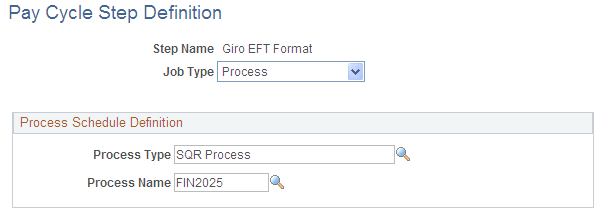
Process Schedule Definition
Pay Cycle Step Table Page
Use the Pay Cycle Step Table page (PYCYCL_STEP_TBL) to define step groups.
A step group contains all the possible steps that might be run during Pay Cycle processing. Each step is associated with a pay cycle status that indicates the order in which the steps are run.
Image: Pay Cycle Step Table page
This example illustrates the fields and controls on the Pay Cycle Step Table page. You can find definitions for the fields and controls later on this page.
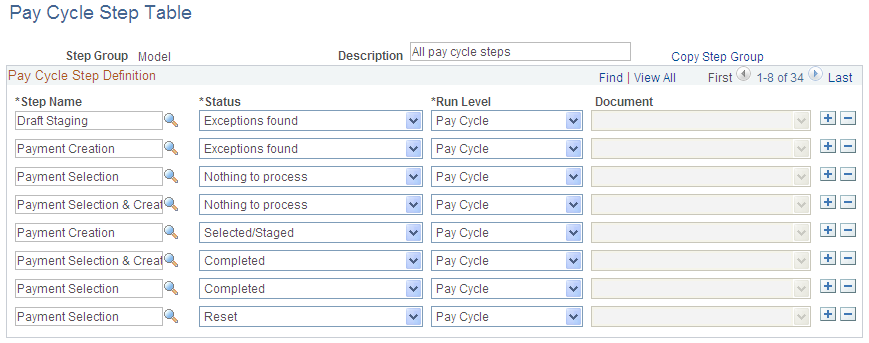
A step group contains all the possible steps that might occur during processing. Each step is associated with a pay cycle status that indicates the order in which the steps are run.
Adding User-Defined Pay Cycle Steps
Pay Cycle Manager enables you to insert custom processes into the Pay Cycle process using the Pay Cycle Step Definition and Pay Cycle Step Table pages. Consider the following questions before configuring the process:
When does the process need to run?
Is the process required or optional?
Is the process applicable to a reusable pay cycle or only specific pay cycle processing instances?
Identify the pay cycle status at which your custom job is eligible to execute. The Pay Cycle process requires that the pay cycle status be set to specific values when processing specific steps. Because of this requirement, adding a new status—for example, between the Payment Selection and Payment Creation steps—requires that you modify the Application Engine program.
Important! If you add a custom process that is run at a pay cycle level, Oracle strongly recommends that you create a link or button on the Pay Cycle Manager page. A link can transfer you to a custom run control record, or you can create PeopleCode that enables the button to initiate the process. Use the PYCYCL_WORK.TRIAL_REGISTER_PB field as an example. Also, you should perform comprehensive testing to ensure that no data or processes are compromised.
Adding a custom process at the bank account level is a bit more involved, because the Pay Cycle Manager component is doing most of the status progression for the overall pay cycle. Processes are directly linked to a specific button in the Pay Cycle Manager component. Therefore, you can associate only one process with a bank account and payment method combination for each bank status. Because of the way that the processes are associated with a particular pay cycle status, the simplest way to create a new process in the payment cycle is to create a new status and associate your custom process with the new status.
To add a new status to the Pay Cycle process, review and modify the PeopleCode behind the Pay Cycle Manager component. You should consider the new status in relation to the overall progression of the pay cycle status.
To create a new pay cycle status:
Analyze your existing implementation and determine all affected PeopleCode and PeopleCode objects.
Modify all affected PeopleCode and PeopleCode objects.
Create a new translate value for the field PAY_RUN_AP_STATUS.
Create a new pay cycle step definition.
Add the new pay cycle step to a pay cycle step group.
Associate the step with a particular bank account status, payment method, and document type.
Review the Pay Cycle Manager page PeopleCode to determine whether modifications are required to advance the pay cycle bank account statuses in accordance with your new pay cycle status.
Perform comprehensive testing of the new pay cycle status working within the pay cycle process to ensure processing validity.
Important! These sorts of modifications should be made only by PeopleTools experts who are proficient in PeopleCode.