
Forecasting Payments
This section discusses how to:
Define forecast cycles.
Review forecast by bank account.
Reset the forecast cycle.
Pages Used to Forecast Payments
|
Page Name |
Definition Name |
Navigation |
Usage |
|---|---|---|---|
|
Forecast Cycle |
PYFRCST_CYCLE |
|
Define forecast cycles that determine the universe of scheduled payments that can be selected for a payment forecast. |
|
Forecast by Bank Account |
PYFRCST_BANK |
|
Review payment forecasts by bank. Review summarized amounts for each period in your forecast cycle. If a category does not appear, no payments are scheduled for that period. |
|
Reset Forecast Cycle |
PYFRCST_DELETE |
|
Reset the forecast cycle and adjust the parameters to review various what-if scenarios. |
|
Forecast Report Request |
PYFRCST_RQST |
|
Define run parameters for the Payment Forecast report (APY2040). Use the report to examine your payment forecasts. |
Forecast Cycle Page
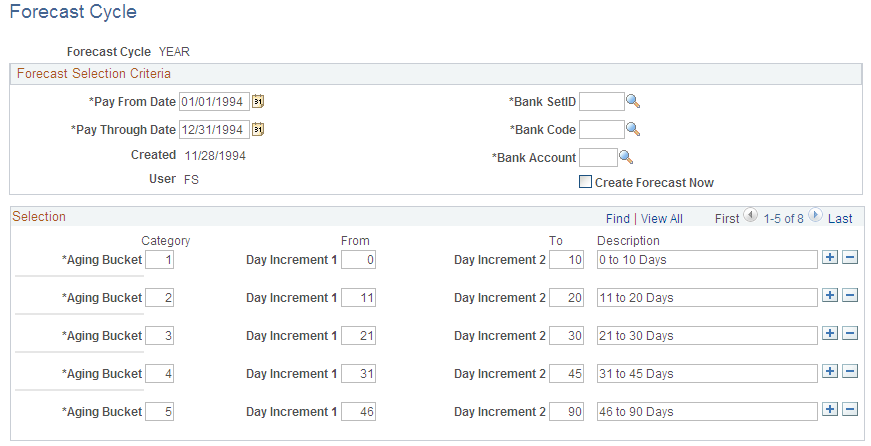
Use the Forecast Cycle page (PYFRCST_CYCLE) to define forecast cycles that determine the universe of scheduled payments that can be selected for a payment forecast.
Image: Forecast Cycle page
This example illustrates the fields and controls on the Forecast Cycle page. You can find definitions for the fields and controls later on this page.
Forecast Selection Criteria
Selection
Forecast by Bank Account Page
Use the Forecast by Bank Account page (PYFRCST_BANK) to review payment forecasts by bank.
Review summarized amounts for each period in your forecast cycle. If a category does not appear, no payments are scheduled for that period.
Forecast by Period
Reset Forecast Cycle Page
Use the Reset Forecast Cycle page (PYFRCST_DELETE) to reset the forecast cycle and adjust the parameters to review various what-if scenarios.