
Reviewing Direct Debits
As you work with direct debits, you can use the inquiry pages to look up information about a single direct debit or all the direct debits created for a business unit.
This section discusses how to review direct debit control information.
Pages Used to Inquire on Direct Debits
|
Page Name |
Definition Name |
Navigation |
Usage |
|---|---|---|---|
|
DD Control |
DD_CONTROL_DSP |
|
View direct debit (DD) control information, such as the direct debit status, customer information, and the posting details. |
|
DD Items |
DD_ITEM_DSP |
|
View basic information about each item in a direct debit. |
|
Direct Debits by Unit |
DD_INQUIRY |
|
View direct debits created for a business unit. |
|
Detail 1 |
ITEM_MAINTAIN |
Click an Item ID link on the DD Items page. |
Change and review information about items, with the exception of customer balance. |
Reviewing Direct Debit Control Information
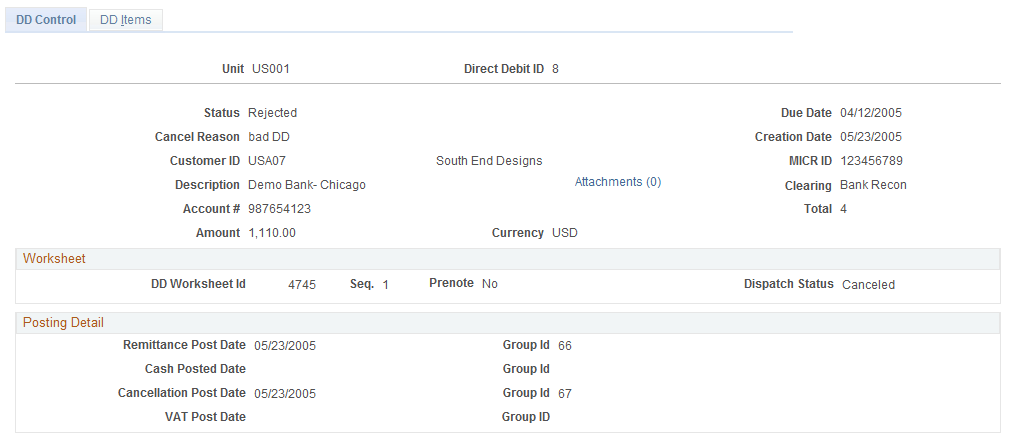
Use the DD Control page (DD_CONTROL_DSP) to view direct debit (DD) control information, such as the direct debit status, customer information, and the posting details.
Use the DD Control page (Accounts Receivable, Direct Debits, Review Direct Debits, All Direct Debits, DD Control).
Image: DD Control page
This example illustrates the fields and controls on the DD Control page. You can find definitions for the fields and controls later on this page.
Note: The Transaction ID and Dispatch Status fields display only if you submitted the payment request through Financial Gateway.