
Setting Up Conditions
To set up conditions, use the Condition Definition (AR_COND_DEF), Condition Definition User (AR_COND_DEF_USER), and Condition Priority (AR_COND_PRIORITY) components.
This section provides an overview of conditions and discusses how to:
Set up system-defined conditions.
Set up user-defined conditions.
Reorder condition priorities.
Pages Used to Set Up Conditions
|
Page Name |
Definition Name |
Navigation |
Usage |
|---|---|---|---|
|
Condition Definition |
AR_COND_DEF |
|
Review and define a single system-defined condition. Displays all information for a condition. |
|
Condition Definition User |
AR_COND_DEF_USER |
|
Set up user-defined conditions. |
|
Condition Priority |
AR_COND_PRIORITY |
|
Review all conditions at one time. Reorder the priority of a condition. Displays limited information for each condition. |
Understanding Conditions
A condition occurs when there is a change of status for a customer's account, such as reaching a credit limit or exceeding a user-defined balance due. A condition also occurs when you create a new deduction or disputed item. The Condition Monitor process checks for customer's accounts or items that meet these conditions and creates an action based on templates and rules that you define. The process looks at the conditions for the customers with the same roles as the role that you select in each condition definition.
PeopleSoft delivers several system-defined conditions. You must set up the system-defined conditions for at least one SetID. Most of the field values for the system-defined conditions are automatically populated by the system. You can also set up your own four-character user-defined conditions. Each condition is monitored at the customer-level or the item-level.
The following table describes the system-defined conditions. You define the details for the condition trigger on the Collection Rule, Assessment Rule, and Assessment Rule User pages. When the Condition Monitor creates an action based on the condition defined on the Assessment Rule User page, it will use the owner (either AR Specialist, Collector, Credit Analyst, or Sales Person) that is stored on the Item instead of the default owner defined on the customer master. The action will not be generated again if it has been marked as complete by a user.
|
Condition Description |
Code |
Condition Trigger |
|---|---|---|
|
Approaching Credit Limit |
ACLA |
Customers' calculated outstanding balance reaches a certain dollar amount or percentage of their credit limit. The Condition Monitor process multiplies the credit limit that you defined for the customer on the Credit Profile page by the percentage that you defined on the Assessment Rules page to determine the calculated credit limit. Note: You define whether the balance includes in-process payments, unapplied payments, and disputed items on the Installation Options - Receivables page. |
|
Approaching Credit Limit Expiration |
ACLD |
Customer's credit review date reaches a specified number of days from the run date of the Condition Monitor process. The Condition Monitor process subtracts the number of days that you specify on the Assessment Rules page from the review date the to determine whether to create an action. The customer must have a review date and credit limit on the Credit Profile page to generate an action. |
|
Approaching Credit Card Expiration Date |
CCEX |
Customer's credit card expiration date reaches a specified number of days from the run date of the Condition Monitor process. |
|
Cancel Credit Hold |
CCHD |
This condition takes off the credit hold that was added by the Condition Monitor. If a customer’s balance amount in the specified currency is less than the specified amount for the condition, the Condition Monitor creates a CCHD action (Take Off Credit Hold) and changes the End Date to the Current Date for the customer message that was added by Condition Monitor.
Assumes the user uses the CCHD action code in an action template used by the CCHD condition. The CCHD action code is used only for the CCHD condition. |
|
Conversation Follow Up |
CFLU |
Customer has a conversation meeting one or more of these criteria:
This condition only processes conversations without promises. |
|
Credit Hold Code Exists |
CHLD |
Customer message containing a credit hold code is placed on the customer's account. |
|
Collection |
COLL |
Amount and age of customer balances that are overdue. |
|
Customer Promise Date Broken |
CPDB |
Evaluates if promise has been met based on payments on item referenced in the promise date conversation. This condition also evaluates the promise tolerance date and promise tolerance amount. If promise date + tolerance days is met and total payment is equal or greater than the promise tolerance amount, the condition will set the promise status to Kept and close the promise date conversation. If the promise date + tolerance days is met and total payment is zero or less than the promise tolerance amount, the condition will set the promise status to Broken and create a broken promise action list. If there is no item referenced, the promise will be evaluated as Broken based on promise date and tolerance days. The condition priority is 18 and the condition role is Bill To Customer. The CPDB condition will also close promise date conversations that have:
|
|
Customer Promise Date Review |
CPDR |
Creates action list for all promise date conversations requiring follow up. The condition priority is 17 and the condition role is Bill To Customer. |
|
Deduction Item |
DEDN |
A new deduction item. |
|
Disputed Item |
DISP |
A new disputed item. |
|
eBill Item |
EBIL |
A new eBill Payment item. |
|
Exceeded Credit Limit |
ECLA |
Customers' calculated outstanding balance exceeds their calculated credit limit. The calculated credit limit is the limit that you defined for the customer on the Credit Profile page multiplied by the percentage that you defined over the limit on the Assessment Rules page or the amount that you defined on the page. Note: You define whether the balance includes in-process payments, unapplied payments, and disputed items on the Installation Options - Receivables page. |
|
Exceeded Credit Limit Expiration Date |
ECLD |
Customer's credit review date is passed. The customer must have a review date and credit limit on the Credit Profile page to generate an action. |
|
Entry Type/Reason Code |
ETRC |
Items for a specified entry type and reason code reach a specific amount or age. The existence of items with the entry type and reason can also trigger the condition. The Condition Monitor process creates one action for each item with the entry type and reason combination unless you leave the entry reason blank. |
|
Key Statistics Exceeded |
KSTE |
Comparison of system- or user-defined history ID amount or count for current fiscal period to assessment rule criteria. The system can also trigger the condition based on the percentage change from a prior period's value. |
|
Large Amount Coming Due |
LACD |
An invoice (or group of invoices) over a specified amount is due in a specified number of days. |
|
Online Item |
ONLN |
An individual adds an action to an item on the item action list. |
|
Risk Score |
RISK |
Creates action items based on risk score. The condition priority is 42 and the condition role is Bill To Customer. |
|
Welcome Back Dormant Customer |
WBDC |
When a customer has not had any activity for a period of time that is specified at the Assessment Rule for this condition, the system sets the customer to Dormant. When the first IN (invoice) entry type item is generated after the Dormant status, the Condition Monitor generates a Call action to welcome back the customer. The customer must be active in order for this condition to function. Note: A customer is considered dormant if Current Date – Last activity is greater than or equal to the Days specified in this condition. The system marks the customer as dormant and records the date that the customer is set to this status. Assumes CALL action will be used in the Action Template that is used by the WBDC condition. |
|
Welcome New Customer |
WCNC |
Condition Monitor generates a Call action to welcome the new customer when a customer creates their first invoice and the first invoice meets these conditions:
Assumes CALL action will be used in the Action Template that is used by the WCNC condition. |
Condition Definition Page
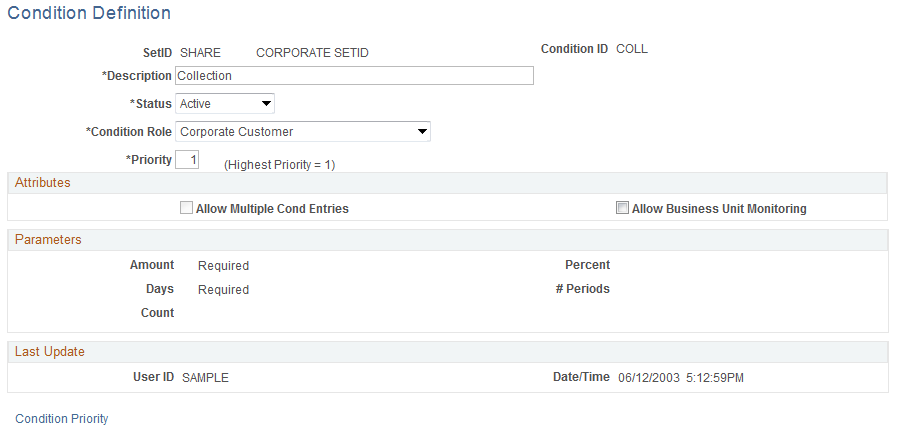
Use the Condition Definition page (AR_COND_DEF) to review and define a single system-defined condition.
Displays all information for a condition.
Image: Condition Definition page
This example illustrates the fields and controls on the Condition Definition page. You can find definitions for the fields and controls later on this page.
Attributes
Parameters
The fields in the Parameter group box—Amount, Count, Days, Percent, and # Periods (number of periods)—control the entry of parameters on the Assessment Rule page. Each condition may have one or more parameter flags set. The parameters are system-defined, and you cannot modify them. The values are Required, Optional, or one of the following values:
The following table lists all of the parameters for each field for each condition. For more information, see Setting Up Actions and Action Templates.
|
Condition |
Amount Currency |
Days |
Count |
Percent |
Number of Periods |
Explanation |
|---|---|---|---|---|---|---|
|
Approaching Credit Limit (ACLA) |
One or All |
One or All |
Either amount or percent must be entered, or both can be entered. |
|||
|
Approaching Credit Limit Expiration (ACLD) |
Required |
Days is required. |
||||
|
Approaching Credit Card Expiration Date (CCEX) |
Required |
Days is required. |
||||
|
Cancel Credit Hold (CCHD) |
Required |
Amount and Currency are required. |
||||
|
Conversation Follow Up (CFLU) |
No parameters can be entered. |
|||||
|
Credit Hold Exists (CHLD) |
No parameters can be entered. |
|||||
|
Customer Promise Date Broken (CPDB) |
No parameters can be entered |
|||||
|
Customer Promise Date Review (CPDR) |
No parameters can be entered |
|||||
|
Collection (COLL) |
Required |
Required |
Both amount and days are required. |
|||
|
Deduction Item (DEDN) |
No parameters can be entered. |
|||||
|
Disputed Item (DISP) |
No parameters can be entered. |
|||||
|
eBill Item (EBIL) |
No parameters can be entered. |
|||||
|
Exceeded Credit Limit (ECLA) |
No parameters can be entered. |
|||||
|
Exceeded Credit Limit Expiration Date (ECLD) |
No parameters can be entered. |
|||||
|
Entry Type/Reason Code (ETRC) |
Optional |
Optional |
Both amount and days are optional. |
|||
|
Key Statistics Exceeded (KSTE) |
Only One |
Only One |
All or None |
All or None |
Either amount or count must be entered; either percent and period must be entered, or both fields must be blank. |
|
|
Large Amount Coming Due (LACD) |
Required |
Required |
Both amount and days are required. |
|||
|
Online Item (ONLN) |
No parameters can be entered. |
|||||
|
Risk Score (RISK) |
Required |
Count is required. |
||||
|
Welcome Back Dormant Customer (WBDC) |
Required |
Days is required. |
||||
|
Welcome New Customer Welcome (WCNC) |
Required |
Days is required. |
||||
|
User-defined (any four-character code) |
No parameters can be entered. |
Condition Priority Page
Use the Condition Priority page (AR_COND_PRIORITY) to review all conditions at one time.
Reorder the priority of a condition. Displays limited information for each condition.
This page contains the same fields as the Condition Definition page except that it has fewer fields.