
Setting Up Promise Date Options for a Customer
This section presents an overview of promise date options and describes how to define promise date options.
Page Used to Define Promise Date Options
|
Page Name |
Definition Name |
Navigation |
Usage |
|---|---|---|---|
|
Promise Date Options |
PROMISE_DT_OPTIONS |
Set Up Financials/Supply Chain, Product Related, Receivables, Credit/Collections, Promise Date Options |
Define promise date options. |
Understanding Promise Date Options
PeopleSoft Receivables enables a collections analyst to enter a promise of payment by the customer and to track and manage that promise within the Conversations component. The Promise Date Options component enables you to configure tolerance levels for a promise to ensure that a promise is kept based on the actual amount paid, the number of items paid or the actual date paid.
On the Promise Date Options page, you indicate the number of days past the promise to pay date that you are willing to wait to take further action for a selected setid, setid and customer, or setid and customer group. Based on this tolerance period, you indicate what percentage of the promised payment amount you are willing to accept. You also select a Broken Promise Action, which has been predefined as a customer action in PeopleSoft Receivables. You predefine these fields on the Promise Date Options page and indicate whether the selected user performing the review of the broken promise can override these fields in the Conversations component. The values you select on this page appear as default values on the Conversations page.
When a collections analyst creates a new conversation on the Conversations page and selects the Promise of Payment check box, the conversation is considered a promise date conversation and the promise status will be set to Open. Once a conversation is marked as a promise of payment conversation, the collections analyst must enter a promise date and the amount that the customer promised to pay in order to save the conversation. When a promise conversation is saved, it cannot be reverted back to a regular conversation.
Promise Date Options Page
Use the Promise Date Options page (PROMISE_DT_OPTIONS) to define promise date options.
Image: Promise Date Options page
This example illustrates the fields and controls on the Promise Date Options page. You can find definitions for the fields and controls later on this page.
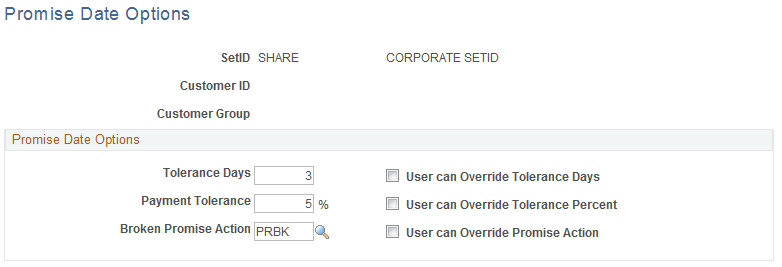
To access the Promise Date Options page you can enter SetID only, SetID and Customer ID, or SetID and Customer Group.