Use the
Source Registration page (PMT_REGISTRATION) to register a source application
by defining the high-level information that is needed to process payments
using Financial Gateway.
Image: Source Registration page with Financials source
system (1 of 2)
This example
illustrates the fields and controls on the Source Registration page
with Financials source system (1 of 2). You can find definitions for
the fields and controls later on this page.
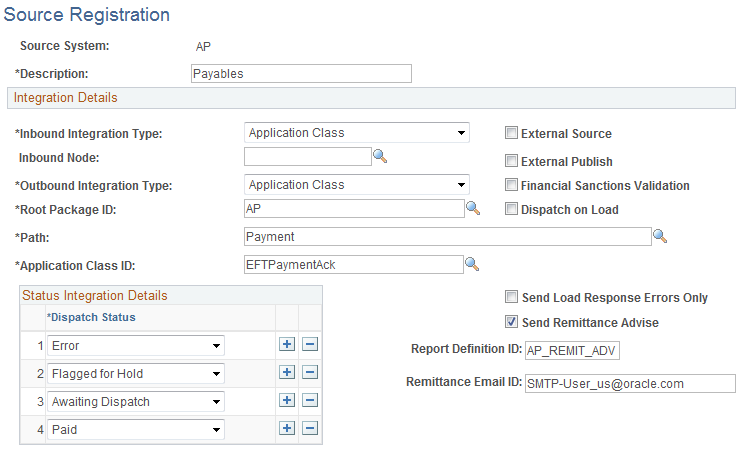
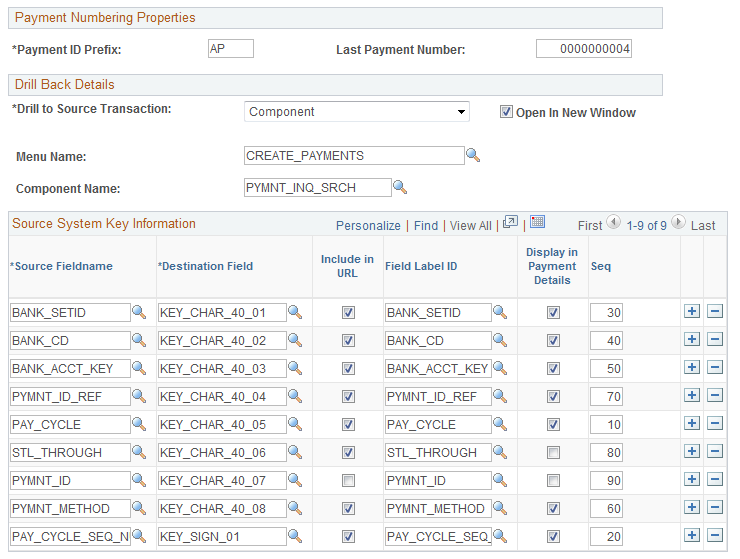
Image: Source Registration page with Financials source
system (2 of 2)
This example
illustrates the fields and controls on the Source Registration page
with Financials source system (2 of 2). You can find definitions for
the fields and controls later on this page.
Integration Details
The Integration Details field values are preconfigured for integration between Financial
Gateway and other PeopleSoft applications. Changes should only be
made for registering third-party applications.
| Inbound Integration Type and Outbound Integration Type |
Choose from the following options:
Application
Class: Select to perform integrations by calling application
classes. If this value is selected, then a root package, path, and
class ID are required.
Integration
Broker: Select to use Integration Broker to pass data
between the source application and Financial Gateway. If this option
is selected, you must enable the service operation used to pass the
data. For example, for integration with Global Payroll, you must enable
the service operation PAYMENT_RESPONSE_OUT_ASYNC to pass the data.
See the product
documentation for PeopleTools: PeopleSoft
Integration Broker.
Note: The asynchronous response message PMT_RESPONSE will
be published only when the Outbound Integration Type is Integration Broker.
Flat
File: Select this option for making or canceling payments
in predefined, comma-separated value (.csv) file format or a fixed-length
field format from a third-party application. If this option is selected,
a directory must be specified in the File Path field.
None: Select if payment acknowledgment functionality is not enabled. This
option is available only for outbound integration.
Component
Interface: Select this option for using a component interface
to load transactions into Financial Gateway. This option is available
only for inbound integration.
|
| Inbound Node |
Select the integration node to use if the External
Publish check box is selected.
|
| Root Package ID |
Enter an application-class, package name. This field
appears only if Application Class is selected as an outbound integration type. This value is delivered
for integration with other PeopleSoft source applications.
|
| Path |
This field appears only if Application Class is selected as an outbound integration
type. This value is delivered for integration with other PeopleSoft
source applications.
|
| Application Class ID |
This field appears only if Application Class is selected as an outbound integration
type. This value is delivered for integration with other PeopleSoft
source applications.
|
| Node Name |
Select a node to be used for communication between
the source application and Financial Gateway using the Integration
Broker. This field appears only if Integration
Broker is selected as an outbound integration type.
|
| External Source |
Select to enable the Execute Edit functionality
that provides an additional level of data validation when you are
importing payments from third-party applications.
|
| External Publish |
Select to send the PAYMENT_REQUEST message from
the source application to Financial Gateway using an Integration Broker
node. This field is available only if Application Class is selected
as the inbound integration type.
See Defining Integration Broker Settings for Payments.
See Understanding the Payment Process in Financial Gateway.
|
| Financial Sanctions Validation |
Select to require financial sanctions validation
of payees for payments from this source application before they can
be loaded into Financial Gateway.
See Understanding the Financial Sanctions Service.
|
| Dispatch on Load |
Click
to enable lights-out processing for payment dispatch in Financial
Gateway. If the Dispatch on Load check box is selected, the system
schedules payment dispatch for each PMT_MSG_ID upon payment load.
Note: PeopleSoft
Global Payroll sends multiple PMT_MSG_IDs in a payroll run, so selecting
this option will create multiple payment files. If Global Payroll
does not want to generate multiple files, deselect this check box
and dispatch payment separately.
|
| Send
Load Response Errors Only |
Select to receive errors only during the Payment
Load process. The default is to receive all response messages. This
option is available only when Integration
Broker is selected in the Outbound
Integration Type field.
|
| Send Remittance Advice |
Select to indicate that Financial Gateway will send
a remittance notification based on the entered Report Definition ID
and Remittance Email ID as sender's address for each source system.
This functionality is currently available only for PeopleSoft Financials
source applications.
See Understanding Electronic Banking.
|
| Report Definition ID (report definition identification) |
Enter the remittance advice report ID.
|
| Report
Email ID (report email identification) |
Enter the email address of the sender of the remittance
advice report.
|
Status Integration Details
The Status Integration
Details group box enables you to select the number and
types of payment statuses for determining the progress or state of
each payment that is sent to a bank from a source application through
Financial Gateway. This group box does not appear if None is selected as the outbound integration
type. Select from the following choices:
Canceled: Identifies a payment that has been canceled. This status can be
sent only in response to a request to cancel a payment by a source
application.
Error: An error message can be generated and returned during any phase
of the processing. If Financial Gateway cannot resolve the error,
then the error message is returned to the source system to identify
that the payment will not be executed without source application rework.
An error message could be returned before a loaded status. Error messages
consist of an error code and a description.
Flagged
for Hold: The payment is being held from further processing
until a manager or other approving authority gives approval to process
it further.
Awaiting
Dispatch: The status after the payment is successfully
persisted in the Financial Gateway database. A unique ID is generated
in Financial Gateway and is returned to the source application with
this status.
In Process: Payment is currently in the process of being sent to the bank by
the Dispatch Payment Application Engine.
Dispatched
to Bank: Payment has been sent to bank. When a payment
progresses to this status, it can no longer be canceled.
Received
by Bank: Payment has been received by bank and is being
processed.
Paid: Payment has been settled.
Payment Numbering Properties
| Payment ID Prefix |
Designate an alphanumeric prefix to use to identify
the source application of the payment.
|
| Last Payment Number |
Represents the payment identification number of
the last payment that was sent by the source application. This value
is automatically updated as payments are sent to Financial Gateway.
|
Drill Back Details
This functionality defines how the user can drill
back to the source application to view details of a payment in Financial
Gateway.
Note: Drill back functionality is currently available
only in PeopleSoft Financials source applications. The Drill to Source Transaction field defaults
to None for Global Payroll.
| Drill to Source Transaction |
Choose a method for drilling back to the source
application to view transaction details. Select from the following
values:
Component: Use to drill back to a selected PeopleSoft source component using
PeopleTools Transfer functionality. Using this method enables users
to drill back to the source application using links on the Review
Payment page and the Dispatch Payments page for users who have security
access to the destination page.
DoModal
Component: Also used to drill back to a selected PeopleSoft
source component. When you select this option, a shared work record
is populated that contains the Financial Gateway ID of the transaction.
This shared work record is used with the DoModal component call.
Using this method, users can click a return button
in Financial Gateway to drill back to the page of origin in the source
application, providing they have security access to the source application
page.
External
URL: This option enables the user to specify an external
URL to view detailed transaction information that is contained outside
of the PeopleSoft system. This method launches a new browser and passes
the Financial Gateway transaction ID and the key information that
is specified in the Source Key Information grid as a parameter in the URL to the desired destination.
None: Select this option to disable the inquiry component and the drill-to-source-application
functionality.
|
| Menu Name |
Enter a valid PeopleTools object menu name. This
field appears only if Component or DoModal Component is selected
in the Drill to Source Transaction field.
|
| Component Name |
Enter a valid PeopleTools object component. This
field appears only if Component or DoModal Component is selected
in the Drill to Source Transaction field.
|
| Open in New Window |
Select to view transaction details in another Web
browser when drilling back into a source application. This option
is available only if External URL or Component is selected in
the Drill to Source Transaction field.
|
Source System Key Information
Specify the metadata that are used by Financial
Gateway to retrieve payment information from the source application.
The retrieved payment data can be selected for display in Financial
Gateway on the Review Payment Requests page and the Review
Payment Details page. These field values are delivered preconfigured
for PeopleSoft source applications.
| Source Fieldname |
Select a field from the source application that
contains payment data to be displayed in Financial Gateway.
|
| Destination Field |
Select the field in the Payment Gateway records
that stores the corresponding information found in the source field
that is listed in the Source Fieldname field.
|
| Include in URL |
Select to include the field within the URL that
is generated to pass control back to the source system. This provides
the source system with navigation to the appropriate page and the
appropriate content.
|
| Field Label ID |
Enter a label that is used to display the destination
field.
|
| Display in Payment Details |
Select to display field values on the Review Payment
Requests page and Review Payment Details page.
|
| Seq (sequence) |
Enter numbers that specify the order in which the
fields are displayed on the Payment Details page.
|
