
Setting Up Journal Entry Approval in PeopleSoft Workflow
This section discusses how to:
Review the current workflow approval setup.
Modify the workflow approval rule properties.
Modify the rule step definition properties for a workflow item.
Define the rules for a journal entry approval workflow item.
Set up the events for a journal entry approval workflow item.
Pages Used to Set Up Journal Entry Approval in PeopleSoft Workflow
|
Page Name |
Definition Name |
Navigation |
Usage |
|---|---|---|---|
|
Open Definition |
Not applicable (NA) |
Access PeopleSoft Application Designer and click File, Open. |
Select Approval Rule Set in the Definition field to display a list of Approval Rule set definitions. |
|
JOURNAL_ENTRY_APPROVAL |
NA |
Enter JOURNAL_ENTRY_APPROVAL in the Name field or click this name in the list of Definitions matching the selection criteria box on the Open Definition page, and click the Open button. |
The JOURNAL_ENTRY_APPROVAL (Approval Rule Set) page displays. |
|
Approval Rule |
N/A |
Right-click in the JOURNAL_ENTRY_APPROVAL page and select Definition Properties to display the Approval Rule Properties page. |
Select the Approval Active check box on the General Tab page to activate the approval rule that is used by the Virtual Approver workflow method). |
|
Approval Rule Step Definition |
NA |
Right-click on one of the icons (Supervisor Approval, Manager Approval) in the JOURNAL_ENTRY_APPROVAL page, and select Item Properties. |
Accesses the Approval Rule Step Definition. |
|
Approval Rule Step Definition - Definition |
NA |
Access the rule step definition by right-clicking one of the icons in the approval rule step and selecting Item Properties. |
Set up or modify the approver roles that apply to journal entry approval workflow process as well as the workflow process steps. |
|
Approval Rule Step - Rules |
NA |
Click the Rules tab on the Approval Rule Step Definition page. |
Sets up the minimum and maximum amounts that you can use in selected journal records and fields, as well as the minimum and maximum quantities. Also identifies whether the row-level rules are determined by route control or SQL object. |
|
Approval Rule Step - Events |
NA |
Click the Events tab on the Approval Rule Step Definition page. |
Use to associate journal approval activities with workflow events. |
See also PeopleTools Documentation: Workflow Technology, "Defining Approval Processes”
See also PeopleTools Documentation: PeopleSoft Application Designer Developer's Guide, "Using PeopleSoft Application Designer"
Reviewing the Current Workflow Approval Setup
Use the Open Definition page (Not applicable (NA)) to select Approval Rule Set in the Definition field to display a list of Approval Rule set definitions.
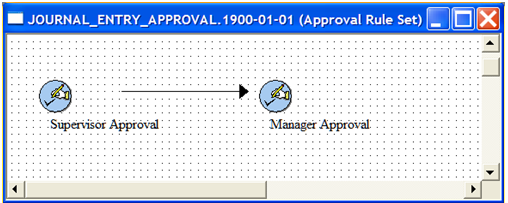
Use the JOURNAL_ENTRY_APPROVAL page (NA) to the JOURNAL_ENTRY_APPROVAL (Approval Rule Set) page to review the current workflow approval setup.
In PeopleSoft Application Designer, enter JOURNAL_ENTRY_APPROVAL in the Name field or click this name in the list of Definitions matching the selection criteria box on the Open Definition page, and click the Open button.
In PeopleSoft Application Designer, access the JOURNAL_ENTRY_APPROVAL.1900–01–01 approval rule set by selecting File, Open and then clicking the approval rule set name in Open Definition dialog box.
Image: JOURNAL_ENTRY_APPROVAL.1900–01–01 approval rule set
This example illustrates the fields and controls on the JOURNAL_ENTRY_APPROVAL.1900–01–01 approval rule set. You can find definitions for the fields and controls later on this page.
Modifying the Workflow Approval Rule Properties
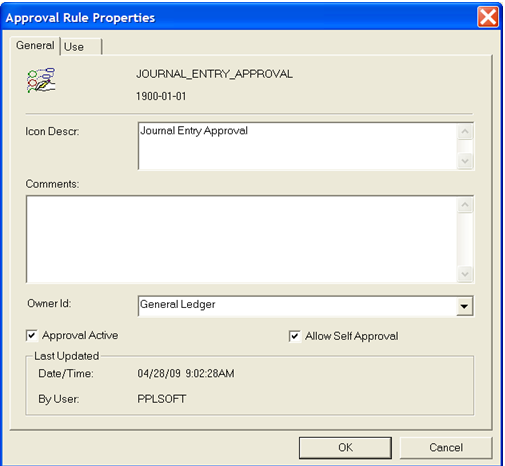
Use the Approval Rule Properties page (N/A) to select the Approval Active check box on the General Tab page to activate the approval rule that is used by the Virtual Approver workflow method).
Right-click in the approval rule set window of the JOURNAL_ENTRY_APPROVAL page and select Definition Properties to display the Approval Rule Properties page.
Image: Approval Rule Properties page
This example illustrates the fields and controls on the Approval Rule Properties page. You can find definitions for the fields and controls later on this page.
Modifying the Rule Step Definition Properties for a Workflow Item
Use the Approval Rule Step Definition - Definition page (NA) to set up or modify the approver roles that apply to journal entry approval workflow process as well as the workflow process steps.
Right-click on one of the icons in the approval rule step (Supervisor Approval, Manager Approval) in the JOURNAL_ENTRY_APPROVAL page, and select Item Properties.
Image: Rule Step Definition - Definition
This example illustrates the fields and controls on the Rule Step Definition - Definition. You can find definitions for the fields and controls later on this page.

See PeopleTools documentation: Workflow Technology
Defining the Rules for a Journal Entry Approval Workflow Item
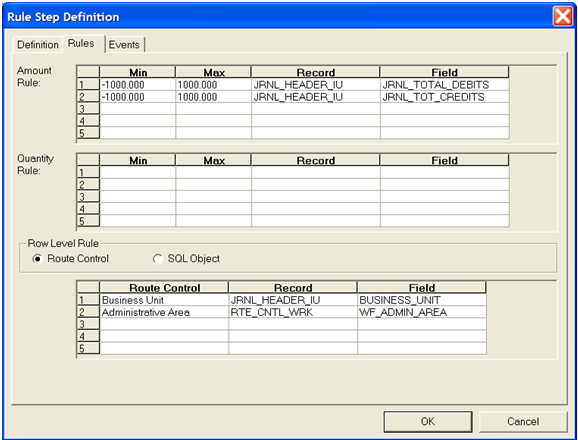
Use the Approval Rule Step - Rules page (NA) to sets up the minimum and maximum amounts that you can use in selected journal records and fields, as well as the minimum and maximum quantities.
Also identifies whether the row-level rules are determined by route control or SQL object.
Image: Rule Step Definition - Rules tab
This example illustrates the fields and controls on the Rule Step Definition - Rules tab. You can find definitions for the fields and controls later on this page.
Setting Up the Events for a Journal Entry Approval Workflow Item
Use the Approval Rule Step - Events page (NA) to use to associate journal approval activities with workflow events.
Image: Rule Step Definition - Events
This example illustrates the fields and controls on the Rule Step Definition - Events. You can find definitions for the fields and controls later on this page.
