
Maintaining Project Status
This topic discusses how to define project status.
Page Used to Maintain Project Status
|
Page Name |
Definition Name |
Navigation |
Usage |
|---|---|---|---|
|
Project Definitions - Status |
PROJECT_STATUS |
|
Assign the project status. This page operates in deferred processing mode and is not available for project templates. |
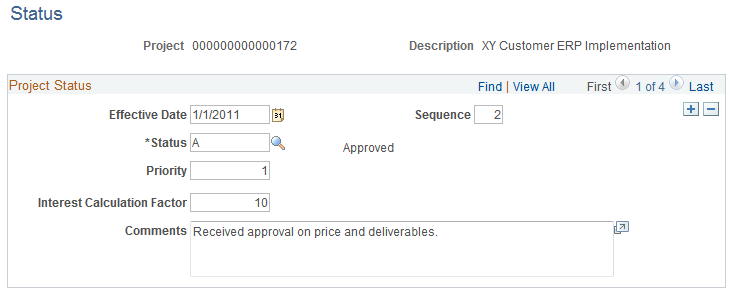
Project Definitions - Status Page
Use the Project Definitions - Status page (PROJECT_STATUS) to assign the project status.
This page operates in deferred processing mode and is not available for project templates.
Image: Project Definitions - Status page
This example illustrates the fields and controls on the Project Definitions - Status page. You can find definitions for the fields and controls later on this page.
| Sequence |
The system increments the sequence number, which tracks incremental changes in status. By using a sequence number in combination with the status effective date, the system can make multiple status changes on the same day. |
| Status |
Select the project status and assign a status effective date. Available options are based on the values that you enter on the Status Types page during implementation. If you use project type status paths, the only available status types are based on the current status of the project. See Project Type Status Paths. When you change the project status on this page, the system automatically sends an email notification to each team member for which an email address exists on the Project Definitions - Team Detail page with the Email Notify for Status Change option selected. |
| Priority |
Enter the project priority. This field is for information only. |
| Interest Calculation Factor |
Enter the percent that the system uses to calculate the amount of interest for this project based on the project status. For example, enter 1 to calculate 100 percent interest for the project when it is Open. Enter 0.5 to calculate 50 percent interest when the project is In Service. This field is available if you select the Allow Interest Calculation option on the Project Costing Definition page. |
Create a new transaction for each status change to maintain a history of the project. For example, assign a project status of Proposed when the project is first proposed. When the project passes the review cycle and is accepted, change the status to Open.
To assign status changes in advance, create new transactions and assign the appropriate future effective date for each status change. Alternatively, manually change the project status if you do not want to change the status in advance.