
Reviewing and Loading Data to PeopleSoft Project Costing Tables
This topic discusses how to:
Review and edit time and labor data.
Load data into PeopleSoft Project Costing tables.
Pages Used to Review and Load Data to PeopleSoft Project Costing Tables
|
Page Name |
Definition Name |
Navigation |
Usage |
|---|---|---|---|
|
Time and Labor Interface |
INTFC_PROJ_TL_01 |
|
Review data that is moved from the HRMS database to the Project Time and Labor Interface staging tables in the Financials database before it is loaded into the Project Transaction table. |
|
Time and Labor |
PC_TL_TO_PC |
|
Run the Time and Labor to Project Costing Application Engine process (PC_TL_TO_PC) that moves time and labor data from the Project Time and Labor Interface staging tables into the Project Transaction table. |
|
Transaction List |
PROJECT_EXPRESSG |
|
View PeopleSoft Time and Labor data in the Project Transaction table. |
Time and Labor Interface Page
Use the Time and Labor Interface page (INTFC_PROJ_TL_01) to review data that is moved from the HRMS database to the Project Time and Labor Interface staging tables in the Financials database before it is loaded into the Project Transaction table.
Image: Time and Labor Interface page
This example illustrates the fields and controls on the Time and Labor Interface page. You can find definitions for the fields and controls later on this page.
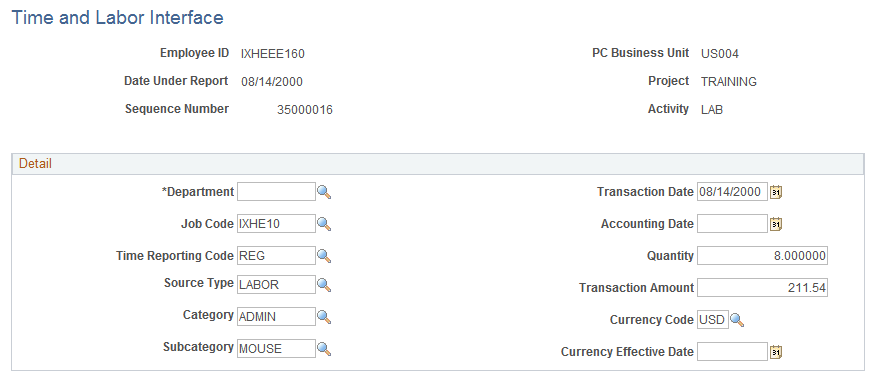
Make any necessary adjustments to transactions brought over from PeopleSoft Time and Labor before moving them to the Project Transaction table.
Time and Labor Page
Use the Time and Labor page (PC_TL_TO_PC) to run the Time and Labor to Project Costing Application Engine process (PC_TL_TO_PC) that moves time and labor data from the Project Time and Labor Interface staging tables into the Project Transaction table.
Image: Time and Labor page
This example illustrates the fields and controls on the Time and Labor page. You can find definitions for the fields and controls later on this page.
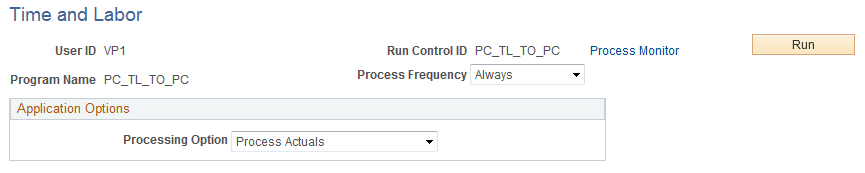
Use this page to select the processing option, and click Run to initiate the Time and Labor to Project Costing process.
Note: Labor amounts that differ from the business unit currency are converted during the integration process if the appropriate exchange rates are set up.
Loading Time from a Flat File
This process reads from the flat file and loads time to the same interface tables that are used to integrate with the PeopleSoft Time and Labor system. Two file layout objects are provided for this feature:
PROJ_ACTUAL_TIME
PROJ_ESTIMATED_TIME
Before running the process from the run control page, be sure that the order of time data fields in the flat file matches the order of fields in the delivered file layout definitions on a one-to-one basis. If it does not, change the order of the data fields in either the flat file or the file layout definition.
The process supports comma-separated, value files (*.csv).
Billing for Labor Transactions
When the Project Transaction table is populated with labor data, the estimated gross rows are identified with an analysis type of TLA. Each transaction ID on these rows has an A suffix. Identical rows are also created with an analysis type of TLB and a transaction ID suffix of B for billing purposes.
A subsequent run of the process, to extract estimated gross rows from PeopleSoft Time and Labor, deletes all TLA rows. In addition, it replaces TLB rows that have not created unbilled billing rows that have been billed, which is indicated by a billing distribution status of W (worksheet) or D (done), with the updated estimated gross amounts.
See also, PeopleTools: PeopleSoft Process Scheduler