
Setting Up Activity-Related Information
To set up activity-related information, use these components:
Activity Types (PROJ_ACTIVITY_TYPE).
Activity Type Status Path (PC_ACTSTATCTL_PNLG).
Quality Types (PROJ_QUALITY_DEFN).
Define Standard Activities (FS_ACTIVITY_TBL).
Use the PC_STD_ACT_INTFC component interface to load data into the tables for the FS_ACTIVITY_TBL component.
This topic discusses how to:
Define activity types.
Define activity type status paths.
Define standard activities.
Pages Used to Set Up Activity-Related Information
|
Page Name |
Definition Name |
Navigation |
Usage |
|---|---|---|---|
|
Activity Types |
PROJ_ACT_DEFN |
|
Create activity types. |
|
Activity Type Status Path |
PC_ACT_STATCTL_PNL |
|
Define the status path for activities. |
|
Activity Options - Quality Types |
PROJ_QUALITY_DEFN |
|
Create and modify quality types. |
|
Standard Activities |
FS_ACTVITY_TBL1 |
|
Create and modify standard activities. |
Activity Types Page
Use the Activity Types page (PROJ_ACT_DEFN) to create activity types.
Image: Activity Types page
This example illustrates the fields and controls on the Activity Types page. You can find definitions for the fields and controls later on this page.
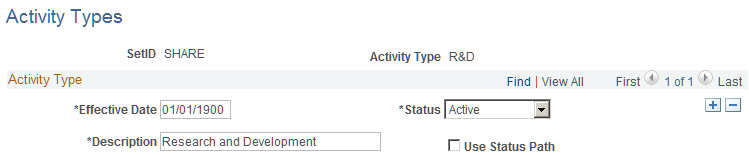
Activity type labels identify and group activities to facilitate analysis and reporting on similar activities across projects.
| Status |
Select the status that determines the availability of an activity type. |
| Use Status Path |
Select to enforce the predefined progression of statuses for activities of this type. |
Activity Type Status Path Page
Use the Activity Type Status Path page (PC_ACT_STATCTL_PNL) to define the status path for activities.
You must define status types before you define activity type status paths. Activities use the same status type data that you define at the project level.
The procedure to define activity type status paths is the same as the procedure to define status paths for projects.
Standard Activities Page
Use the Standard Activities page (FS_ACTVITY_TBL1) to create and modify standard activities.
Image: Standard Activities page
This example illustrates the fields and controls on the Standard Activities page. You can find definitions for the fields and controls later on this page.

Use this page to predefine activities that users can assign to projects.
Standard activities are keyed by SetID and based on project type. To enable standard activity functionality, select the Standard Activities check box on the Project Costing Definition page for a project. Using standard activities is optional.