Setting Up Budgets in PeopleSoft Project Costing
This topic discusses how to define budget alert thresholds.
Pages Used to Set Up Budgets in PeopleSoft Project Costing
|
Page Name |
Definition Name |
Navigation |
Usage |
|---|---|---|---|
|
Installation Options - Project Costing |
INSTALLATION_PC |
|
Enable projects budgeting, and establish the default settings for the budget calendar, periods, and analysis groups. If you use PeopleSoft Program Management, enable users to choose the general ledger business unit and department distribution for budget detail rows. |
|
Budget Items |
PC_BUD_ITEMS |
|
Define and modify budget items. |
|
Project Costing Options - Budget Alerts (business unit) |
PC_BUD_BU_ALERTS |
|
Define cost budget alert thresholds that appear as default settings for all project budgets that belong to the business unit. |
|
Project Definitions - Budget Alerts |
PC_BUD_PROJ_ALERTS |
|
Define cost budget alert thresholds at the project level to alert the project manager when costs exceed the specified threshold. |
|
Budget Alerts (activity) |
PC_BUD_ACT_ALERTS |
|
Define cost budget alert thresholds to alert the project manager for potential cost overruns at the activity level. |
Project Costing Options - Budget Alerts (business unit) Page
Use the Project Costing Options - Budget Alerts (business unit) page (PC_BUD_BU_ALERTS) to define cost budget alert thresholds that appear as default settings for all project budgets that belong to the business unit.
Note: There are three Budget Alerts pages in Project Costing—one at the business unit level, project level, and activity level. The navigation path to these pages is based on whether you are defining the budget alert thresholds for the business unit, project, or activity. The field definitions that appear in this topic apply to all three pages.
Image: Budget Alerts page (Percentage calculation type)
This example illustrates the fields and controls on the Budget Alerts page (Percentage calculation type). You can find definitions for the fields and controls later on this page.
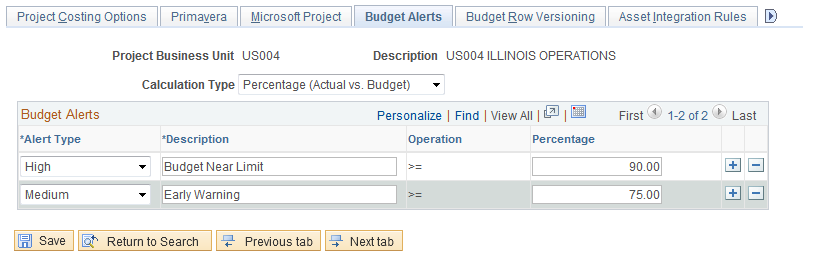
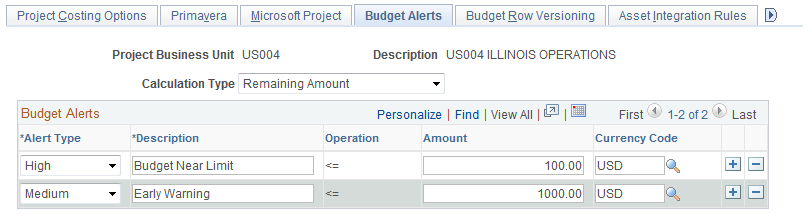
Image: Budget Alerts page (Remaining Amount calculation type)
This example illustrates the fields and controls on the Budget Alerts page (Remaining Amount calculation type). You can find definitions for the fields and controls later on this page.