
Setting Up Transaction-Related Information
To set up transaction-related information, use these components:
Analysis Types (PROJ_ANALYSIS_TYPE)
Analysis Groups (ANALYSIS_GRP_DEFN)
Resource Groups (PROJ_RES_GRP_DEFN)
Transaction Identifiers (PC_TRANS_IDENTIFY)
This topic discusses how to:
Define analysis types.
Define analysis groups.
Define source groups.
Define transaction identifiers.
Pages Used to Set Up Transaction-Related Information
|
Page Name |
Definition Name |
Navigation |
Usage |
|---|---|---|---|
|
Analysis Types |
PROJ_ANTYPE_DEFN |
|
Create and modify analysis types. |
|
Analysis Groups |
PROJ_AN_GRP_MAP |
|
Create and modify analysis groups. |
|
Analysis Groups - Description |
PROJ_AN_GRP_DEFN |
Select the Description tab on the Analysis Groups page. |
Describe the purpose of the analysis group. |
|
Source Groups |
PROJ_RT_GRP_MAP |
|
Create and modify source groups. |
|
Source Groups - Description |
PROJ_RT_GRP_DEFN |
|
Describe the source group. |
|
Transaction Identifiers |
PC_TRANS_IDENTIFY |
|
Define transaction identifiers that consist of groups of project ChartField values. |
Analysis Types Page
Use the Analysis Types page (PROJ_ANTYPE_DEFN) to create and modify analysis types.
Image: Analysis Types page
This example illustrates the fields and controls on the Analysis Types page. You can find definitions for the fields and controls later on this page.

Analysis Groups Page
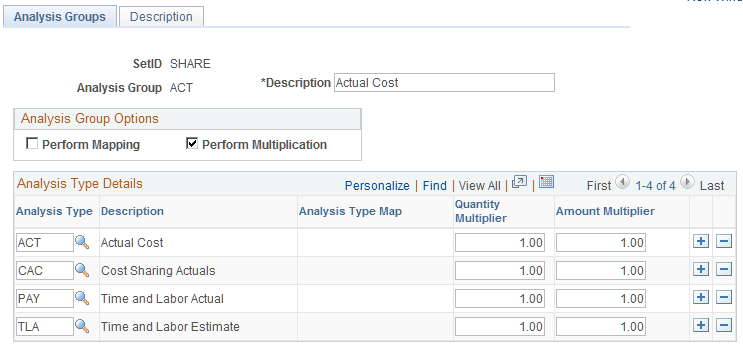
Use the Analysis Groups page (PROJ_AN_GRP_MAP) to create and modify analysis groups.
Image: Analysis Groups page
This example illustrates the fields and controls on the Analysis Groups page. You can find definitions for the fields and controls later on this page.
Source Groups Page
Use the Source Groups page (PROJ_RT_GRP_MAP) to create and modify source groups.
Image: Source Groups page
This example illustrates the fields and controls on the Source Groups page. You can find definitions for the fields and controls later on this page.

| Flexible Rate |
Enter a rate by which to multiply the source types in this source group to create a special project view. |
| Source Types |
Select the source types to include in the source group. |
Transaction Identifiers Page
Use the Transaction Identifiers page (PC_TRANS_IDENTIFY) to define transaction identifiers that consist of groups of project ChartField values.
Image: Transaction Identifiers page
This example illustrates the fields and controls on the Transaction Identifiers page. You can find definitions for the fields and controls later on this page.
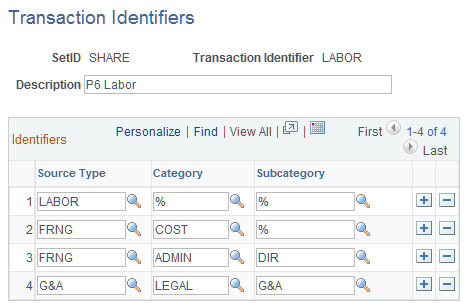
Enter source type, category, and subcategory rows that are valid combinations of project ChartField values. Use the wildcard value (a percent sign) in a field to indicate that any value for that field is valid in combination with the other field values in that row. Although the system prevents the creation of duplicate rows within a transaction identifier, an identical row can be part of other transaction identifiers.
Transaction identifiers are used when exporting actual costs from PeopleSoft to Primavera P6. For additional information about integrating with Primavera P6 see Understanding PeopleSoft Integration with Primavera P6