
Creating Employee Data
To create employee data, use the Personal Data Table component (RS_CM_PERSONAL). If you have a large number of employees, use the Personal Data component interface (RS_CM_PERSONAL) to load data into the table for this component.
This section discusses how to set up employee data tables.
Pages Used to Create Employee Data
|
Page Name |
Definition Name |
Navigation |
Usage |
|---|---|---|---|
|
Update Employee Data - Personal Data |
RS_CM_PERSONL_DATA |
|
Specify name, address, telephone, and personnel status information for an employee ID. |
|
Update Employee Data - Employee Job |
RS_CM_EMPL_JOB |
Select the Employee Job tab in any page in the Personal Data Table component. |
Specify employee status and other basic job information such as department, location, and supervisor. |
|
Update Employee Data - Visa/Work Permit |
RS_CM_VISA_PRMT |
Select the Visa/Work Permit tab in any page in the Personal Data Table component. |
Specify visa and work permit information. |
|
Update Employee Data - Citizenship/Passport |
RS_CM_CITI_PASS |
Select the Citizenship/Passport tab in any page in the Personal Data Table component. |
Specify citizenship and passport information. |
Setting Up Employee Data Tables
Define employee data tables by completing these steps:
Access the setup table page.
Enter a new or existing employee ID.
Enter or update the required information on each page.
Save the record and click Add to create the next employee ID and definition.
Employee Personal Data
Use the Update Employee Data - Personal Data page (RS_CM_PERSONL_DATA) to specify name, address, telephone, and personnel status information for an employee ID.
Image: Update Employee Data - Personal Data page
This example illustrates the fields and controls on the Update Employee Data - Personal Data page. You can find definitions for the fields and controls later on this page.

Note: Personal data records with the personnel status Non-Employee appear on the Employee Data page even if you do not allow non-employees to be established as resources.
Employee Job Information
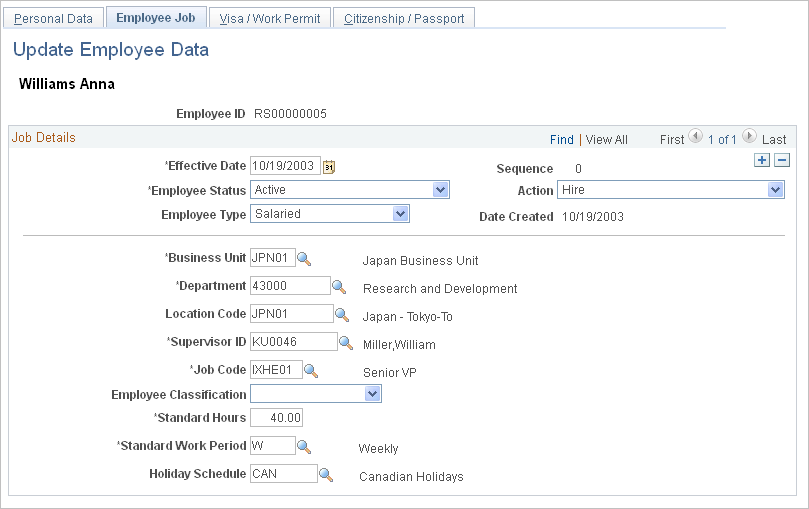
Use the Update Employee Data - Employee Job page (RS_CM_EMPL_JOB) to specify employee status and other basic job information such as department, location, and supervisor.
Image: Update Employee Data - Employee Job page
This example illustrates the fields and controls on the Update Employee Data - Employee Job page. You can find definitions for the fields and controls later on this page.
Note: You must refresh the Eligible Resource Cache table (RS_ELGBL_WRKR) when routine changes are made to a resource's job-related information. Additionally, you must update the Resource Organizational Unit Cache table (RS_WORKER_ORG) when a resource's organization unit value changes, such as the resource's department.
See Setting Up and Maintaining the SES Search Engine and Resource Matching Cache Tables.
Visa Permit Information
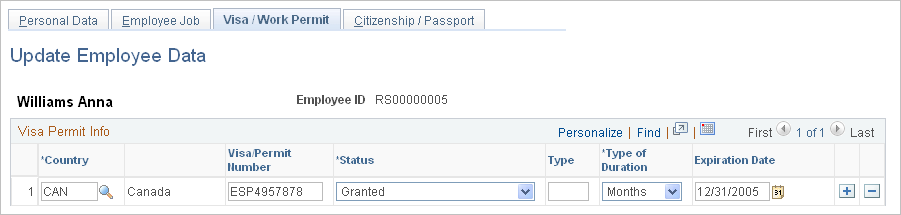
Use the Update Employee Data - Visa/Work Permit page (RS_CM_VISA_PRMT) to specify visa and work permit information.
Image: Update Employee Data - Visa/Work Permit page
This example illustrates the fields and controls on the Update Employee Data - Visa/Work Permit page. You can find definitions for the fields and controls later on this page.
Enter the applicable information for each field.
Citizenship and Passport Information
Use the Update Employee Data - Citizenship/Passport page (RS_CM_CITI_PASS) to specify citizenship and passport information.
Image: Update Employee Data - Citizenship/Passport page
This example illustrates the fields and controls on the Update Employee Data - Citizenship/Passport page. You can find definitions for the fields and controls later on this page.

Enter the applicable citizenship and passport information for each field.