Managing Pool Resources
This section discusses how to:
View pool resources.
Add multiple date ranges.
Add named resources.
Add generic resources.
Transfer resources between pools.
Modify resource transfers.
Pages Used to Manage Pool Resources
|
Page Name |
Definition Name |
Navigation |
Usage |
|---|---|---|---|
|
Pool Resources - Manage Pool Resources |
RS_POOL_MEMBER |
|
View the resource information for the selected pool. |
|
Pool Resource Detail |
RS_MBR_DETAILS |
Click a link in the Name column on the Pool Resources - Manage Pool Resources page. |
View pool resource details and modify membership dates. |
|
Add Named Resource |
RS_ADD_NAMED |
Click the Add Named Resource button on the Pool Resources - Manage Pool Resources page. |
Add named resources to the pool. |
|
Add Generic Resource |
RS_ADD_GENERIC |
Click the Add Generic Resource button on the Pool Resources - Manage Pool Resources page. |
Add generic resources to the pool. |
|
Transfer Resource |
RS_TRANSF_MBR |
Click the Transfer Resources icon on the Pool Resources - Manage Pool Resources page. |
Transfer named resources from one resource pool to another. |
|
Modify Resource Transfer |
RS_MODIFY_TRANSF |
|
Modify a pending resource transfer. |
|
Manage Pool Resources - Delete Confirmation |
EO_DEL_CONFIRM |
Click the Delete icon for a resource on the Pool Resources - Manage Pool Resources page. |
Remove a resource from the pool and confirm the deletion. |
|
Resource Pool History |
RS_POOL_HISTORY |
Click the Pool History link on the Pool Resources - Manage Pool Resources page. |
View the pool history for a particular pool. |
|
Supply Category Analytics |
RS_OCP_POOL_SELECT |
Click the View Supply Category Analytics link on the Pool Resources - Manage Pool Resources page. |
View the Supply Category Analytics for a particular pool. |
|
Transfer Assignments |
RS_TRNSFR_ASSGNMNT |
Click the Transfer Assignments link on the Pool Resources - Manage Pool Resources page. |
Transfer assignments from one resource to another in a particular pool. |
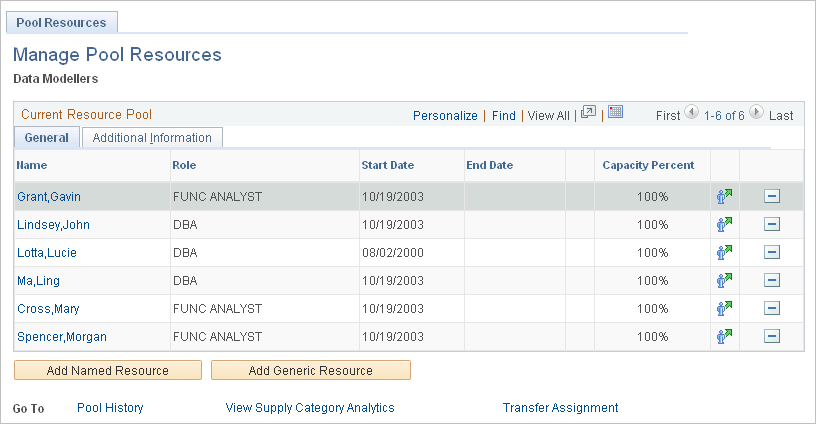
Pool Resources - Manage Pool Resources Page
Use the Pool Resources - Manage Pool Resources page (RS_POOL_MEMBER) to view the resource information for the selected pool.
Image: Pool Resources - Manage Pool Resources page
This example illustrates the fields and controls on the Pool Resources - Manage Pool Resources page. You can find definitions for the fields and controls later on this page.


Pool Resource Detail Page
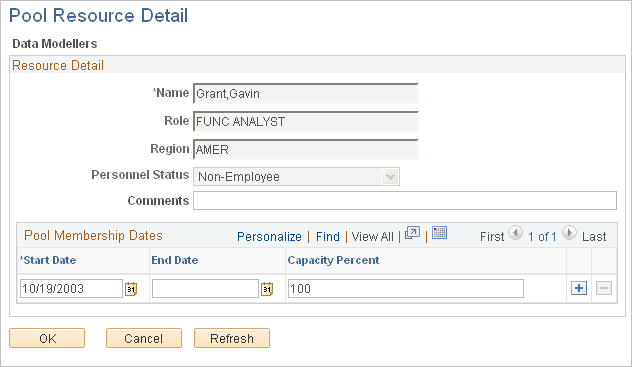
Use the Pool Resource Detail page (RS_MBR_DETAILS) to view pool resource details and modify membership dates.
Image: Pool Resource Detail page
This example illustrates the fields and controls on the Pool Resource Detail page. You can find definitions for the fields and controls later on this page.
Pool Membership Dates
Any date periods with an end date that is greater than the current date appear in this grid. You can add different date ranges with different capacity percentages for the same resource.
Add Named Resource Page
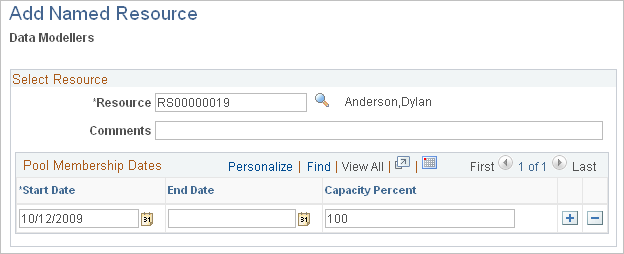
Use the Add Named Resource page (RS_ADD_NAMED) to add named resources to the pool.
Image: Add Named Resource page
This example illustrates the fields and controls on the Add Named Resource page. You can find definitions for the fields and controls later on this page.
Add Generic Resource Page
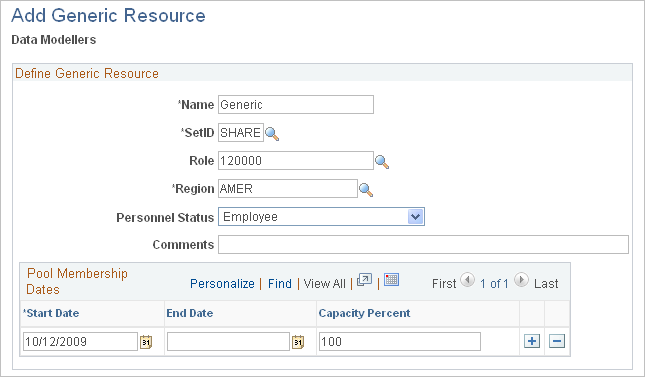
Use the Add Generic Resource page (RS_ADD_GENERIC) to add generic resources to the pool.
Click the Add Generic Resource button on the Pool Resources - Manage Pool Resources page.
Image: Add Generic Resource page
This example illustrates the fields and controls on the Add Generic Resource page. You can find definitions for the fields and controls later on this page.
Transfer Resource Page
Use the Transfer Resource page (RS_TRANSF_MBR) to transfer named resources from one resource pool to another.
Image: Transfer Resource page
This example illustrates the fields and controls on the Transfer Resource page. You can find definitions for the fields and controls later on this page.

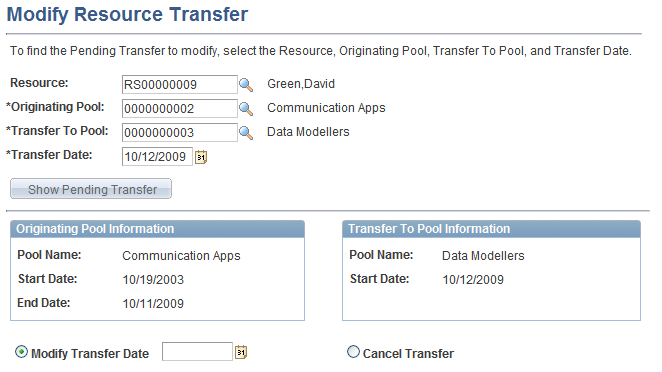
Modify Resource Transfer Page
Use the Modify Resource Transfer page (RS_MODIFY_TRANSF) to modify a pending resource transfer.
Image: Modify Resource Transfer page
This example illustrates the fields and controls on the Modify Resource Transfer page. You can find definitions for the fields and controls later on this page.