
Setting Up Commitment Control Security Rules
To set up commitment control security rules, use the Security Rule Definition (KSEC_RULE_ENTRY) component.
Security rules enable you to establish, independently of any specific user, which security events can be performed on which budgets. Setup for security rules consists of two steps, described in this section:
Defining the security rules and applying them to business units.
Applying the security rules to security events.
Pages Used to Define Security Rules
|
Page Name |
Definition Name |
Navigation |
Usage |
|---|---|---|---|
|
Rule Definition |
KSEC_RULE_ENTRY |
|
Specify the key ChartField values and business units that define the budgets included in a security rule. |
|
Apply Rule |
KSEC_RULE_APPLY_TO |
|
Apply the attributes that you defined on the Rule Definition page to one or more security events. |
Budget Security - Rule Definition Page
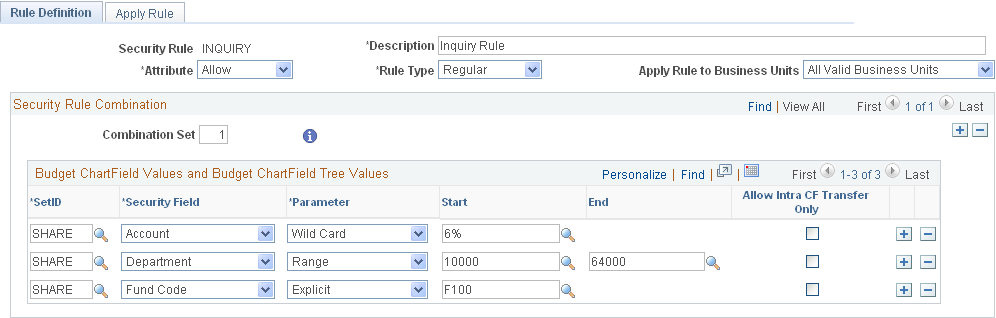
Use the Budget Security - Rule Definition page (KSEC_RULE_ENTRY) to specify the key ChartField values and business units that define the budgets included in a security rule.
Image: Budget Security - Rule Definition page
This example illustrates the fields and controls on the Rule Definition page. You can find definitions for the fields and controls later on this page.
| Rule Type |
Select one of the following:
|
Security Rule Combination
Budget ChartField Values and Budget ChartField Tree Values
See Assigning Commitment Control Security Rules
See Key ChartFields and Translation Trees.
Apply Rule to Business Units
Apply the rule either to all valid business units or to the business units you specify in the grid.
Budget Security - Apply Rule Page
Use the Budget Security - Apply Rule page (KSEC_RULE_APPLY_TO) to apply the attributes that you defined on the Rule Definition page to one or more security events.
Apply Rule to Security Events
See Security Events.
 |
Click to see a discussion of why you should or should not include ledger group as a security field for this event. You enter security fields in the ChartField column on the Rule Definition page. |
Applicable Modules for Budget Date Event
Available only when you select the BUDG_DT (budget date override) Security Event.
Applicable Source Transactions for Override Event
Available only when you select the OVERRIDE (budget override) Security Event.
Note: Selecting Do not Allow Override as the Override Budget Checking option for a source transaction type on the Source Transactions - Options page is only effective if the override event is inactive within commitment control security.