
Defining MICR IDs
To define customer MICR IDs, use the Customer MICR Information component (CUSTOMER_MICR).
This section provides an overview of MICR IDs and discusses how to:
Associate MICR IDs with remit from customers.
Enter customer-specific bank information.
Pages Used to Define MICR IDs
|
Page Name |
Definition Name |
Navigation |
Usage |
|---|---|---|---|
|
MICR Information - Address |
CUSTOMER_MICR |
|
Enter MICR IDs and associate them with remit from customers. |
|
MICR Information - Customer Bank |
CUSTOMER_MICR2 |
|
Enter additional bank information for specific customers. |
Understanding MICR IDs
Every bank account has an associated MICR ID. Because customers may use multiple bank accounts, you can associate a customer with more than one MICR ID. A MICR ID is one way in which Payment Predictor identifies customers and can be used as the basis for building payment and maintenance worksheets.
The MICR pages are optional: use them if the lockbox interface provides a MICR ID for customer identification or if you regularly use MICR IDs for identification. If you perform direct debit or electronic draft processing, you can use these pages to define customer bank account information used for remittance processing.
MICR Information - Address Page
Use the MICR Information - Address page (CUSTOMER_MICR) to enter MICR IDs and associate them with remit from customers.
Image: MICR Information - Address page
This example illustrates the fields and controls on the MICR Information - Address page. You can find definitions for the fields and controls later on this page.
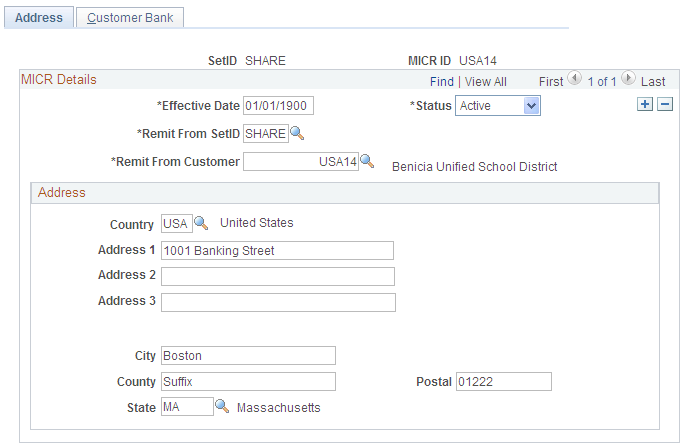
Note: During processing, you may discover a payment with a MICR ID that does not match any customer in the system. If you have additional information that is associated with the payment that positively identifies the remit from customer, then link the MICR ID to the customer by clicking the Link MICR link on the Regular Deposit Entry - Payments page or the Worksheet Selection page.
MICR Information - Customer Bank Page
Use the MICR Information - Customer Bank page (CUSTOMER_MICR2) to enter additional bank information for specific customers.
Image: MICR Information - Customer Bank page
This example illustrates the fields and controls on the MICR Information - Customer Bank page. You can find definitions for the fields and controls later on this page.
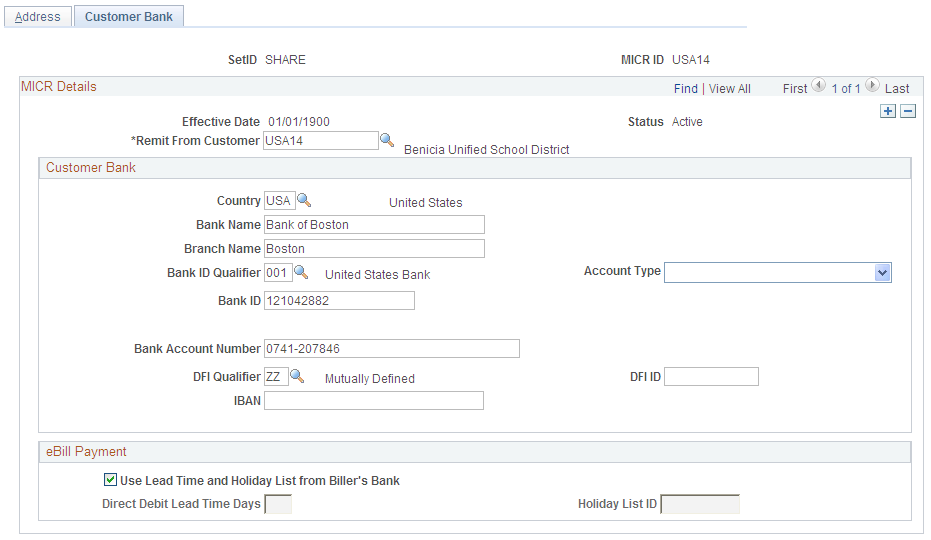
To conduct EFT transfers using this account, you may need to provide the appropriate routing information for the depository financial institution (DFI).
Each DFI ID type has a specific number of digits that you can enter, as listed in this table:
|
DFI Qualifier |
DFI ID |
|---|---|
|
Transit Number |
Exactly nine numerals, plus check digit calculation. |
|
Swift ID |
Eight or 11 characters; positions five and six must comprise a valid two-character country code. |
|
CHIPS ID |
Three or four numerals. |
|
Canadian Bank Branch/Institute |
No validation. |
|
Mutually Defined |
No validation. |