
Establishing VAT Defaults
To establish VAT defaults, use the following components:
VAT Defaults Setup (VAT_DFLT_SRCH_DTL).
Service VAT Sub-Search (VAT_DEF_SER_SEARCH).
This section provides an overview of VAT defaults setup and discusses how to:
Access the VAT Defaults Setup page.
Set up and maintain VAT defaults.
Copy VAT default setup.
Review VAT field descriptions by VAT driver.
Access the Service VAT Treatment Defaults Setup page.
Set up and maintain service VAT treatment drivers.
Copy service VAT treatment drivers.
Validate VAT default setup.
Override VAT defaults and controls on transaction entry VAT pages.
Pages Used to Establish VAT Defaults
|
Page Name |
Definition Name |
Navigation |
Usage |
|---|---|---|---|
|
VAT Defaults Sub-Search |
VAT_DEFAULT_SEARCH |
Select the VAT driver and click Search. |
Enter VAT driver keys, or country and state information, as applicable. |
|
VAT Defaults Setup |
VAT_DEFAULTS_DTL |
Enter search criteria on the VAT Default Sub-Search page and click Search. |
Enter VAT default information. The fields displayed, default values, and data required vary based on the VAT driver and VAT driver keys entered. |
|
Copy Service VAT Treatment Defaults From Copy Service VAT Treatment Defaults From |
VAT_DFLT_SRCH_COPY |
|
Copy data from an existing VAT default or service VAT treatment default setup to the current VAT driver and driver keys combination. |
|
Copy VAT Defaults Setup |
VAT_DEFAULT_DTLSEC |
Click any of the row links returned by the search on the Copy VAT Defaults From page. |
View the details from which to copy. |
|
Service VAT Treatment Defaults Sub-Search |
VAT_DEFAULT_SEARCH |
Select a VAT driver and click Search. |
Enter VAT driver keys, and country or state information, as applicable. |
|
Service VAT Treatment Defaults Setup |
VAT_DEFAULTS_DTL |
Enter search criteria on the Service VAT Treatment Defaults Sub-Search page and click Search. |
Enter VAT default information for service VAT treatment. |
|
VAT Set Up Validation Report |
RUN_LC_VATCHK |
|
Validate VAT default setup data and expose inconsistencies and missing default values. |
Understanding VAT Defaults Setup
By providing common components for establishing VAT defaults for all installed applications that process VAT transactions, PeopleSoft software provides the tax expert in your organization the ability to see and access all VAT default setup from a shared menu. In addition, this same default setup can be accessed from the various application pages.
Note: Generate the VAT 3000 report after setting up defaults to validate VAT default setup data and to expose any inconsistencies and missing default values.
VAT Defaults
VAT defaults may be defined for many VAT drivers, and these VAT drivers make up all the levels of the defaults hierarchy. Common default records are used to store the hierarchical default data in such a way as to make retrieval of the appropriate defaults efficient. For example, a VAT default specified for an item, expense type, or product should be used before a default for a category or product group. Furthermore, within each VAT driver defaults specified by country and state are more specific and come before defaults by country only, which in turn are more specific and come before defaults for which both the country and state are blank.
You can establish VAT settings for all applicable VAT drivers using the VAT Defaults Setup component. You access the component by first selecting a VAT driver. The drivers available to you are based on the applications installed. A sub-search page appears on which you can enter more specific search criteria or driver keys. Clicking the search button accesses the VAT Defaults Setup page. The default VAT data that appears is determined by the combination of the VAT driver and VAT driver keys. You then enter the required defaults and any optional defaults as needed and save the changes.
Service VAT Treatment Defaults
If you need to establish default values for the additional VAT treatment determinants specific for services, you can do this using the Services VAT Treatment Defaults Setup component. Like the VAT Defaults setup component, this component uses VAT drivers to provide the default values at various levels of the hierarchy. For any applicable driver, you can define the place of supply of the service or the place where the VAT is liable, whether it is the supplier's countries, the customer's countries, or the place where the service is actually performed depending on the type of service. You can also specify whether the service is freight transport or other.
Understanding VAT Drivers, VAT Driver Keys, and the Default Hierarchy for VAT Defaults
The following table lists the VAT drivers and associated VAT driver keys in VAT default hierarchy sequence from most specific to least specific for the VAT Defaults component. This table also indicates which drivers also control defaults for the services VAT treatment:
|
VAT Driver |
VAT Driver Keys |
PeopleSoft Application |
Country |
State |
Applicable to Regular VAT Defaults |
Applicable to Services VAT Treatment Defaults |
|---|---|---|---|---|---|---|
|
Item BU |
Item SetID Item ID Business Unit |
Purchasing |
Optional |
Optional |
Yes |
No |
|
Item |
Item SetID Item ID |
Purchasing, Payables |
Optional |
Optional |
Yes |
Yes |
|
Expense Type |
SetID Expense Type |
Expenses |
Optional |
Optional |
Yes |
No |
|
Sales Line Identifier |
SetID Table Identifier Identifier |
Billing, Order Management, CRM |
Optional |
Optional |
Yes |
Yes |
|
Account ChartField |
Account SetID Account |
General Ledger |
Optional |
Optional |
Yes |
No |
|
Item Category |
Item SetID Category Code |
Purchasing |
Optional |
Optional |
Yes |
Yes |
|
Sales Line Identifier Group |
Identifier Group SetID Table Identifier Identifier Group |
Billing, Order Management, CRM |
Optional |
Optional |
Yes |
Yes |
|
Journal Source |
Source SetID Source |
General Ledger |
Optional |
Optional |
Yes |
No |
|
Accounting Template |
Accounting Template SetID Accounting Template ID |
Treasury |
Optional |
Optional |
Yes |
No |
|
Asset Class |
Asset SetID Asset Class |
Asset Management |
Optional |
Optional |
Yes |
No |
|
Bank Branch |
Bank SetID Bank Code Branch Name |
Treasury |
Optional |
Optional |
Yes |
No |
|
Supplier Location |
Supplier SetID Supplier ID Supplier Location |
Purchasing, Payables |
Optional |
Optional |
Yes |
Yes |
|
Customer Location |
Customer SetID Customer ID Address Sequence Number |
Receivables, Asset Management, Billing, Order Management |
Optional |
Optional |
Yes |
Yes |
|
Bank |
Bank SetID Bank Code |
Treasury |
Optional |
Optional |
Yes |
No |
|
Supplier |
Supplier SetID Supplier ID |
Purchasing, Payables |
Optional |
Optional |
Yes |
Yes |
|
Credit Card Provider |
Supplier SetID Credit Card Supplier |
Purchasing |
Optional |
Optional |
Yes |
No |
|
Customer |
Customer SetID Customer ID |
Receivables, Asset Management, Billing, Order Management |
Optional |
Optional |
Yes |
Yes |
|
Voucher Control Group |
Business Unit Control Group ID |
Payables |
Optional |
Optional |
Yes |
Yes |
|
Bill Source |
Bill Source SetID Bill Source ID |
Billing |
Optional |
Optional |
Yes |
Yes |
|
Voucher Origin |
Origin SetID Origin |
Payables |
Optional |
Optional |
Yes |
Yes |
|
Bill Type |
Bill Source SetID Bill Type ID |
Billing |
Optional |
Optional |
Yes |
Yes |
|
AM Business Unit |
Business Unit |
Asset Management |
Optional |
Optional |
Yes |
No |
|
AP Business Unit |
Business Unit |
Payables |
Optional |
Optional |
Yes |
No |
|
BI Business Unit |
Business Unit |
Billing |
Optional |
Optional |
Yes |
Yes |
|
Expenses Business Unit |
Business Unit |
Expenses |
Optional |
Optional |
Yes |
No |
|
GL Business Unit |
Business Unit |
General Ledger |
Optional |
Optional |
Yes |
No |
|
OM Business Unit |
Business Unit |
Order Management |
Optional |
Optional |
Yes |
Yes |
|
PO Business Unit |
Business Unit |
Purchasing |
Optional |
Optional |
Yes |
No |
|
Treasury Options |
Business Unit |
Treasury |
Optional |
Optional |
Yes |
No |
|
AP Options |
SetID |
Payables |
Optional |
Optional |
Yes |
Yes |
|
AR Options |
SetID |
Receivables |
Optional |
Optional |
Yes |
Yes |
|
PO Options |
SetID Process Option ID |
Purchasing |
Optional |
Optional |
Yes |
Yes |
|
VAT Entity Registration |
VAT Entity Country |
All |
Required |
Optional |
Yes |
No |
|
VAT Country |
Country |
All |
Not applicable |
Optional |
Yes |
No |
VAT Defaults Sub-Search Page
Use the VAT Defaults Sub-Search page (VAT_DEFAULT_SEARCH) to enter VAT driver keys, or country and state information, as applicable.
Navigate to Set Up Financials/Supply Chain, Common Definitions, VAT and Intrastat, Value Added Tax, VAT Defaults.
A search window appears.
Select the VAT driver that you want to maintain or set up and click Search.
The VAT drivers listed are based on the installed applications. A VAT Default Sub-Search page appears.
Optionally, enter any or all of the VAT driver keys that appear, the VAT reporting country, and default state or province, as applicable.
Click Search.
The system accesses the VAT Defaults Setup page and displays all VAT default data for the rows matching the VAT driver option selected and VAT driver keys entered.
In addition, the system displays only the applicable VAT default fields.
VAT Defaults Setup Page
Use the VAT Defaults Setup page (VAT_DEFAULTS_DTL) to enter VAT default information.
The fields displayed, default values, and data required vary based on the VAT driver and VAT driver keys entered.
Image: VAT Defaults Setup page (1 of 2)
This example illustrates the fields and controls on the VAT Defaults Setup page (1 of 2). You can find definitions for the fields and controls later on this page.
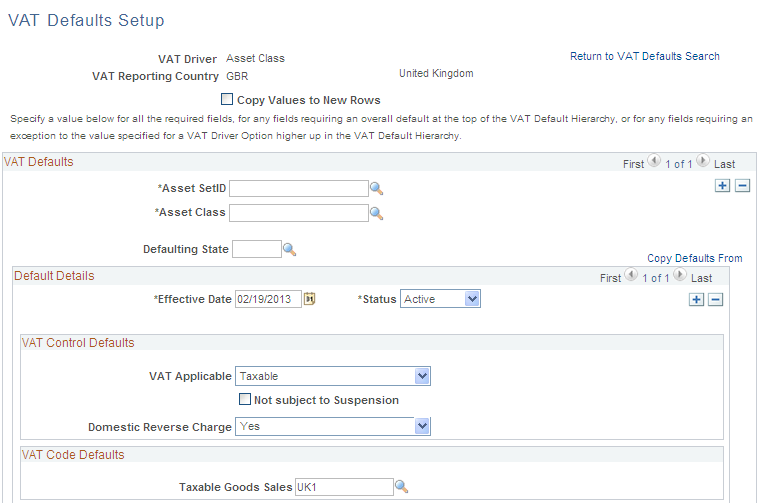
Image: VAT Defaults Setup page (2 of 2)
This example illustrates the fields and controls on the VAT Defaults Setup page (2 of 2). You can find definitions for the fields and controls later on this page.
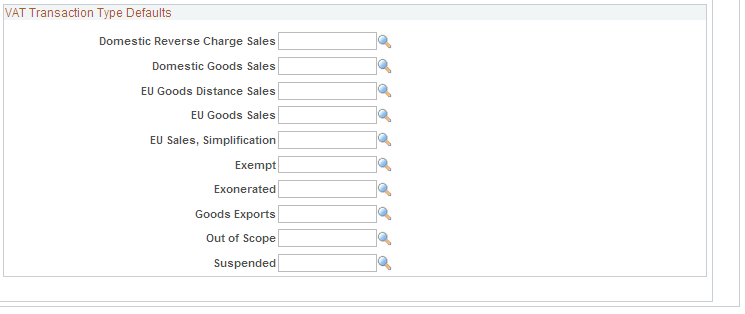
Note: The VAT default fields that appear vary based on the VAT driver. In addition, the VAT default data is based on the VAT driver and VAT driver keys used to access this page.
Use the page to specify a value for all the required fields, for any fields requiring an overall default at the top of the VAT default hierarchy, or for any fields requiring an exception to the value specified for a VAT driver higher up in the VAT default hierarchy.
You can insert rows for any or all of the VAT driver keys as well as the VAT country or state. You can also delete any existing rows.
Note: The remaining fields on the page vary based on the combination of VAT driver and VAT driver keys. See the section on VAT fields for details of the fields that appear and the VAT drivers for which they appear in hierarchy order.
Copy VAT Defaults Setup Page
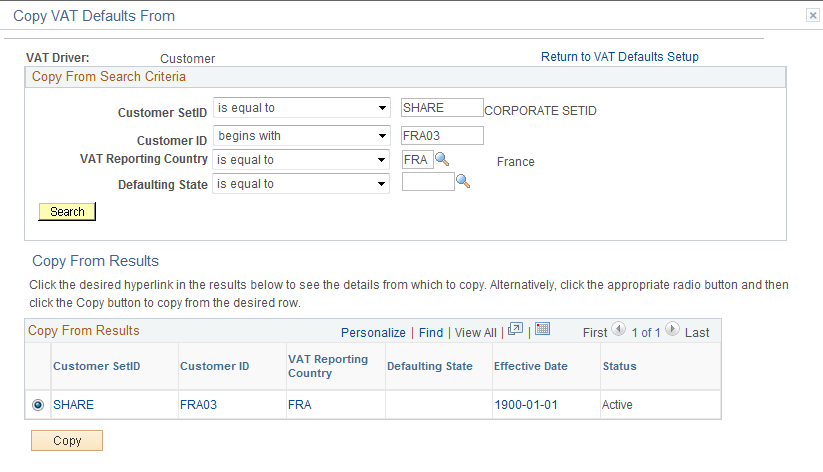
Use the Copy VAT Defaults Setup page (VAT_DEFAULT_DTLSEC) to view the details from which to copy.
Image: Copy VAT Defaults From page
This example illustrates the fields and controls on the Copy VAT Defaults From page. You can find definitions for the fields and controls later on this page.
Reviewing VAT Field Descriptions by VAT Driver
The following tables list the available VAT fields, field descriptions, and VAT drivers for which they appear. The drivers are listed in reverse hierarchy order, from least specific to most specific. The tables also indicate on which driver the VAT field is required. Fields can be overridden at lower levels of the hierarchy as needed.
VAT Control Defaults
This table lists the fields by VAT driver that control how and when VAT is applied and calculated:
|
Field |
Description |
VAT Driver |
|---|---|---|
|
VAT Applicable |
Select the appropriate VAT status. Values are: Taxable Exempt (not subject to VAT) Outside of Scope of VAT |
VAT Country Driver (required) PO Options AR Options AP Options Treasury Options Order Management Business Unit General Ledger Business Unit Expenses Business Unit Billing Business Unit Asset Management Business Unit Bill Type Voucher Origin Bill Source Voucher Control Group Customer Supplier Bank Customer Location Supplier Location Bank Branch Asset Class Accounting Template Journal Source Sales Line Identifier Group
|
|
VAT Applicable (continued) |
Select the appropriate VAT status. Values are: Taxable Exempt (not subject to VAT) Outside of Scope of VAT |
Item Category Account ChartField Expense Type Item Sales Line Identifier
|
|
Reverse Charge |
Select to indicate that the goods on transaction lines that are associated with the VAT driver are subject to the Domestic Reverse Charge. |
PO Options AR Options AP Options Order Management Business Unit Billing Business Unit Asset Management Business Unit Bill Type Voucher Origin Bill Source Voucher Control Group Customer Supplier Customer Location Supplier Location Asset Class Product Charge Code Discount code Surcharge code Generic Identifier Product Group Item Item category |
|
VAT Rounding Rule |
Specify the VAT rounding rule that you want to use: Natural Round: Amounts are rounded normally (up or down) to the precision specified for the currency code. For example, for a currency defined with two decimal places, 157.4659 would round up to 157.47, but 157.4649 would round down to 157.46. Round Down: Amounts are rounded down. Round Up: Rounds up and limits rounding precision to one additional decimal place. For example, for a currency defined with 2 decimal places, 157.4659 would round up to 157.47, but 157.4609 would be rounded down to 157.46. |
VAT Country Driver (required) VAT Entity Registration Supplier Supplier Location |
|
Goods Declaration Point |
Select when you want VAT transaction information for goods to be recognized for reporting purposes. At Invoice Time: VAT is recognized at time of invoice. At Payment Time: VAT is recognized at time of payment. At Delivery Time: VAT is recognized at time of delivery. At Accounting Date: VAT is recognized as of the accounting date. |
VAT Entity Registration (required) PO Options AR Options AP Options Order Management Business Unit Billing Business Unit Asset Management Business Unit Bill Type Voucher Origin Bill Source Voucher Control Group Customer Supplier Customer Location Supplier Location |
|
Services Declaration Point |
Select when you want VAT transaction information for services to be recognized for reporting purposes. At Invoice Time: VAT is recognized at time of invoice. At Payment Time: VAT is recognized at time of payment. At Delivery Time: VAT is recognized at time of delivery. At Accounting Date: VAT is recognized as of the accounting date. |
VAT Entity Registration (required) PO Options AR Options AP Options Order Management Business Unit Billing Business Unit Bill Type Voucher Origin Bill Source Voucher Control Group Customer Supplier Customer Location Supplier Location |
|
Calculate at Gross or Net |
Select how to calculate VAT. Gross: The system calculates VAT before it applies any early payment discounts. Net: The system calculates VAT after it deducts early payment discounts. If two percentage discounts exist, the system uses the larger of the two when it calculates VAT. The system does not use discount amounts, only discount percentages. |
VAT Entity Registration (required) |
|
Include Freight |
Select to include freight charges for purchase orders and vouchers when the system calculates VAT. |
VAT Entity Registration (required) |
|
Include Miscellaneous |
Select to include miscellaneous charges (for example, customs fees, insurance, or handling fees) on purchase orders and vouchers when the system calculates VAT. |
VAT Entity Registration (required) |
|
Recalculate at Payment |
Select if you are calculating VAT at gross and you want to recalculate VAT at payment time to allow for any early payment discounts. Selecting this field causes the system to adjust the VAT amount at the time of payment if the discount has been taken. |
VAT Entity Registration (required) |
|
VAT on Adv Pay (VAT on advance payment) |
Select the VAT on Adv Pay fields if you want to record VAT on advance payments in PeopleSoft Payables or Receivables. You can select when to record the VAT based on your declaration point, for example at invoice, delivery, or accounting date. You must always specify that VAT be recorded on advance payments when declaration is at payment. |
VAT Entity Registration (required) |
|
Amounts in Reporting Currency |
Select to enable the input of VAT and taxable amounts in the reporting currency on vouchers, treasury fees, and general ledger journals, and to enable printing of base currency amounts on sales invoices. |
VAT Entity Registration (required) |
|
Calculation Type |
Select the type of calculation you want the system to use. Exclusive: VAT is calculated on top of the entered transaction amount, because it excludes any VAT. Inclusive: VAT is calculated from within the entered transaction amount, because it already includes the VAT. |
AP Options (required) Treasury Options (required) General Ledger Business Unit (required) Asset Management Business Unit (required) Voucher Origin Voucher Control Group Supplier Bank Supplier Location Bank Branch Accounting Template Journal Source Account ChartField |
|
Allow Override Recovery/Rebate |
Select to enable the override of calculated VAT recovery and rebate percentages on a transaction. Do Not Allow Override Override Both Recvry/Rebate % (override both the recovery and rebate percentage) Override Rebate % Only Override Recovery % Only |
PO Options (required) AP Options (required) Treasury Options (required) General Ledger Business Unit (required) Expenses Business Unit (required) |
|
Item VAT Recovery Rate |
Use to enter the recovery rate for any items or expense types for which you cannot fully recover VAT in this country. |
Expense Type Item |
|
Item VAT Recovery Rate Default = zero |
Use if the VAT recovery rate for an item or expense type is zero. |
Expense Type Item |
|
VAT Reclaim Percent |
Specify the reclaim percent for an expense type for which foreign VAT is not fully reclaimable in this country. |
Expense Type |
|
VAT Reclaim Percent Default = zero |
Use if a VAT reclaim percent for an expense type is zero. |
Expense Type |
|
VAT Use Type |
Select the appropriate use type to define the split between taxable and exempt activity. |
PO Options (required) AP Options (required) Treasury Options (required) General Ledger Business Unit (required) Expenses Business Unit (required) Voucher Origin Voucher Control Group Supplier Bank Supplier Location Bank Branch Accounting Template Journal Source Item Category Account ChartField Expense Type Item Item BU |
|
VAT Apportionment Control |
Select the appropriate apportionment control to apply, as applicable. Distribution GL Business Unit: If you select this value, the system uses the general ledger business unit on the distribution line to search for the taxable and exempt percentages. Transaction Business Unit: If you select this value, the system uses the applicable transaction business unit to search for the taxable and exempt percentages. Transaction GL Business Unit: If you select this value, the system uses the general ledger business unit to which the applicable transaction business unit is mapped to search for the taxable and exempt percentages. |
Purchasing Business Unit (required) General Ledger Business Unit (required) Expenses Business Unit (required) Payables Business Unit (required) |
|
VAT Accounting Entry Type |
Select the appropriate VAT accounting entry type for the account. This is applicable only to accounts designated as VAT Accounts. It is not applicable for accounts designated as VAT Applicable. |
Account ChartField |
|
VAT Place of Supply Country |
Select the country where the supply of a service is liable to VAT. |
Treasury Options (required) Bank Bank Branch Accounting Template |
|
VAT Place of Supply State |
Select the state where the supply of a service is liable to VAT. |
Treasury Options Bank Bank Branch Accounting Template |
|
VAT Tolerance Amount Currency |
Select the currency for currency conversion of VAT tolerance amounts. |
AR Options AP Options Treasury Options General Ledger Business Unit Expenses Business Unit Voucher Origin Voucher Control Group Credit Card Provider Supplier Bank Supplier Location Bank Branch Accounting Template Journal Source Account ChartField |
|
VAT Tolerance Amount Rate Type |
Select the exchange rate type for currency conversion of VAT tolerance amounts. |
AR Options AP Options Treasury Options General Ledger Business Unit Expenses Business Unit Voucher Origin Voucher Control Group Credit Card Provider Supplier Bank Supplier Location Bank Branch Accounting Template Journal Source Account ChartField |
|
VAT Tolerance Amount |
You can enter the allowable amount of difference between the entered VAT amount and the calculated VAT amount. |
AR Options AP Options Treasury Options General Ledger Business Unit Expenses Business Unit Voucher Origin Voucher Control Group Credit Card Provider Supplier Bank Supplier Location Bank Branch Accounting Template Journal Source Account ChartField |
|
VAT Tolerance Percentage |
You can enter the allowable percentage of difference between the entered VAT amount and the calculated VAT amount. |
AR Options AP Options Treasury Options General Ledger Business Unit Expenses Business Unit Voucher Origin Voucher Control Group Credit Card Provider Supplier Bank Supplier Location Bank Branch Accounting Template Journal Source Account ChartField |
|
VAT Tolerance Amount Default = zero |
Use if a VAT tolerance amount value is zero. |
AR Options AP Options Treasury Options General Ledger Business Unit Expenses Business Unit Voucher Origin Voucher Control Group Credit Card Provider Supplier Bank Supplier Location Bank Branch Accounting Template Journal Source Account ChartField |
|
VAT Tolerance Percentage Default = zero |
Use if a VAT tolerance percentage value is zero. |
AR Options AP Options Treasury Options General Ledger Business Unit Expenses Business Unit Voucher Origin Voucher Control Group Credit Card Provider Supplier Bank Supplier Location Bank Branch Accounting Template Journal Source Account ChartField |
|
Not subject to Suspension |
Select if not subject to suspension from VAT. |
Asset Class Accounting Template Sales Line Identifier Group
Item Category Sales Line Identifier
Item |
|
Record Input VAT |
Select to record and report one or more types of input VAT (Input Rebate, Input Recoverable, Input Nonrecoverable, and others) on transactions containing this VAT driver value. |
Account ChartField (required) |
|
Record Output VAT |
Select to record and report one or more types of output VAT (Output, Output Intermediate, Output for Purchases) on transactions containing this VAT driver value. |
Account ChartField (required) |
VAT Code Defaults
VAT codes specify the rate at which VAT is calculated. The following table lists the available VAT code default fields and the VAT driver for which they are available. Select the most frequently used VAT code for each VAT code field at the highest level of the VAT default hierarchy, and then specify exceptions at the lower levels of the hierarchy as necessary.
|
Default Field |
Description |
VAT Driver |
|---|---|---|
|
Taxable Goods Purchases VAT Code |
Select the VAT code for purchases of taxable goods. |
VAT Country PO Options AP Options Expenses Business Unit Voucher Origin Voucher Control Group Supplier Supplier Location Item Category Expense Type Item |
|
Taxable Services Purchases |
Select the VAT code for purchases of taxable services. |
VAT Country PO Options AP Options Treasury Options Expenses Business Unit Voucher Origin Voucher Control Group Supplier Bank Supplier Location Bank Branch Accounting Template Item Category Expense Type Item |
|
Taxable Goods Sales |
Select the VAT code for sales of taxable goods. |
VAT Country AR Options Order Management Business Unit Billing Business Unit Asset Management Business Unit Bill Type Bill Source Customer Customer Location Asset Class Sales Line Identifier Group
Sales Line Identifier
|
|
Taxable Services Sales |
Select the VAT code for sales of taxable services. |
VAT Country AR Options Order Management Business Unit Billing Business Unit Bill Type Bill Source Customer Customer Location Sales Line Identifier Group
Sales Line Identifier
|
|
General Ledger Goods |
Select the VAT code for general ledger transactions of physical goods. |
General Ledger Business Unit (required) Journal Source Account ChartField |
|
General Ledger Services |
Select the VAT code for general ledger transactions of services. |
General Ledger Business Unit (required) Journal Source Account ChartField |
|
Zero-Rated |
Select the zero-rate VAT code for exonerated, suspended, or other zero-rated transactions. |
VAT Country |
VAT Transaction Types Defaults
VAT transaction types classify and categorize transactions at a more detailed level for both VAT reporting and accounting. The following table lists the available types of VAT transaction type defaults and the VAT drivers for which they are available. Select the most frequently used VAT transaction type for each VAT Transaction Type field at the highest level of the VAT default hierarchy, and then specify exceptions at the lower levels of the hierarchy as necessary.
|
Default VAT Transaction Type Field |
Field Description |
VAT Driver Option |
|---|---|---|
|
Domestic Goods Purchases |
Purchase of goods within the same country. |
VAT Entity Registration (required) PO Options AP Options Expenses Business Unit Voucher Origin Voucher Control Group Supplier Supplier Location Item Category Expense Type Item |
|
Domestic Goods Reverse Charge Purchases |
Purchases of goods within the same country that are subject to the domestic reverse charge. |
VAT Entity Registration (required) PO Options AP Options Voucher Origin Voucher Control Group Supplier Supplier Location Item Category Item |
|
Domestic Goods Sales |
Sale of goods within the same country. |
VAT Entity Registration (required) AR Options Order Management Business Unit Billing Business Unit Asset Management Business Unit Bill Type Bill Source Customer Customer Location Asset Class Sales Line Identifier Group
Sales Line Identifier
|
|
Domestic Goods Reverse Charge Sales |
Sales of goods within the same country that are subject to the domestic reverse charge. |
VAT Entity Registration (required) AR Options Order Management Business Unit Billing Business Unit Asset Management Business Unit Bill Type Bill Source Customer Customer Location Asset Class Sales Line Identifier Group
Sales Line Identifier
|
|
Domestic Services Purchases |
Purchase of services within the same country. |
VAT Entity Registration (required) PO Options AP Options Treasury Options Expenses Business Unit Voucher Origin Voucher Control Group Supplier Bank Supplier Location Bank Branch Accounting Template Item Category Expense Type Item |
|
Domestic Services Sales |
Sale of services within the same country. |
VAT Entity Registration (required) AR Options Order Management Business Unit Billing Business Unit Bill Type Bill Source Customer Customer Location Sales Line Identifier Group
Sales Line Identifier
|
|
Deemed Services Exports |
Services that are provided in the country in which the supplier is located and registered for VAT to a customer located in another country. The supply of these services must be zero-rated. |
VAT Entity Registration AR Options Order Management Business Unit Billing Business Unit Bill Type Bill Source Customer Customer Location Sales Line Identifier Group
Sales Line Identifier
|
|
EU Goods Distance Sales |
Sale of goods between EU countries in which the supplier is registered in an EU country and the purchaser is not registered in an EU country. The VAT rate charged is the rate applicable in the supplier's country. |
VAT Entity Registration AR Options Order Management Business Unit Billing Business Unit Asset Management Business Unit Bill Type Bill Source Customer Customer Location Asset Class Sales Line Identifier Group
Sales Line Identifier
|
|
EU Acquisitions |
Acquisition of goods within the EU. |
VAT Entity Registration PO Options AP Options Voucher Origin Voucher Control Group Supplier Supplier Location Item Category Item |
|
EU Goods Sales |
Sale of goods within the EU. |
VAT Entity Registration AR Options Order Management Business Unit Billing Business Unit Asset Management Business Unit Bill Type Bill Source Customer Customer Location Asset Class Sales Line Identifier Group
Sales Line Identifier
|
|
EU Services Purchases |
Purchase of services within the EU. |
VAT Entity Registration PO Options AP Options Treasury Options Voucher Origin Voucher Control Group Supplier Bank Supplier Location Bank Branch Accounting Template Item Category Item |
|
EU Sales, Simplification |
This treatment is used for the transaction between an intermediary and the purchaser in cases in which a sale of goods exists between EU countries involving three parties: the purchaser, an intermediary (bill-from) supplier, and the actual goods supplier. Each party is located in a different EU country and registered in his own country, and not in either of the other two countries. The only difference between this VAT treatment and that applied to normal EU sales is that the supplier is required to print a different message on the invoice referencing the statute that applies to triangulation, rather than the one that references the statute for normal EU sales. |
VAT Entity Registration AR Options Order Management Business Unit Billing Business Unit Asset Management Business Unit Bill Type Bill Source Customer Customer Location Asset Class Sales Line Identifier Group
Sales Line Identifier
|
|
Exempt |
Subject to exemption from VAT. |
VAT Entity Registration PO Options AR Options AP Options Treasury Options Order Management Business Unit General Ledger Business Unit Expenses Business Unit Billing Business Unit Asset Management Business Unit Bill Type Voucher Origin Bill Source Voucher Control Group Customer Supplier Bank Customer Location Supplier Location Bank Branch Asset Class Accounting Template Journal Source Sales Line Identifier Group
Item Category Account ChartField |
|
Exempt (continued) |
Subject to exemption from VAT. |
Sales Line Identifier
Expense Type Item |
|
Exonerated |
Subject to exoneration from VAT. |
VAT Entity Registration PO Options AR Options AP Options Treasury Options Order Management Business Unit General Ledger Business Unit Billing Business Unit Asset Management Business Unit Bill Type Voucher Origin Bill Source Voucher Control Group Customer Supplier Bank Customer Location Supplier Location Bank Branch Asset Class Accounting Template Journal Source Sales Line Identifier Group
Item Category Account ChartField |
|
Exonerated (continued) |
Subject to exoneration from VAT. |
Sales Line Identifier
Item |
|
Foreign Goods Expenses |
Expenses on foreign goods. |
VAT Entity Registration Expenses Business Unit Expense Type |
|
Foreign Services Expenses |
Expenses on foreign services. |
VAT Entity Registration Expenses Business Unit Expense Type |
|
General Ledger Goods |
VAT transaction type exclusively for General Ledger. |
General Ledger Business Unit (required) Journal Source Account ChartField |
|
General Ledger Services |
VAT transaction type exclusively for General Ledger. |
General Ledger Business Unit (required) Journal Source Account ChartField |
|
Goods Exports |
Export of goods. |
VAT Entity Registration AR Options Order Management Business Unit Billing Business Unit Asset Management Business Unit Bill Type Bill Source Customer Customer Location Asset Class Sales Line Identifier Group
Sales Line Identifier
|
|
Out of Scope EU Service Sales |
Sale of services within the EU that are designated as outside of the scope of VAT. |
VAT Entity Registration AR Options Order Management Business Unit Billing Business Unit Bill Type Bill Source Customer Customer Location Sales Line Identifier Group
Sales Line Identifier
|
|
Out of Scope |
Outside of the scope of VAT. |
VAT Entity Registration PO Options AR Options AP Options Treasury Options Order Management Business Unit General Ledger Business Unit Expenses Business Unit Billing Business Unit Asset Management Business Unit Bill Type Voucher Origin Bill Source Voucher Control Group Customer Supplier Bank Customer Location Supplier Location Bank Branch Asset Class Accounting Template Journal Source Sales Line Identifier Group
Item Category Account ChartField |
|
Out of Scope (continued) |
Outside of scope of VAT. |
Sales Line Identifier
Expense Type Item |
|
Out of Scope Services Exports |
Export of services designated as outside the scope of VAT. |
VAT Entity Registration AR Options Order Management Business Unit Billing Business Unit Bill Type Bill Source Customer Customer Location Sales Line Identifier Group
Sales Line Identifier
|
|
Self-Assessed Goods Imports |
Imported goods subject to self-assessed VAT. |
VAT Entity Registration PO Options AP Options Voucher Origin Voucher Control Group Supplier Supplier Location Item Category Item |
|
Self-Assessed Services Imports |
Import of services subject to self-assessed VAT. |
VAT Entity Registration PO Options AP Options Treasury Options Voucher Origin Voucher Control Group Supplier Bank Supplier Location Bank Branch Accounting Template Item Category Item |
|
Suspended |
Subject to suspension from VAT. |
VAT Entity Registration PO Options AR Options AP Options Treasury Options Order Management Business Unit General Ledger Business Unit Billing Business Unit Asset Management Business Unit Bill Type Voucher Origin Bill Source Voucher Control Group Customer Supplier Bank Customer Location Supplier Location Bank Branch Asset Class Accounting Template Journal Source Sales Line Identifier Group
Item Category Account ChartField |
|
Suspended (continued) |
Subject to suspension from VAT. |
Sales Line Identifier
Item |
|
Zero-rated EU Service Sales |
Sale of services within the EU subject to zero-rated VAT. |
VAT Entity Registration AR Options Order Management Business Unit Billing Business Unit Bill Type Bill Source Customer Customer Location Sales Line Identifier Group
Sales Line Identifier
|
|
Zero-rated Goods Imports |
Import of goods subject to zero-rated VAT. |
VAT Entity Registration PO Options AP Options Voucher Origin Voucher Control Group Supplier Supplier Location Item Category Item |
|
Zero-rated Services Exports |
Export of services subject to zero-rated VAT. |
VAT Entity Registration AR Options Order Management Business Unit Billing Business Unit Bill Type Bill Source Customer Customer Location Sales Line Identifier Group
Sales Line Identifier
|
Accessing the Service VAT Treatment Defaults Setup Page
To access the Service VAT Treatment Defaults Setup page:
Navigate to Setup Financials/Supply Chain, Common Definitions, VAT and Intrastat, Value Added Tax, Service VAT Treatment Defaults.
A search window appears.
Select the VAT Driver that you want to maintain or set up and click Search.
The VAT drivers listed are based on the installed applications. A Service VAT Treatment Defaults Sub-Search page appears.
Note: The VAT drivers table provided previously in this section lists the VAT drivers on which you can specify service VAT treatment defaults.
Enter any or all of the VAT driver keys that appear, the supplier's location country, and supplier's location state, as applicable, and then click Search.
The system accesses the Service VAT Treatment Defaults Setup page and displays all service VAT treatment default data for the rows matching the VAT driver selected and VAT driver keys entered.
Service VAT Treatment Defaults Setup Page
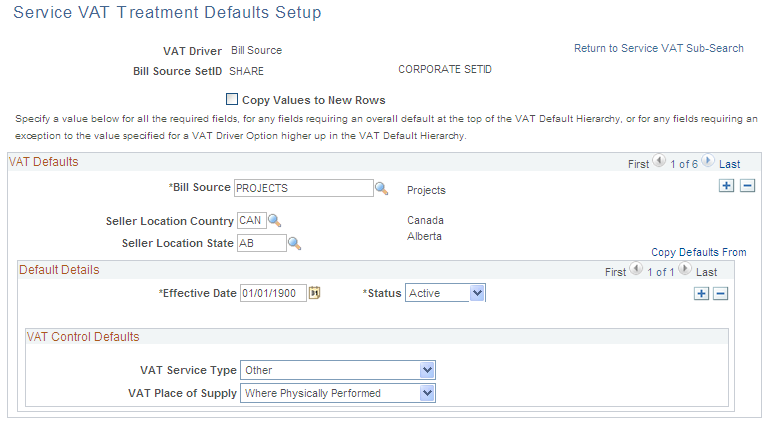
Use the Service VAT Treatment Defaults Setup page (VAT_DEFAULTS_DTL) to enter VAT default information for service VAT treatment.
Enter search criteria on the Service VAT Treatment Defaults Sub-Search page and click Search.
Image: Service VAT Treatment Defaults Setup page showing the Bill Source driver
This example illustrates the fields and controls on the Service VAT Treatment Defaults Setup page showing the Bill Source driver. You can find definitions for the fields and controls later on this page.
You can insert rows for any or all of the VAT driver keys as well as the supplier's location country or state. You can also delete any existing rows.
Copy Service VAT Treatment Defaults From Page
Use the Copy Service VAT Treatment Defaults From page (VAT_DFLT_SRCH_COPY) to copy data from an existing VAT default or service VAT treatment default setup to the current VAT driver and driver keys combination.
Click the Copy Defaults From link on the VAT Defaults Setup page.
Click the Copy Defaults From link on the Service VAT Treatment Defaults Setup page.
VAT Set Up Validation Report Page
Use the VAT Set Up Validation Report page (RUN_LC_VATCHK) to validate VAT default setup data and expose inconsistencies and missing default values.
Generate the VAT 3000 VAT Set Up Validation report to confirm that VAT defaults have been set up correctly and that defaults that are required at the highest levels in the hierarchy have been defined.
Applicable Transaction Entry VAT Page
Access the applicable transaction entry VAT page from the PeopleSoft application. The name of the page varies based on the application. The following example shows the Invoice Line VAT Information page accessed from a voucher line in PeopleSoft Payables.
Image: Invoice Line VAT Information page (1 of 2) accessed from the voucher line in PeopleSoft Payables
This example illustrates the fields and controls on the Invoice Line VAT Information page (1 of 2) accessed from the voucher line in PeopleSoft Payables. You can find definitions for the fields and controls later on this page.
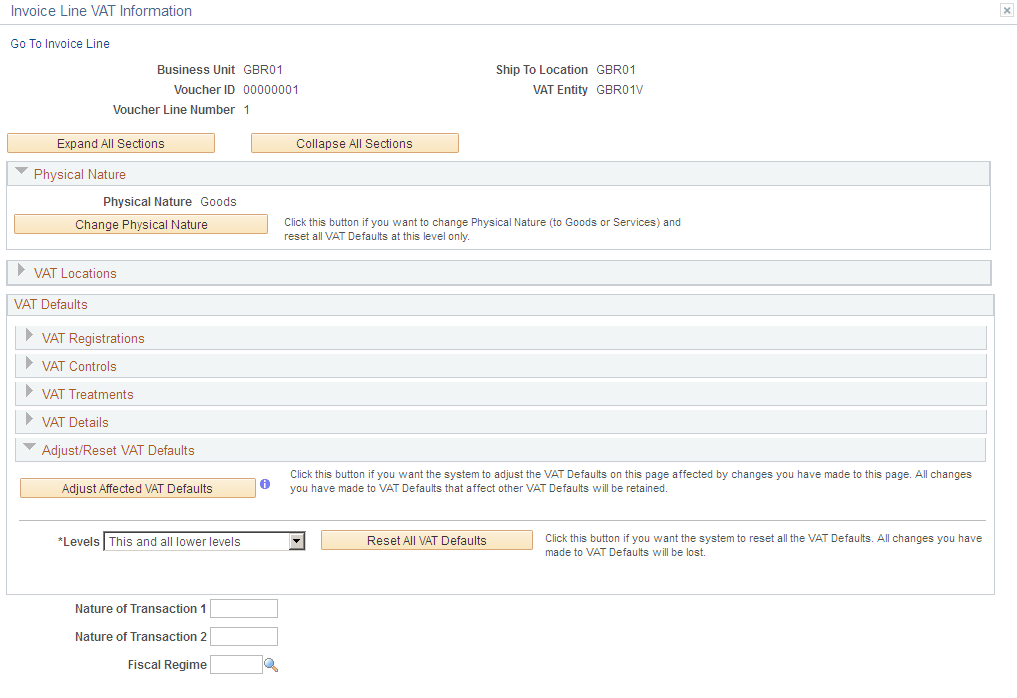
Image: Invoice Line VAT Information page (2 of 2) showing all the sections expanded
This example illustrates the fields and controls on the Invoice Line VAT Information page (2 of 2) showing all the sections expanded. You can find definitions for the fields and controls later on this page.
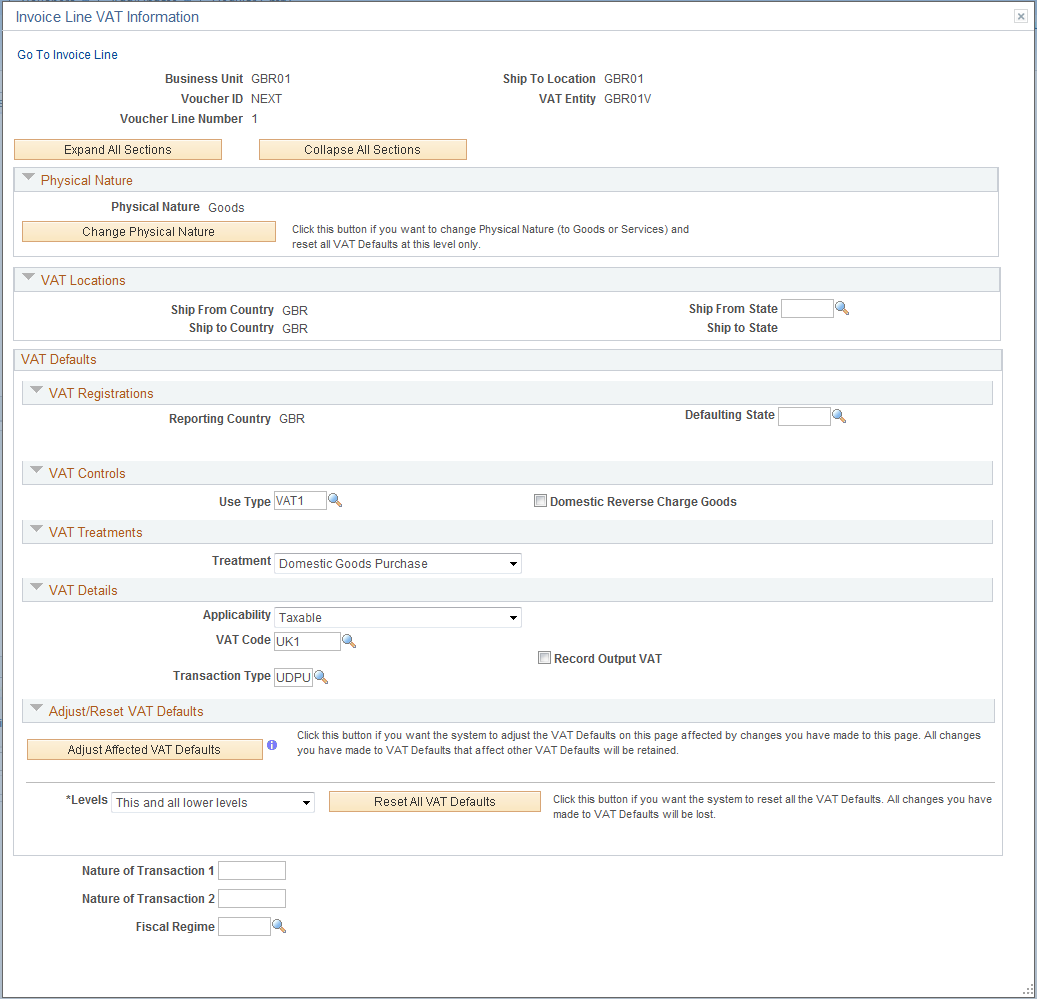
Selecting or deselecting the Reverse Charge Goods check box and then clicking the Adjust button adjusts the VAT Treatment, Record Output VAT, and other related defaults.
You can override default VAT settings on individual transactions from the applicable PeopleSoft application pages. For example, you can override VAT settings for a voucher line by accessing the Invoice Line VAT Information page from the Voucher component. While the fields that appear on this page may vary based on the application, the page acts in much the same way.
Note: The VAT defaults appear in descending order of effect. If you change any settings on this page, you should work from the top of the page to the bottom, clicking the Adjust Affected VAT Defaults button as appropriate.
| Expand All Sections |
Click to expand all the VAT default sections on the page. The sections are collapsed by default. |
| Collapse All Sections |
Click to collapse all the VAT default sections on the page. |
Adjust/Reset VAT Defaults
A section at the bottom of the page enables you to adjust the VAT defaults based on changes you make on this page or to reset all VAT defaults.
Physical Nature
VAT Locations
The VAT location fields are populated by the applications. Values in these fields are never affected by changes to any of the VAT default fields and are never updated when you click the Change Physical Nature, Adjust Affected VAT Defaults, or Reset All VAT Defaults button. The possible VAT locations are:
Bank Country
Buyer's Location Country
Buyer's Location State
Consumption Country
Consumption State
Location Country
Location State
Seller's Location Country
Seller's Location State
Service Performed Country
Service Performed State
Ship From Country
Ship From State
Ship To Country
Ship To State
Ship To VAT Rgstrn Country
VAT Registrations
The fields for VAT registration defaults include:
Reporting Country
Default State
Bank, Customer, or Supplier Registration Country
Bank, Customer, or Supplier Registration ID
Exception Type
Exception Certificate ID
Any changes that you make to these values with the exception of the exception type and exception certificate ID affect all VAT default settings if you click the Adjust Affected VAT Defaults button after making changes.
If you change the exception type, only the VAT transaction type and VAT code defaults are adjusted when you click the Adjust Affected VAT Defaults button.
VAT Controls
If you change the default setting in the Calc on Advance Payments field or the Domestic Reverse Charge Goods check box, and click the Adjust Affected VAT Defaults button, the system updates all VAT default settings.
Changes to any other VAT control fields do not affect other VAT defaults. Also, if you change any of the following fields and click the Adjust Affected VAT Defaults button, your changes will be lost if you have also changed fields that affect the VAT control fields:
Calculate at Gross or Net
Recalculate at Payment.
Calculation Type
Declaration Point
Declaration Date
Accounting Entry Type
Rounding Rule
Non-Recovery Charge
Use Type
Apportionment Control
Recovery Source
Rebate Source
Reclaim Percent
Include Freight
Include Miscellaneous
In Reporting Currency
No VAT Receipt
Prorate Non-Recoverable
Allocate Non-Recoverable
VAT Treatments
Examples
These examples illustrate the behavior of the VAT defaults:
Example 1
The user overrides the Calculate at Gross or Net field and clicks the Adjust Affected VAT Defaults button. The system does nothing, because Calculate at Gross or Net is a VAT control field that does not affect any other VAT defaults. The user then overrides the supplier registration country and clicks the Adjust Affected VAT Defaults button once more. This time the system adjusts all the VAT defaults except the change to the supplier registration country. This includes the Calculate at Gross or Net field, which the user must override again, if necessary.
Example 2
The user overrides the supplier registration country and clicks the Adjust Affected VAT Defaults button. The system adjusts all VAT defaults except the change to the supplier registration country and supplier registration ID. The user then overrides the place of supply settings and clicks the Adjust Affected VAT Defaults button once more. The system adjusts all VAT defaults except the service type, place of supply, supplier registration country, and supplier registration ID.