
Defining Agency Location Codes
To set up agency location codes (ALCs) and Government-wide Accounting and Reporting (GWA) options for reporting, use the Agency Location component (AGENCY_LOC_CD)
This section discusses how to:
Define agency location codes.
Define GWA reporting options.
Define IPAC fields.
Pages Used to Define Agency Location Codes
|
Page Name |
Definition Name |
Navigation |
Usage |
|---|---|---|---|
|
Agency Location Code |
AGENCY_LOC_CD |
Set Up Financials/Supply Chain, Common Definitions, Agency Location Codes, Agency Location, Agency Location Code |
Define agency location codes by set ID for federal payment schedules and reporting purposes and provide ALC name, location, address, and telephone information. |
|
GWA Reporting Options |
AGENCY_LOC_CD2 |
Set Up Financials/Supply Chain, Common Definitions, Agency Location Codes, Agency Location, Agency Location Code, GWA Reporting Options |
Assign a Business Activity and one or more effective dated Reporter Categories to an Agency Location Code. When an agency system is ready to pass the BETC code to the U.S. Treasury, the agency will select the appropriate Reporter Category so that the data can be reported as required. |
|
IPAC Fields |
ALC_IPAC_FLDS |
Set Up Financials/Supply Chain, Common Definitions, Agency Location Codes, Agency Location, Agency Location Code, IPAC Fields |
Define additional IPAC fields as required or optional. |
Understanding Agency Location Codes
The Agency Location Code (ALC) is an identifier that is used to define agencies by setID for federal payment schedules and reporting purposes.
PeopleSoft supports IPAC Payments (PeopleSoft Payables) and Collections (PeopleSoft Receivables) as well as IPAC adjustments and zero dollar transactions. The department of Treasury and the IPAC system utilize bulk file formats to send and receive IPAC transactions. These formats are flat files that contain the necessary information to accurately report and account for payments, collections, adjustments, and zero dollar (info only) IPAC transaction types.
See Processing Inbound IPAC Transactions
See Processing Outbound IPAC Transactions
See (USF) Submitting Transactions Between Agencies Using the IPAC System
For General Ledger, by using the ALC field on the Journal Header page, agencies can record cash transactions by journal entry directly to the general ledger. The journal header ALC field can be used by the system to select cash entries that were entered directly to the general ledger for reporting purposes. Journal entries made directly to the general ledger are usually made for the recording of undeposited cash, or collections.
Undeposited collections are amounts received by an agency that have yet to be deposited with the U.S. Treasury. Some agencies receive small amounts of money that they deposit once a week. Agencies book these amounts to an undeposited collections account until they are officially deposited with the U.S. Treasury.
Common Terms Used for U.S. Government Agency Reporting
These terms are commonly used when referring to U. S. Government Reporting for Agencies
|
Term |
Description |
|---|---|
|
CGAC (Common Government-wide Accounting Classification Structure) |
The CGAC is the U. S. government structure that establishes a standard method for classifying the financial effects of government business activities. |
|
FSIO (Financial Systems Integration Office) |
The FSIO is a U.S. government office that establishes requirements for federal government business systems processing. |
|
TAS (Treasury Account Symbol) |
Federal agencies are required to use Treasury Account Symbols (TAS) when reporting cash transactions to the U. S. government. They must also use valid combinations of TAS and Business Event Type Codes (BETC) that the Department of Treasury publishes when entering and reporting IPAC Transactions. See Defining Component TAS and BETC Elements in Compliance with Federal Reporting Requirements |
|
BETC (Business Event Type Code) |
This code identifies the business event type of a transaction for U. S. government reporting. |
|
IPAC Payment |
Originates from PeopleSoft Payable and provides the IPAC system with payment-specific information using bulk file formats. |
|
IPAC Collection |
Originates from PeopleSoft Receivables and provides the IPAC system with collection-specific information via bulk file formats. |
Agency Location Code Page
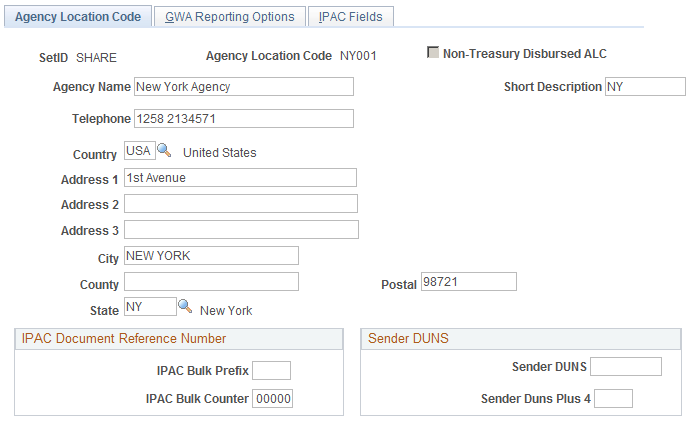
Use the Agency Location Code page (AGENCY_LOC_CD ) to define agency location codes by set ID for federal payment schedules and reporting purposes and provides for ALC name, location, address, and telephone information.
Image: Agency Location Code page
This example illustrates the fields and controls on the Agency Location Code page. You can find definitions for the fields and controls later on this page.
IPAC Document Reference Number
IPAC (Intra-governmental Payment and Collection system) is designed to transfer funds between government agencies and provide the capability to include descriptive information related to each transaction. This descriptive information assists with monthly reconciliation.
See Processing Outbound IPAC Transactions.
See(USF) Submitting Transactions Between Agencies Using the IPAC System .
Sender DUNS
| Sender DUNS and Sender DUNS Plus 4 |
Enter a Sender DUNS or Sender DUNS Plus 4 value for the Sender Agency Location Code (ALC). These fields may be required as defined on the IPAC Fields page. (The Receiver DUNS and DUNS Plus 4 values are stored on the Customers - Additional General Information page). If the Sender DUNS and Sender DUNS Plus 4 are defined as required on the IPAC Fields page, the system uses these values as the Sender information defaults on the Receivable IPAC Transactions page. Note: The Sender and Receiver DUNS and DUNS Plus 4 fields will only appear as defaults on the IPAC transactions if they are marked as required on the IPAC Fields page. This applies to items created online and from an external interface (therefore derived from the AR Posting program). |
Agency Location Code - GWA Reporting Options Page
Use the GWA Reporting Options page (AGENCY_LOC_CD2) to assign a Business Activity and one or more effective dated Reporter Categories to an Agency Location Code.
When an agency system is ready to pass the BETC code to the U.S. Treasury, the agency will select the appropriate Reporter Categoryt.
Image: http://adc6170080:8096/ImageLib/img/help-PB/fscm/fglr/i2a517932n-7ea1.png
This example illustrates the fields and controls on the http://adc6170080:8096/ImageLib/img/help-PB/fscm/fglr/i2a517932n-7ea1.png. You can find definitions for the fields and controls later on this page.

Image: GWA Reporting Options Page
This example illustrates the fields and controls on the GWA Reporting Options Page. You can find definitions for the fields and controls later on this page.
Business Activity and Reporter Category Combinations
The system requires that the business activity type and reporter category codes are a valid combination. The system displays a warning message if the combination is invalid.
This table shows valid and invalid combinations:
|
Business Activity Type |
Valid Reporter Category Code |
Invalid Reporter Category Code |
|---|---|---|
|
CashLink Only |
|
|
|
IPAC Only |
|
|
|
IPAC and CashLink |
|
|
|
IPAC and TDO Payments |
|
|
|
IPAC, CashLink and TDO Payments |
|
No reporter category codes are invalid with this business activity. |
|
TDO Payments Only |
|
|
|
TDO Payments and CashLink |
|
|
|
No Business Activity Type |
Non Reporter |
|
IPAC Fields Page
Use the IPAC Fields page (ALC_IPAC_FLDS) to assign a Business Activity and one or more effective dated Reporter Categories to an Agency Location Code.
When an agency system is ready to pass the BETC code to the U.S. Treasury, the agency will select the appropriate Reporter Category so that the data can be excluded from the SF224 report.
Image: IPAC Fields page
This example illustrates the fields and controls on the IPAC Fields page. You can find definitions for the fields and controls later on this page.
