
Running the Centralized Interunit and Intraunit Processor
This section provides an overview discusses how to:
View delivered system transactions.
Access the system transaction page 1.
Access the system transaction page 2.
Review sample parameters provided at run time.
Pages Used to Process a Centralized Interunit and Intraunit Interface
|
Page Name |
Definition Name |
Navigation |
Usage |
|---|---|---|---|
|
System Transaction Page 1 |
IU_SYS_TRAN |
Set Up Financials/Supply Chain, Common Definitions, Inter/Intra Unit, System Transaction Definition, System Transaction Page 1 |
Do not make changes to this page. Any change you make to this page is a customization of the system. Access to this page is for information only or in the rare event that you intend to implement a customization to your system. System Transactions are predefined and delivered with the system for transactions that can generate inter and intraunit entries |
|
System Transaction Page 2 |
IU_SYS_TRAN2 |
Set Up Financials/Supply Chain, Common Definitions, Inter/Intra Unit, System Transaction Definition, System Transaction Page 2 |
Do not make changes to this page. Any change you make to this page is a customization of the system. Access to this page is for information only or in the rare event that you intend to implement a customization to your system. |
Understanding the Running of the Centralized Processor
In conjunction with centralized setup, PeopleSoft also provides centralized processing for inter and intraunit transactions. The centralized processor's primary function is the creation of due to and due from balancing entries for transactions that are not yet balanced from either or both an interunit and intraunit perspective.
Typically, a process in an individual PeopleSoft product generates an initial set of accounting entries that are functionally complete, but not yet balanced by business unit or any other balancing ChartField, (this includes all system-generated entries as well as those created by the ChartField Offset Inheritance process). You can also create cross entity online journal entries directly in General ledger.
Running of the Centralized Inter/IntraUnit Process (IU_PROCESSOR) varies from product to product. For example, in General Ledger the inter and intraunit processor is called as a part of the Journal Edit (GL_ JEDIT) process, but in Payables, voucher post (AP_PSTVCHR) and payment post (AP_PSTPYMENT) call the central processor to create inter and intraunit balancing accounting entries.
The central processor evaluates the entries by reading directly from product— specific tables defined by the System Transaction and its interface definition. Additional information, such as the Transaction Code and Anchor ChartField values, are passed to the central processor by these product specific tables.
The central processor determines which ChartFields are to be balanced, whether the transaction is in balance, and if it is not balanced, generates any necessary due to and due from balancing lines. The processor writes balancing lines directly to the accounting entry table for the product or to an interface table as specified by the product interface definition. For feeder applications, the balanced accounting lines are passed back to the application for later journal generation and edit before finally being posted to the General Ledger.
Refer to the documentation on individual products for application specific information about running the centralized inter and intraunit processor.
Viewing Delivered System Transactions
Use the System Transaction component (IU_SYS_TRAN), System Transaction Map component (IU_TRAN_MAP), and Transaction Code component (IU_TRAN_CD) to view pages.
Each PeopleSoft application delivers System Transactions for major types of activities that can be expected to generate inter and intraunit entries. The variety of System Transactions that are provided enables you to segregate your inter and intraunit payable and receivable accounts by type of transaction, for example AP (accounts payable) Voucher, AP (accounts payable) Payment, GL (general ledger) Journal and Expense Sheet.
System Transactions provide information to your system that is necessary to support the interface between various application processes and the common PeopleSoft Centralized Inter/Intra Unit Processor.
Note: System Transactions are delivered and are not to be changed. Any changes to the delivered System Transactions are customizations. You need not access or make changes to the System Transaction pages. They are to be used as delivered. The following is provided for information only or for the use of your MIS personnel or consultants in the event that you intend to implement a customization.
System Transaction Page 1 Page
Use the System Transaction Page 1 page (IU_SYS_TRAN) for customizing interunit and intraunit transactions. Do not make changes to this page unless you are customizing this process.
Any change you make to this page is a customization of the system.Access to this page is for information only or in the rare event that you intend to implement a customization to your system.System Transactions are predefined and delivered with the system for transactions that can generate inter and intraunit entries
Set Up Financials/Supply Chain, Common Definitions, Inter/Intra Unit, System Transaction Definition, System Transaction Page 1
Image: System Transaction Page 1
This example illustrates the fields and controls on the System Transaction Page 1. You can find definitions for the fields and controls later on this page.

Note: Do not make changes to any of the system transactions pages unless you intend to implement a customization.
System Transaction Page 2 Page
Image: System Transaction Page 2 (1 of 4)
This example illustrates the fields and controls on the System Transaction Page 2 (1 of 4). You can find definitions for the fields and controls later on this page.
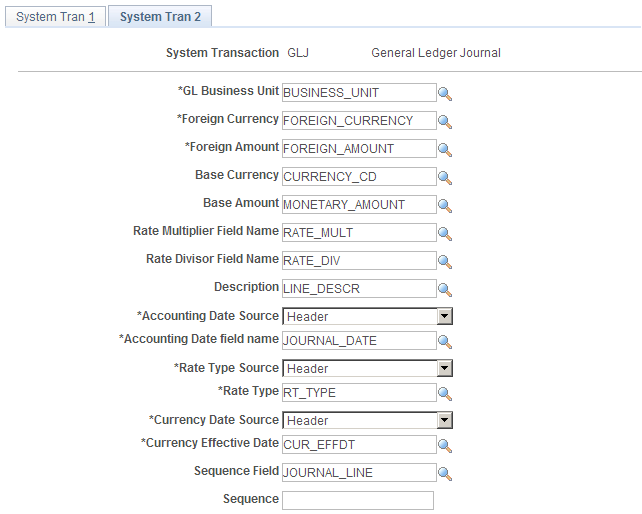
Image: System Transaction Page 2 (2 of 4)
This example illustrates the fields and controls on the System Transaction Page 2 (2 of 4). You can find definitions for the fields and controls later on this page.
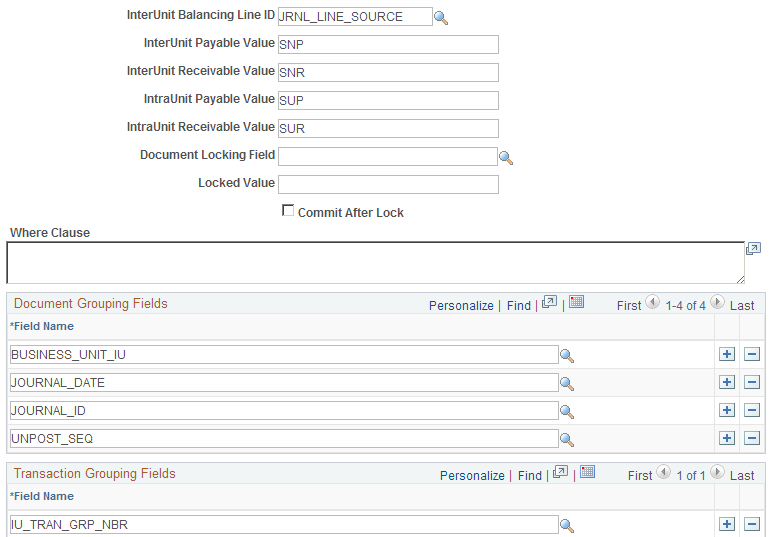
Image: System Transaction Page 2 (3 of 4)
This example illustrates the fields and controls on the System Transaction Page 2 (3 of 4). You can find definitions for the fields and controls later on this page.

Image: System Transaction Page 2 (4 of 4)
This example illustrates the fields and controls on the System Transaction Page 2 (4 of 4). You can find definitions for the fields and controls later on this page.
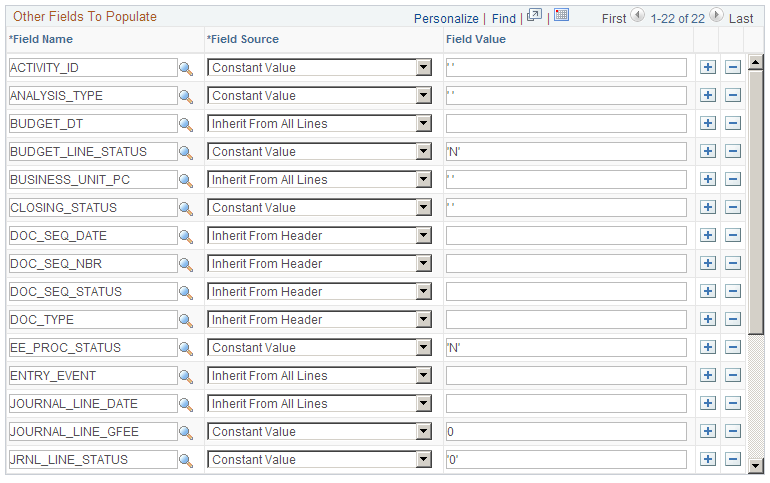
Note: Currency Effective Date can be specified in the Other Fields to Populate definition as long as it is not the same field as the Accounting Date.
Reviewing Sample Parameters Provided at Run Time
The following section describes the sample parameters that you may select before running the process.
Technical Requirements for calling the Centralized Inter and Intra Unit processor
If you are implementing a customization in which you want to utilize the Centralized Inter/IntraUnit Processor, consider the following requirements.
Calling the Centralized Interunit Processor
The Centralized Inter/IntraUnit processor (IU_PROCESSOR) is an application engine program. In most cases it is called from within another application engine program, such as AP Voucher Post or GL Journal Edit. In some cases it is called directly from PeopleCode using the CallAppEngine built-in function.
When calling the processor, you must first populate the fields on the state record (IU_PROCESS_AET), as described in the following section. If you are calling the processor from another application engine program you must specify the Inter/IntraUnit Processor State Record in the list of state records for your program.
The inter and intraunit processor uses a temporary table (IU_TRAN_TAO) for some of its internal processing. If you call the processor from another application engine program you specify this record in the list of temporary tables for the calling application engine program. In this way, the dedicated instance is allocated at the beginning of the process. Please refer to the PeopleTools Application Engine documentation for additional information about allocating temporary tables.
When control is passed back to your application from the processor, check the value in the processor status field (IU_STATUS) on the state record to determine if the processor encountered any errors during processing.
The InterUnit Processor State Record (IU_PROCESS_AET)
The Inter/IntraUnit Processor State record is used to pass parameters between the calling program and the inter and intraunit processor. In Contains the Following Fields, list in the order that they appear on the record.
Process Instance (PROCESS_INSTANCE)
Process Instance is required on every application engine state record. This field is populated automatically by PeopleSoft tools.
Business Unit (BUSINESS_UNIT)
Insert a general ledger business unit value in this field if you want the inter and intraunit processor to generate balancing entries for just one business unit.
Header (Input) Record (HEADER_RECORD)
The Header Record is used to send related data for unprocessed accounting entries to the inter and intraunit processor for balancing. It may be a SQL Table, SQL View, or a Temporary Table.
Header Update Record (UPDATE_HEADER_REC)
The Header Update Record is used to update the Header Status fields. It may be a SQL Table or a Temporary Table, and in most cases is the same as the Header (Input) Record, unless the Header (Input) Record is a SQL View.
Line (Input) Record (LINE_RECORD)
The Line Record is used to send unprocessed accounting entries to the inter and intraunit processor for balancing. It may be a SQL Table, SQL View, or Temporary Table. It must contain the following fields:
GL (general ledger) Business Unit.
Foreign Currency.
Foreign Amount.
Accounting Date (may be on line or optional header).
Rate Type (may be on line or optional header).
Currency Effective Date (may be on line or optional header; may be the same as the accounting date).
ChartFields (those on standard subrecord, plus DeptID and Project ID).
Ledger Group (LEDGER_GROUP).
Ledger (LEDGER).
IU Anchor Flag (IU_ANCHOR_FLG).
IU System Transaction (IU_SYS_TRAN_CD).
IU Transaction Code (IU_TRAN_CD).
Note: Where a field name is not specified, any field name may be used because it is defined on the system transaction definition.
Line Update Record (UPDATE_LINE_REC)
The Line Update Record is used to update the Document and Transaction Status fields on the original accounting entries. It may be a SQL Table or a Temporary Table, and in most cases is the same as the Line (Input) Record, unless the Line (Input) Record is a SQL View.
Line Insert Record (INSERT_LINE_REC)
The Line Insert Record is the record to which the processor inserts the inter and intraunit balancing entries that it creates. It may be a SQL Table or a Temporary Table, and in most cases is the same as either the Line (Input) Record or the Line Update Record.
You may wish to use a different Line Insert Record if it is necessary for the calling application to perform additional manipulation of the inter and intraunit balancing entries prior to inserting them in the accounting entry table. For example, if the calling application has non-standard rules regarding sequence numbering, it might be better to perform this function after the processor creates the balancing entries, rather than having the processor assign sequence number.
Line Work Record (LINE_WRK_REC)
The Line Work Record is used internally within the Inter/IntraUnit Processor. It may be a SQL Table or a Temporary Table. It should contain all of the same fields as the Line Record, plus the following additional fields (if they are not already on the Line Record):
Process Instance (PROCESS_INSTANCE).
InterUnit Line Type (IU_LINE_TYPE).
If the Account Balance Group option on the System Transaction is selected, then the work record must also contain the Account Balance Group (ACT_BAL_GRP) field.
Note: If there are fields on the Line Insert Record that should always be populated with the PeopleTools default value (the default specified on the record definition, or blank for character fields and zero for numeric fields), then these fields do not have to be included on the Line Work Record. If you do choose to leave the fields off the Line Work Record, then you should not specify them in the Other Fields to Populate section of the System Transaction definition.
Line Work Record #2 (LINE_WRK2_REC)
The Line Work Record #2 is used internally within the Inte/IntraUnit Processor. It may be a SQL Table or a Temporary Table. It should contain all of the same fields as the Line Work Record, plus the following additional fields (if they are not already on the Line Record):
Maximum Sequence Number (MAX_SEQ_NBR)
Error Message Set and Number (MESSAGE_SET_NBR and MESSAGE_NBR)
If the Status returned by the processor is Complete with Errors (IU_STATUS = 1), these fields contain the message set and message number for the appropriate error message.
Inter/IntraUnit Processor Status (IU_STATUS)
The IU Processor Status has the following valid values:
0 - Complete without errors.
1 - Complete with errors.
2 - Incomplete.
We recommend that you set the Status equal to 2 - Incomplete when you populate the state record prior to calling the Inter/IntraUnit Processor. When the processor returns control to the calling program, the status is set to either 0 - Complete without Errors or 1 - Complete with Errors.
Dynamic Where Clause, part 1 (SQL_STMT_254)
The Dynamic Where Clause is used to specify selection criteria that changes each time the processor is called. Selection criteria that is constant or static is typically defined on the System Transaction definition, but can also be included here if desired.
The where clause can refer to fields on both the line record and the optional header record. All references to fields from the line record use the record alias LN_A and all fields from the header record use the record alias HDR.
If the where clause exceeds 254 characters, you can use the field IU_WHERE_SQL below instead of or in addition to this field.
System Transaction Code (IU_SYS_TRAN_CD)
If all of the transactions on your Line (Input) Record are for the same InterUnit System Transaction Code, or if you want to process entries for a System Transaction only, then you specify the System Transaction Code in this field in the state record. This makes the processor run more efficiently.
If your Line (Input) Record contains transactions for more than one System Transaction and you want to process them with one call to the processor, you can leave this field blank.
Dynamic Where Clause, part 2 (IU_WHERE_SQL)
Continuation of the Dynamic Where Clause, as described above. If your where clause exceeds 254 characters, you can use this long character field instead of or in addition to the SQL_STMT_254 field described above.
Specifying Anchor Values for the Inter/IntraUnit Processor
The Inter/IntraUnit Processor looks for the accounting entry line whose InterUnit Anchor (IU_ANCHOR_FLG) is set equal to Y to determine the anchor business unit and anchor values for other balancing ChartFields for each transaction group (or document group if transaction group by fields are not used).
It is important that each transaction group (or document group if transaction group-by fields are not used) has one and only one accounting entry identified as the anchor entry per ledger.
The line marked as the anchor line (IU_ANCHOR_FLG = Y) affects how the due to and due from lines are formatted. For example, assume that you call the interunit and intraunit processor to process the following lines:
|
BUSINESS_UNIT |
AMOUNT |
IU_ANCHOR_FLG |
AFFILIATE |
|---|---|---|---|
|
US001 |
−100 |
Y |
|
|
US002 |
60 |
N |
|
|
US003 |
40 |
N |
|
Based on the processing of the preceding information, the processor creates the following lines:
|
BUSINESS_UNIT |
AMOUNT |
IU_ANCHOR_FLG |
AFFILIATE |
|---|---|---|---|
|
US002 |
−60 |
N |
US001 |
|
US001 |
60 |
N |
US002 |
|
US003 |
−40 |
N |
US001 |
|
US001 |
40 |
N |
US003 |
However, if you change the original assumption so that the second line and not the first line has the value Y and is the anchor, the due to and from lines created by the processor then appear as follows:
|
BUSINESS_UNIT |
AMOUNT |
IU_ANCHOR_FLG |
AFFILIATE |
|---|---|---|---|
|
US001 |
100 |
N |
US002 |
|
US002 |
−100 |
N |
US001 |
|
US003 |
−40 |
N |
US002 |
|
US002 |
40 |
N |
US003 |
The following example illustrates how the IU_ANCHOR_FLG determines the transaction (foreign) currency and amount of the due to and from lines for a cross currency transaction. The processor rule is that the due to and from lines have the transaction currency and amount of the non-anchor line. For example, assume the processor is run for the following transaction lines:
|
BUSINESS_UNIT |
FOREIGN_AMOUNT |
BASE_AMOUNT |
IU_ANCHOR_FLG |
AFFILIATE |
|---|---|---|---|---|
|
US001 |
−100 USD |
−100 USD |
Y |
|
|
US002 |
150 CAD |
100 USD |
N |
|
The following lines are generated by the processor given the previous assumptions:
|
BUSINESS_UNIT |
FOREIGN_AMOUNT |
BASE_AMOUNT |
IU_ANCHOR_FLG |
AFFILIATE |
|---|---|---|---|---|
|
US002 |
−150 CAD |
−100 |
N |
US001 |
|
US001 |
150 CAD |
100 USD |
N |
US002 |
MultiBook entries and the Inter/IntraUnit Processor
If the calling application supports PeopleSoft MultiBook processing, then the application typically generate accounting entries for both the primary and secondary ledgers prior to calling the processor. In this case, one entry for the primary ledger and all of its corresponding secondary ledger entries are all flagged as anchor entries for each transaction group (or document group if transaction group-by fields are not used).
The following is an example from General Ledger of the type of parameters provided at run-time when calling the Central Inter/IntraUnit Processor:
The JRNL_IU_ANCHOR table with the following fields maintains inter and intraunit anchor values:
The table is also used to identify inter and intraunit journals because non-interunit journals have no entries in this table.
The following fields in the JRNL_HEADER table support calling of the interunit processor:
| IU_SYS_TRAN_CD |
InterUnit System Transaction Code, for example GLJ. |
| IU_TRAN_CD |
InterUnit Transaction Code, for example JOURNAL and EXPALLOC. |
The following fields on the JRNL_LN table must be populated properly before calling the Iinter and intraunit processor:
| IU_ANCHOR_FLG |
Indicates which journal line contains the Anchor Business Unit value or anchor ChartField value. |
| IU_TRAN_GRP_NBR |
Groups a set of journal lines as a set of intraunit transactions. |