
Setting Up Locations
Use the following components to set up locations:
Country (COUNTRY_TABLE)
State (STATE_DEFN)
Location (LOCATION_TBL)
Country Statistics (COUNTRY_STAT)
Use the LOCATION_TBL_CI component interface to load data into the tables for these components.
This topic discusses how to:
Review country descriptions.
Select address formats by country.
Review state and province descriptions.
Define locations.
Add location details.
Define countries for reporting.
Pages Used to Set Up Locations
|
Page Name |
Definition Name |
Navigation |
Usage |
|---|---|---|---|
|
Country Description |
COUNTRY_DEFN |
|
Add or review country descriptions. |
|
Address Format |
ADDR_FORMAT_TABLE |
|
Select address fields for a country so that the system displays addresses in the appropriate format. |
|
State |
STATE_DEFN |
|
Add or review a state or province code. |
|
Location Definition |
LOCATION_TBL |
|
Define a location code, such as a branch office or shipping office. |
|
Location Detail |
LOCATION_TBL2 |
|
Add details to a location definition. |
|
Country Stat Rpt Codes |
COUNTRY_STAT_PNL |
|
Enter country codes requiring reporting as well as reporting options for each country code that you specify. |
Country Description Page
Use the Country Description page (COUNTRY_DEFN) to add or review country descriptions.
Address Format Page
Use the Address Format page (ADDR_FORMAT_TABLE) to select address fields for a country so that the system displays addresses in the appropriate format.
Location - State Page
Location - Definition Page
Use the Location Definition page (LOCATION_TBL) to define a location code, such as a branch office or shipping office.
Image: Location Definition page
This example illustrates the fields and controls on the Location Definition page. You can find definitions for the fields and controls later on this page.
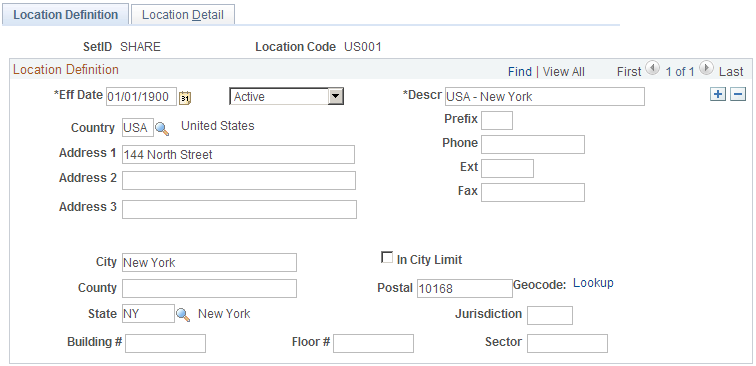
Enter a description and populate the fields for the telephone and address information.
The address fields that appear are defined on the Address Format page.
Location - Detail Page
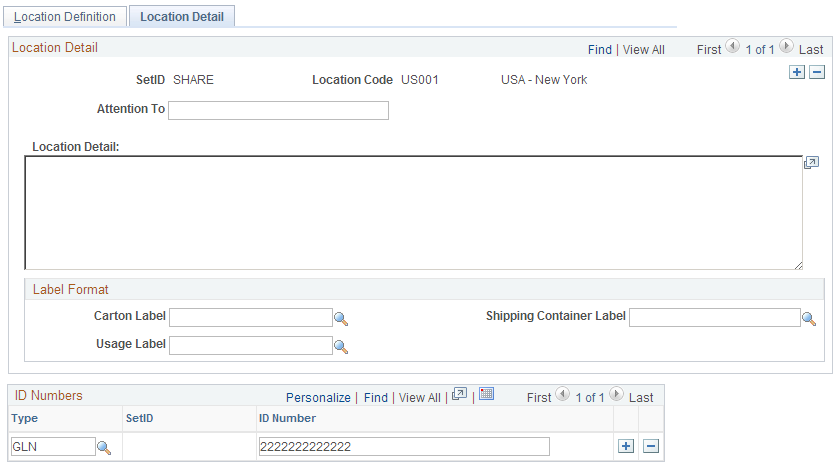
Use the Location Detail page (LOCATION_TBL2) to add details to a location definition.
Image: Location Detail page
This example illustrates the fields and controls on the Location Detail page. You can find definitions for the fields and controls later on this page.
Country Stat Rpt Codes Page
Use the Country Stat Rpt Codes (country statistics report codes) page (COUNTRY_STAT_PNL) to enter country codes requiring reporting as well as reporting options for each country code that you specify.
Image: Country Stat Rpt Codes
This example illustrates the fields and controls on the Country Stat Rpt Codes. You can find definitions for the fields and controls later on this page.
