
Using Advanced ChartField Configuration
The following configuration actions can be performed using Advanced Configuration:
Add new ChartFields.
Delete ChartFields.
Resize ChartFields.
Rename ChartFields.
Use advanced configuration when the standard configuration and delivered ChartFields do not meet your requirements. Note that these configuration actions must be applied to new objects containing ChartFields received using an upgrade or by applying application fixes. Therefore, Oracle recommends that the standard configuration be used exclusively, if possible, to meet your ChartField requirements.
This list suggests ways to use the Standard Configuration in place of the Advanced Configuration:
Activate an inactive ChartField instead of adding a new ChartField.
Inactivate a ChartField instead of deleting it.
Change the display length rather than the field length when reducing the size of a ChartField.
Relabel a ChartField instead of renaming it.
PeopleSoft software enables you to have an unlimited number of ChartFields, each of which may be up to 30 characters in length. Due to platform-specific index length limitations, however, the combined field length of your ChartFields might cause this limit to be exceeded on a given table, although this is highly unlikely. These index limits are shown below and represent the total length of all key fields on a table excluding inactive ChartFields because inactive fields are not included in the index:
|
RDBMS Platform |
Max Index Length ANSI |
Max Index Length Unicode |
Max # of Columns in an Index |
Max # of Columns in a Table |
|---|---|---|---|---|
|
MSSQLServerVersion 2000 |
900 |
450 |
16 |
1024 |
|
DB2/Unix Versions 7.0, 8.0 |
1024 * |
1024 ** |
16 |
500 with 4K page. 1012 with 8, 16, 32K page. |
|
DB2/OS390 Versions 6.1, 7.1 |
255 * |
Unicode is not supported. |
64 |
750 |
|
Oracle Versions 8i, 9i |
40% of the database block size minus some overhead. Block size can be 4K or 8K. |
40% of the database block size minus some overhead. Block size 8K is recommended. |
32 |
1000 |
|
Sybase ASEVersion 12.5.03 ESD#4 for Unicode |
600 for Page size 2K. 1250 for Page size 4K. 2600 for Page size 8K. |
2600 for Page size 8K |
31 |
1024 for DOL (Row level lock) |
|
Informix Versions 9.2, 9.3 |
390 |
Unicode is not supported. |
16 |
32K |
* Subtract one byte for each key field defined as a Date, Time, Datetime, or Long Character field (key columns that allow NULL).
** Subtract one byte for each key field defined as Date, Time, Datetime or Long Character. Subtract four bytes for each key field defined as Character. When summing the field lengths of the key fields, double the field length of each key field defined as Character.
For example, if FLD1 is a character key field with length 3, during the index size calculation the length is doubled to 6. You must also add four bytes so that the final length is ten bytes for the index size calculation.
Pages Used for Advanced ChartField Configuration
|
Page Name |
Definition Name |
Navigation |
Usage |
|---|---|---|---|
|
Advanced Configuration |
FS_CF_TEMPLATE |
You can also access the Standard Configuration page from this page by selecting the Standard Configuration tab. |
Perform advanced ChartField configuration such as adding, deleting, renaming and resizing of ChartFields. |
|
Change ChartField Name |
FS_CF_TMPLT_CONFIG |
Click the Change Name link. |
Change a ChartField name. Also use to change the description, short name and names of associated prompt tables. |
|
Add New ChartField |
FS_CF_ADD_MODEL |
Click the Add New ChartField button. |
Add an IntraUnit Affiliate ChartField or Standard ChartFields. |
|
Add New ChartField |
FS_CF_TMPLT_CONFIG |
Click the Add New ChartField button. |
Add a new ChartField. |
|
Preview Configuration |
FS_CF_PAGE_DEMO |
Click the Preview button on the Advanced Configuration page. |
Preview before completing configuration. |
Advanced Configuration Page
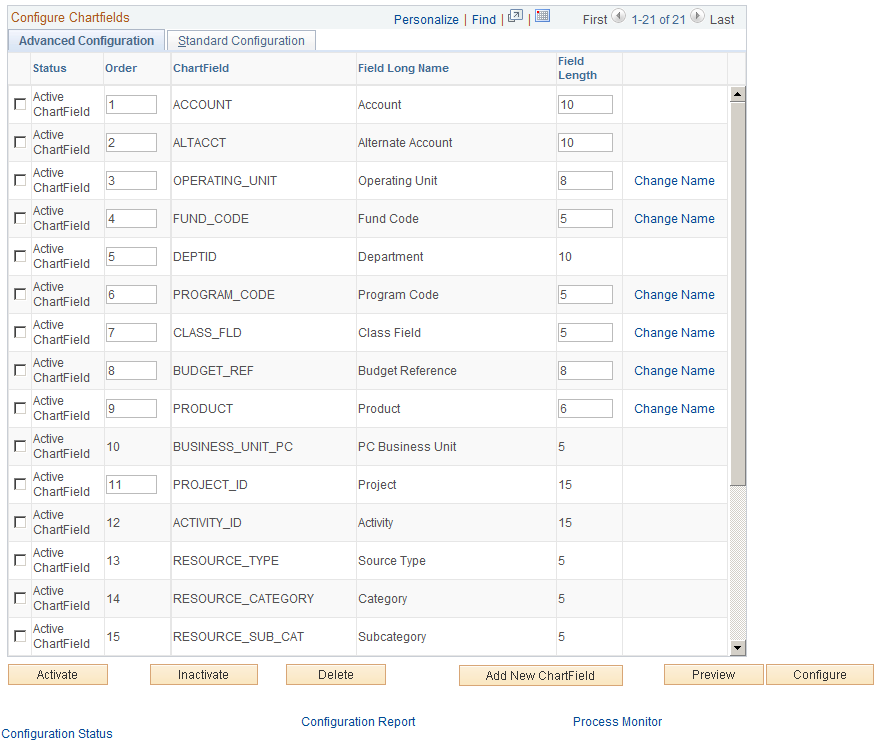
Use the Advanced Configuration page (FS_CF_TEMPLATE) to perform advanced ChartField configuration such as adding, deleting, renaming and resizing of ChartFields.
You can also access the Standard Configuration page from this page by selecting the Standard Configuration tab.
Image: Advanced Configuration page
This example illustrates the fields and controls on the Advanced Configuration page. You can find definitions for the fields and controls later on this page.
Select one or more advanced actions.
See Running and Verifying the ChartField Configuration Program.