
Using Standard ChartField Configuration
This topic discusses how to complete the Standard ChartField Configuration page.
To configure your ChartFields, use the Standard Configuration component (STANDARD_CF_TMPLT).
The following configuration actions can be performed using the standard configuration:
Change the display order of ChartFields on pages and reports.
Relabel long and short names (descriptions) of ChartFields.
Inactivate or activate ChartFields.
Change the display length of ChartFields on pages and reports.
Change Related ChartFields for IntraUnit Affiliate ChartFields.
Inactivated ChartFields are not displayed on pages, reports, or prompt lists and are not included in indexes. While not displayed, they are not removed form records or pages. This significantly reduces configuration time and effort.
After a standard configuration, no additional manual database changes are required other than rebuilding indexes, recreating views, and updating nVIsion reports..
Note: Oracle recommends that, if possible, the standard configuration be used exclusively, because it minimizes the need to reapply ChartField configuration actions when you subsequently upgrade or apply application fixes.
Pages Used for Standard ChartField Configuration
|
Page Name |
Definition Name |
Navigation |
Usage |
|---|---|---|---|
|
Standard ChartField Configuration |
STANDARD_CF_TMPLT |
Alternatively, you can select the Standard Configuration tab on the Advanced Configuration page. |
Perform Standard ChartField Configuration such as changing display order, changing display length, relabeling, and activating or inactivating a ChartField. |
|
Change ChartField Labels |
FS_CF_TMPLT_CONFIG |
Click the Relabel link for a ChartField on the Standard ChartField Configuration page. |
Add or modify long and short names for the ChartFields. |
|
Preview Configuration |
FS_CF_PAGE_DEMO |
Click the Preview button on the Standard ChartField Configuration page. |
Preview the results before completing configuration. |
Standard ChartField Configuration Page
Use the Standard ChartField Configuration page (STANDARD_CF_TMPLT) to perform Standard ChartField Configuration such as changing display order, changing display length, relabeling, and activating or inactivating a ChartField.
Alternatively, you can select the Standard Configuration tab on the Advanced Configuration page.
Image: Standard ChartField Configuration page
This example illustrates the fields and controls on the Standard ChartField Configuration page. You can find definitions for the fields and controls later on this page.
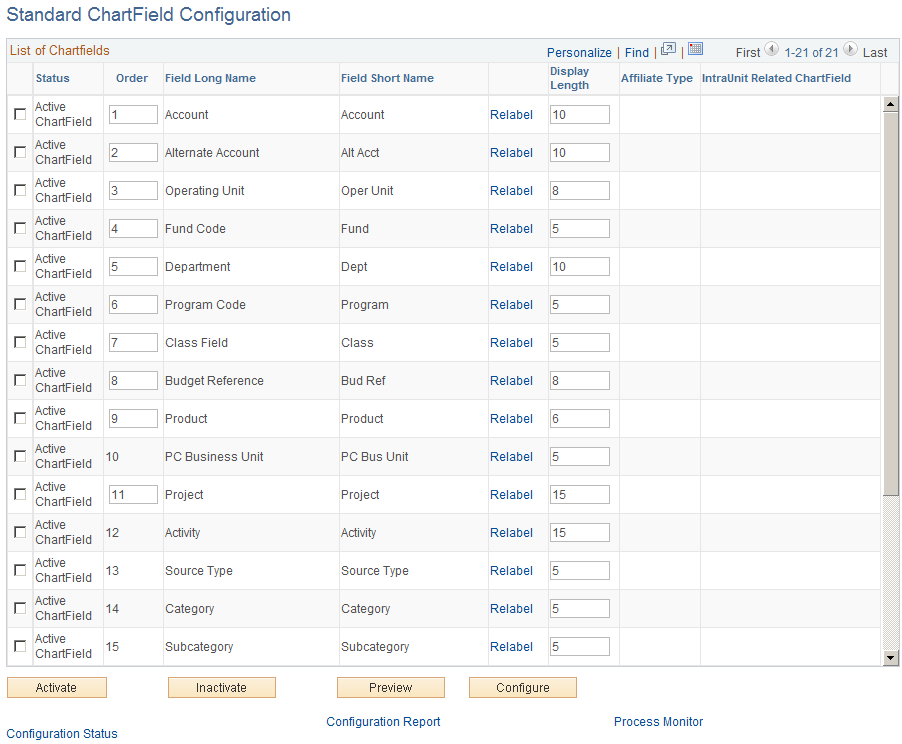
This page initially displays the ChartFields as delivered.
Warning! Do not change the status of a ChartField after you have run the full configuration and are using the system in production. Status determines whether ChartFields are displayed on pages, reports, and prompt lists throughout the system.
| Order |
You change the order of display by directly changing the sequence of order numbers in this field. Inactive ChartFields are given the order value of 99. An order number is required when a ChartField is Active. When you activate an inactive ChartField, the system assigns it the next available number, which you can change to place the newly activated ChartField in any desired sequence. Final reordering is done when you save the page or press the Configure button to remove gaps or duplicates in the numbering sequence as well as when you reposition the project ChartFields as a group. |
| Field Long Name and Field Short Name |
Displays the current long name and short name for the ChartField. These labels, rather than the database field name of the ChartField, appear on pages, reports, and prompt lists. To relabel the description of a ChartField, click the Relabel link and supply a new long name and short name for both base language and foreign language, if applicable. |
| Relabel |
Click this link to access the Change ChartField Labels page where you can supply a new ChartField long name and short name to be used as labels in the base language. If multiple base language labels exist or foreign language translations exist for the labels of a ChartField, this link becomes available to allow editing of these labels. |
| Display Length |
Enter a new value to change display length on pages. The display length cannot be greater than the actual field length of the ChartField. For added ChartFields, this value becomes the ChartField length by default. You can later change the value. |
| Affiliate Type |
Standard ChartFields have no affiliate type. An Affiliate ChartField is either an interunit or intraunit affiliate. |
| IntraUnit Related ChartField |
A unique IntraUnit Related ChartField of the same or smaller ChartField length must be specified for each IntraUnit Affiliate ChartField that is Active. If this represents a new ChartField that is being added in the same configuration process run, you must wait to specify it as an IntraUnit Related ChartField until you have completed all of the steps required to add the ChartField. When the ChartField is successfully added, you can specify it as an IntraUnit Related ChartField and run a separate configuration process. (The Business Unit field is required for the InterUnit Affiliate ChartField.) |
| Activate |
Click the check boxes next to the fields that you want to activate and then click the Activate button. |
| Inactivate |
Click the check boxes next to the fields that you want to inactivate, and then click the Inactivate button. Note: You cannot inactivate the Project ChartField if you have installed any the following PeopleSoft applications: Project Costing, Expenses, and Resource Management. You can inactivate the Source Type, Category, and Subcategory ChartFields only when they are not associated with the Project Costing business unit. You cannot inactivate the Source Type and Category ChartFields if they are defined as required input controls on the Project Costing Options page (BUS_UNIT_OPT_PC). |
| Preview |
Click the Preview button prior to clicking the Configure button to preview what the ChartField grid display will look like after configuration. |
| Configure |
Refer to the section on running and verifying the ChartField configuration before initiating the configuration using the Configure button. |
See Running and Verifying the ChartField Configuration Program.
Warning! Do not inactivate or delete a ChartField if you have transaction data posted to that ChartField. If you do so, you will not be able to view that ChartField on pages and reports and might errors might occur when you are altering tables for which that ChartField is defined as a key.
Warning! If you make any changes to the Standard or Advanced Configuration pages, you must run the Full Configuration process to implement those changes before using the system. If you have saved changes but want to cancel them before running the Full Configuration, use the Configuration Status - Action Status page to cancel the undesired configuration actions. This will reset the ChartField to its previous configuration.