
Creating Fee Entries
This section discusses how to:
Create fee entries.
Create external transactions fee entries.
After establishing fee codes and structures, you can create fee entries for both delivered PeopleSoft fee sources and miscellaneous fee entries to track these expenditures. In addition, if you have enabled VAT (value-added tax) processing in Treasury Management, the system automatically calculates, processes, and tracks VAT amounts for VAT−applicable fee entries.
Pages Used to Create Fee Entries
|
Page Name |
Definition Name |
Navigation |
Usage |
|---|---|---|---|
|
Enter Fees |
FEE_GENERATOR_PNL |
|
Create fees for deal, facility, EFT, and letter of credit sources. |
|
Category Purpose |
CAT_PURP_FEE |
Click the Category Purpose link on the Enter Fees page. |
Identify the high-level purpose of the payment instruction based on a set of predefined categories as per ISO 20022 external code list or a proprietary scheme name. |
Enter Fees Page
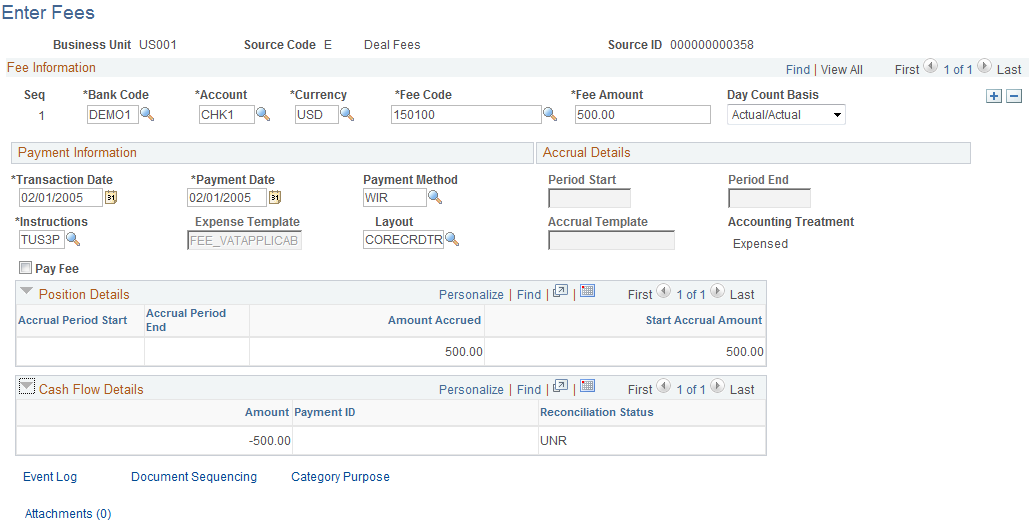
Use the Enter Fees page (FEE_GENERATOR_PNL) to create fees for deal, facility, EFT, and letter of credit sources.
Image: Enter Fees page
This example illustrates the fields and controls on the Enter Fees page. You can find definitions for the fields and controls later on this page.
Fee Information
Payment Information
Accrual Details
| Period Start and Period End |
Enter the beginning and ending dates of the accrual period. |
| Accrual Template |
Specify the accounting template to record the accrual amount for this fee entry. |
Position Details
As the fee is processed through the system, you can view accrual details.
Cash Flow
As the fee is processed through the system, you can view approval and payment details.