
Maintaining Pool Positions
This section provides an overview of the investment pool maintenance process discusses how to:
Import pool position data from an external investment management source.
Manually update pool positions.
Distribute investment pool income.
Pages Used to Update Pool Positions
|
Page Name |
Definition Name |
Navigation |
Usage |
|---|---|---|---|
|
Import Pool Position |
BSP_IMPORT |
|
Update an investment pool's position by importing data in a flat file format from an outside investment source. |
|
Layout Catalog |
PMT_FORMAT_CATLOG |
|
Define and configure the files that will be used to import a flat file containing pool position data into the system. Modify the POOL file layout to define your pool-position, flat file. |
|
Update Pool Position |
TRP_POOL_POS_ADD |
Click the Update Pool Position link. |
Manually update the pool's cash position with current values obtained from outside investment sources. Obtaining the updated pool data may require running the Import Pool Position process. |
|
Income Distribution |
TRP_INC_RUN |
|
Run the Income Distribution Application Engine (TRP_INC_DIST) process to disburse investment pool income and maintenance fees among participants based on the parameters set on the Pool Information page. |
Updating Investment Pools
In order to have an accurate view of an investment pool's position, as well as the position of its participants, you must periodically update the investment data. To do so requires importing income and fee data from external investment managers into the pool and distributing it among the pools participants.
There are two ways to update investment pool data:
Import the data in a flat-file format from the Import Pool Position page.
A file layout already provided will need to be modified along with its transformation code.
Obtain a hard copy of the data and manually enter it using the Update Pool Position page.
Once the pool has been updated, run the Income Distribution Application Engine process (TRP_INC_DIST) to update the pool's participant positions by distributing the income and maintenance fees among them.
Import Pool Position Page
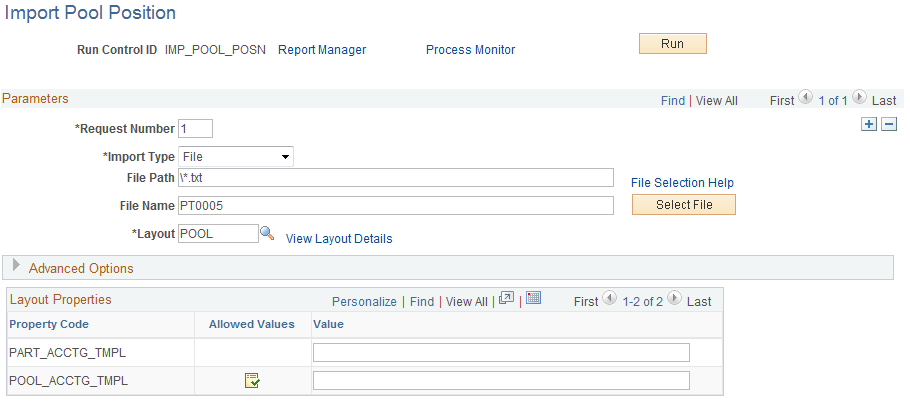
Use the Import Pool Position page (BSP_IMPORT) to update an investment pool's position by importing data in a flat file format from an outside investment source.
Image: Import Pool Position page
This example illustrates the fields and controls on the Import Pool Position page. You can find definitions for the fields and controls later on this page.
Parameters
Advanced Options
See also PeopleTools: PeopleSoft Integration Broker, Configuring Nodes and Transactions.
Update Pool Position Page
Use the Update Pool Position page (TRP_POOL_POS_ADD) to manually update the pool's cash position with current values obtained from outside investment sources.
Image: Update Pool Position page
This example illustrates the fields and controls on the Update Pool Position page. You can find definitions for the fields and controls later on this page.

Note: Obtaining the updated pool data may require running the Import Pool Position process.
Obtaining the updated pool data may require running the Import Pool Position process.