Scheduling Purchase/On-Hand Resources for a Work Order Task
This section describes how to:
Assign and schedule purchased/on-hand resources for work order tasks.
Define the Purchase/On-Hand Schedules Procurement tab.
Define the Purchase/On-Hand Schedules Details tab.
Define the Purchase/On-Hand Schedules Availability tab.
Define the Purchase/On-Hand Schedules Supplier tab.
Define the Purchase/On-Hand Schedules Default Settings tab.
Define the Purchase/On-Hand Schedules Cost tab.
Define the Purchase/On-Hand Schedules Distributions tab.
Pages Used to Schedule Purchase On-Hand Resources for a Work Order Task
|
Page Name |
Definition Name |
Navigation |
Usage |
|---|---|---|---|
|
Schedules |
WM_WO_TASK_SCHED |
Maintenance Management, Work Order Management, Work Order, click the Schedules tab |
Enter resource schedules for work order tasks. |
|
Copy from Equipment Parts Lists |
WM_EPL_SELECT_SEC |
Click the Copy from EPL button above the Purchase/On-Hand Scheduling grid. |
Copy non-inventory items and description only materials associated with a task's asset from an EPL template to a selected work order task row. |
|
Add to Equipment Parts List |
WM_AM_EPL_UPDATE |
Click the Add to EPL button above the Purchase/On-Hand Scheduling grid. |
Add non-inventory and open description items to one or more existing EPL templates. |
|
Purchase Orders |
WM_WO_PO_INQ |
|
Review any purchase orders or requisitions associated with work orders and work order tasks. |
|
Requisitions |
WM_WO_PO_INQ |
|
Review any purchase orders or requisitions associated with work orders and work order tasks. |
|
Maintain Purchase Order |
PO_LINE |
|
Add a purchase order based on a work order task to purchase labor, materials, or tools identified in the Purchase/On Hand Schedules grid. |
|
Maintain Requisitions |
REQ_FORM |
|
Add requisition based on a work order task to purchase labor, materials, or tools identified in the Purchase/On Hand Schedules grid. |
|
Item Availability |
WM_WO_ITMAVAIL_SEC |
Click the Item Availability link in the Schedules page - Purchase/On-hand Schedules Availability tab. |
Review availability of an item or reason item is not available. |
Schedules Page - Purchase/On-Hand Schedules
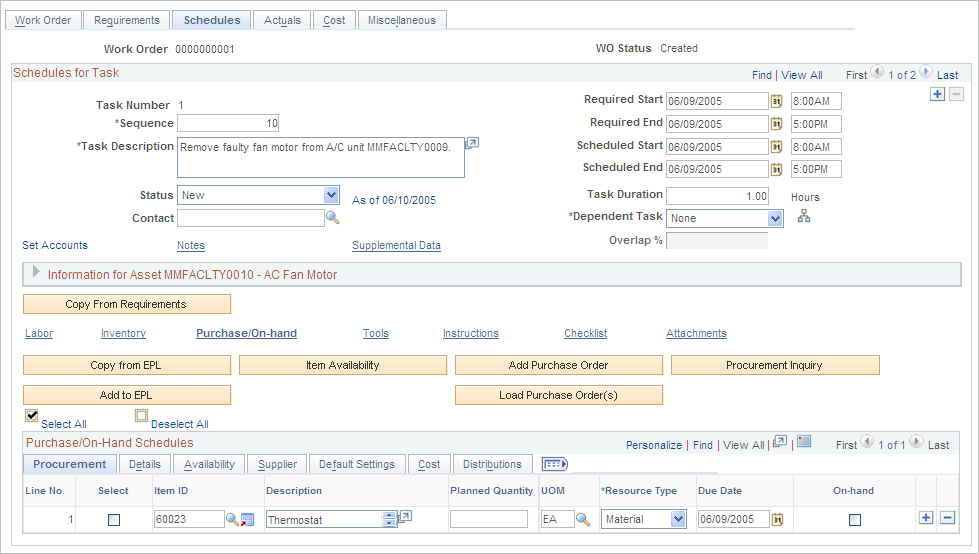
Use the Schedules page (WM_WO_TASK_SCHED) to enter resource schedules for work order tasks.
Image: Schedules page - Purchase/On-Hand Schedules grid
This example illustrates the fields and controls on the Schedules page - Purchase/On-Hand Schedules grid. You can find definitions for the fields and controls later on this page.
| Item Availability |
Select one or more rows and click this button to determine if the selected items are available as of the due date. The row must be pegged before you can determine if an item is available. See Procurement of Material, Labor, and Tool Resources Using the Purchase/On-Hand Schedules Grid. |
| Add Purchase Order or Add Requisition |
Click this button to access the PeopleSoft Purchasing Add/Update Purchase Order component, the PeopleSoft Purchasing Add/Update Requisition component, or the PeopleSoft eProcurement Create Requisitions component to create a purchase order or requisition. The button that displays in the work order depends on your selection of either Purchase Order,Purchasing Requisition, or ePro Requisition on the work order business unit's Integrations page. |
| Load Purchase Order(s) or Load Requisition(s) |
Select the resource lines for which you intend to create purchase orders (or requisitions) and then click the Load Purchase Order(s) button for a work order task. The selected rows are then staged into the purchasing related stage records (PO_ITM_STG and PO_DIST_STG). Once the rows are staged, you must access PeopleSoft Purchasing to run either the PO Auto Sourcing process or the PO Calculations and PO Creation processes to create the purchase order. This stages the purchase orders. When you click the Load Requisition(s) button, this flags the selected work order rows and you then must access PeopleSoft Purchasing to run the Load Requisitions process. Note: Normally, organizations schedule PO Auto Sourcing, PO Calculations, PO Creation, and Load Requisitions to run automatically at regular intervals. Requisitions that are created in PeopleSoft eProcurement use the same staging tables as requisitions created in PeopleSoft Purchasing. |
| Copy from EPL (copy from Equipment Parts List) |
Click this button to access the Copy from Equipment Part List page. This button only appears on the page if the asset selected for this work order task is associated with one or more EPL templates that contain non-inventory or open description items. Note: Inventory items are not included in the item list that displays based on the selected template. |
| Add to EPL |
Click this button to access the Add to Equipment Parts List page. You select a Purchase/On-Hand row with a non-inventory or open description item that you want to add to one or more existing EPL templates before you click this button. If this is an open description item, you must enter the description, planned quantity and UOM for the item. |
| Procurement Inquiry |
Click this button to access the Work Order Procurement Inquiry component in Maintenance Management. This inquiry displays all the purchase orders and requisitions that are associated with this work order task. |
Purchase/On-Hand Schedules - Procurement tab
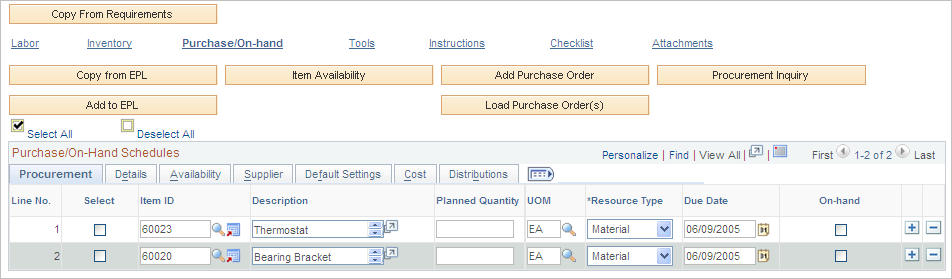
Select the Purchase/On-Hand Schedules - Procurement tab.
Image: Purchase/On-Hand Schedules Procurement tab on Schedules page
This example illustrates the fields and controls on the Purchase/On-Hand Schedules Procurement tab on Schedules page. You can find definitions for the fields and controls later on this page.
Purchase/On-Hand Schedules - Details tab
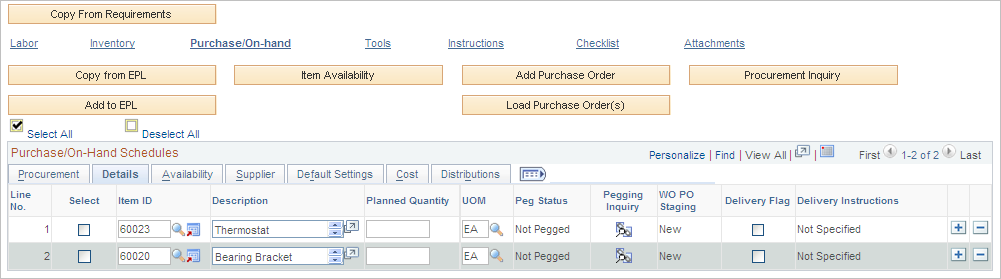
Select the Purchase/On-Hand Schedules - Details tab.
Image: Purchase/On-Hand Schedules Details tab on Schedules page
This example illustrates the fields and controls on the Purchase/On-Hand Schedules Details tab on Schedules page. You can find definitions for the fields and controls later on this page.
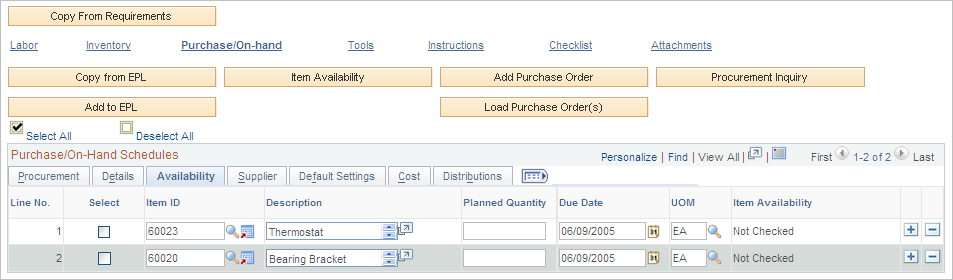
Purchase/On-Hand Schedules - Availability tab
Select the Purchase/On-Hand Schedules - Availability tab.
Image: Purchase/On-Hand Schedules Availability tab on Schedules page
This example illustrates the fields and controls on the Purchase/On-Hand Schedules Availability tab on Schedules page. You can find definitions for the fields and controls later on this page.
Purchase/On-Hand Schedules - Supplier tab — Schedules Page
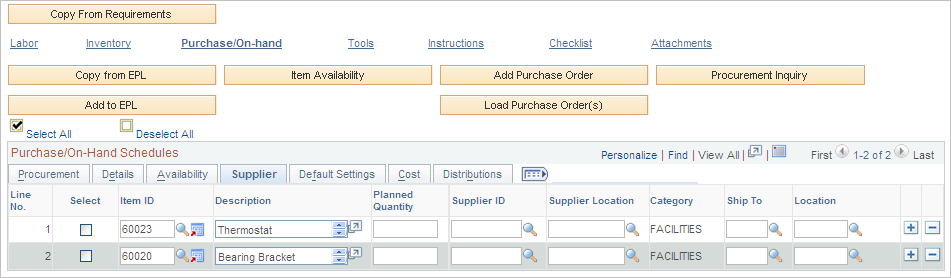
Select the Purchase/On-Hand Schedules - Supplier tab.
Image: Purchase/On-Hand Schedules Supplier tab on Schedules page
This example illustrates the fields and controls on the Purchase/On-Hand Schedules Supplier tab on Schedules page. You can find definitions for the fields and controls later on this page.
Purchase/On-Hand Schedules - Default Settings tab — Schedules Page
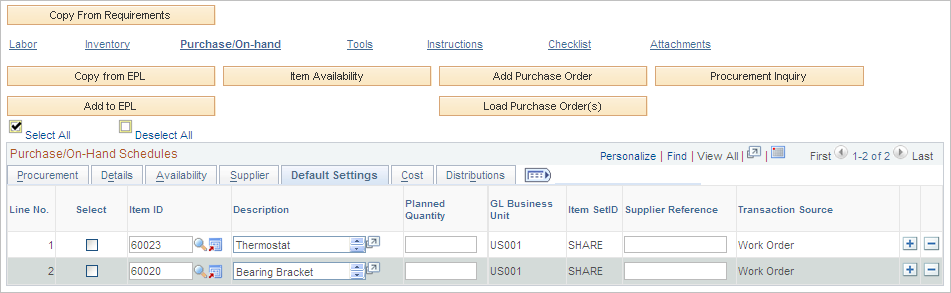
Select the Purchase/On-Hand Schedules - Default Settings tab.
Image: Purchase/On-Hand Schedules Default Settings tab on Schedules page
This example illustrates the fields and controls on the Purchase/On-Hand Schedules Default Settings tab on Schedules page. You can find definitions for the fields and controls later on this page.
Purchase/On-Hand Schedules - Cost tab — Schedules Page
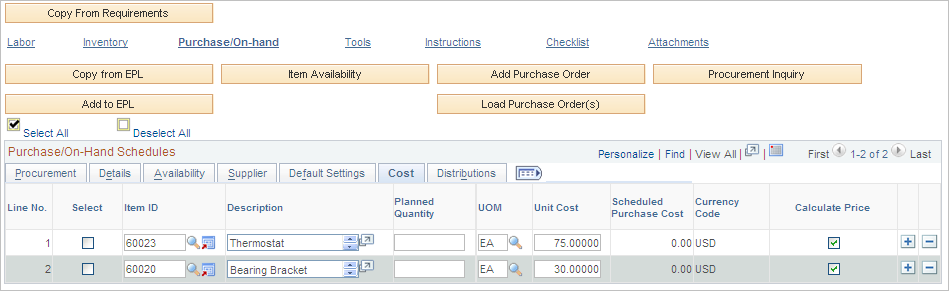
Select the Purchase/On-Hand Schedules - Cost tab.
Image: Purchase/On-Hand Schedules Cost tab on Schedules page
This example illustrates the fields and controls on the Purchase/On-Hand Schedules Cost tab on Schedules page. You can find definitions for the fields and controls later on this page.
Purchase/On-Hand Schedules - Distributions tab — Schedules Page
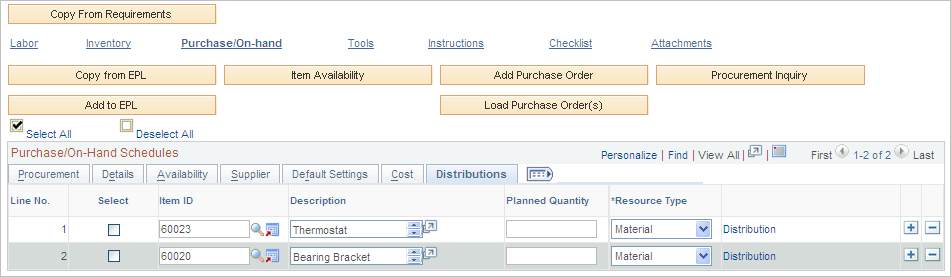
Select the Purchase/On-Hand Schedules - Distributions tab.
Image: Purchase/On-Hand Schedules Distributions tab on Schedules page
This example illustrates the fields and controls on the Purchase/On-Hand Schedules Distributions tab on Schedules page. You can find definitions for the fields and controls later on this page.