
Using the Work Order Procurement Inquiry
This section discusses how to review the Pegging and Purchasing Inquiry.
Pages Used to Review the Work Order Procurement Inquiry
|
Page Name |
Definition Name |
Navigation |
Usage |
|---|---|---|---|
|
Work Order Procurement Inquiry |
WM_WO_PO_INQ |
|
Review any quantities pegged for the work order using purchase orders and requisitions. |
Work Order Procurement Inquiry Page
Use the Work Order Procurement Inquiry page (WM_WO_PO_INQ) to review any quantities pegged for the work order using purchase orders and requisitions.
Image: Work Order Procurement Inquiry page
This example illustrates the fields and controls on the Work Order Procurement Inquiry page. You can find definitions for the fields and controls later on this page.
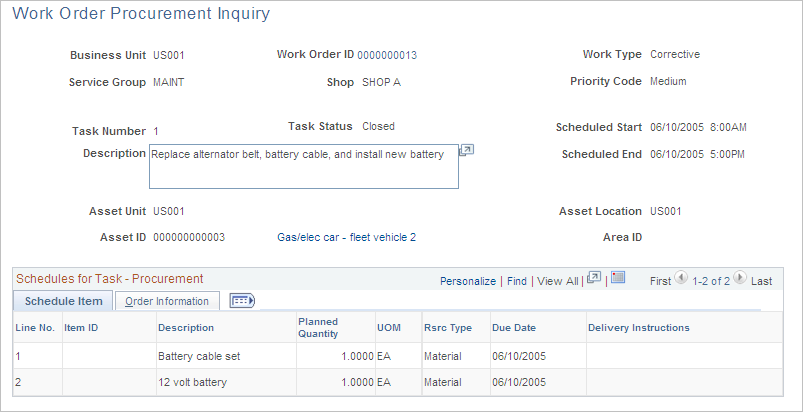
The Work Order Procurement Inquiry provides a view into any requisition and purchase order transactions that are either created using a work order or created in PeopleSoft Purchasing and tied back from the requisition or purchase order to a work order. You can select a specific work order and task on the Work Order Procurement Inquiry search page. The work order header information and the work order task number and description appear at the top of the Work Order Procurement Inquiry page. The Schedules for Task - Procurement grid lists each Scheduled Purchase/On-Hand resource item for the work order task in the first grid tab, and the corresponding Purchasing requisition or purchase order information in the second grid tab.
| Business Unit |
Identifies the business unit associated with the purchase order created. |
| Scheduled Start and Scheduled End |
Displays the scheduled start date and the end date for the work order. |
Schedule Item tab
Order Information tab