
Running the Load GL Accounting Entries Process (BILDGL01)
Run the Load GL processes to create accounting entries for billing activities and unbilled revenue accruals. Two different processes are available that insert accounting entries to the PeopleSoft Billing Accounting Entries table (BI_ACCT_ENTRY): the Load GL Accounting Entries process (BILDGL01) and the Load GL Unbilled Revenue Accrual process (BIACCRUE).
This section provides overviews of the Load GL Accounting Entries process and accounting entries, and discusses how to:
Run the Load GL Accounting Entries process (BILDGL01) for regular and consolidated invoices.
Regenerate Load GL Accounting Entries reports.
Restart the Load GL process.
Inquire about GL accounting entries.
Note: You must set up ChartField reporting options before running the Load GL Accounting Entries process (BILDGL01). Without the ChartField reporting option information, the system cannot determine which ChartFields to include on the report.
Pages Used to Run the Load GL Accounting Entries Process (BILDGL01)
|
Page Name |
Definition Name |
Navigation |
Usage |
|---|---|---|---|
|
Load GL Accounting Entries |
RUN_BI_LOADGL |
|
Enter the process parameters for loading GL accounting entries. |
|
Load GL for Consolidated Bills |
RUN_BI_LOADGL_CON |
|
Enter the process parameters for loading GL for consolidated invoices. |
|
GL Accounting Entries Report Consol GL Accounting Entries Report |
RUN_BI_GL |
|
Regenerate GL Accounting Entries reports listing all accounting entries that are processed in a specified accounting date range. |
|
Accounting Entries By Invoice - Accounting Entries |
BI_ACCT_ENTRY_INV |
|
Review accounting entries that are created by the Load GL process or the Unbilled Revenue Accrual process. |
|
Exchange Rate Detail |
EXCH_RT_DTL_INQ |
Click the Exchange Rate Detail button on the Accounting Entries By Invoice - Accounting Entries page. |
Review exchange rate information for the selected transaction line. |
|
Accounting Entries By Journal - Accounting Entry |
BI_ACCT_ENTRY_JRNL |
|
Review accounting entries after they go through the Journal Generator process and post to the general ledger. |
Understanding the Load GL Accounting Entries Process (BILDGL01)
The Load GL process performs the following tasks:
Checks credit card authorization for all invoices.
Inserts into the Load GL temporary table all invoices that are to be processed (those invoices that are processed by the Pre-Load process).
Determines which bill lines are subject to deferred revenue processing.
Inserts accounting entries into the BI_ACCT_ENTRY table, retrieving rows from BI_ACCT_HDR_STG and BI_ACCT_LN_STG for bill lines that are not subject to deferred revenue.
Inserts AR accounting and revenue accounting entries.
Inserts revenue accounting entries for Inter/IntraUnit invoices.
Inserts revenue accounting entries for discounts and surcharges.
Inserts Inter/IntraUnit expense accounting entries for Inter/IntraUnit invoices.
Inserts Inter/IntraUnit payable accounting entries for Inter/IntraUnit invoices.
Inserts tax accounting entries into the BI_ACCT_ENTRY table.
Inserts VAT tax accounting entries into the BI_ACCT_ENTRY table for invoices that are subject to VAT.
Inserts statistical accounting entries into the BI_ACCT_ENTRY table.
Inserts unbilled AR accounting entries into the BI_ACCT_ENTRY table.
Inserts deferred revenue accounting entries into BI_ACCT_ENTRY (retrieving data from BI_ACCT_LN_STG), and applies processing rules as defined by the deferred revenue proration method.
Handles adjusted invoice or invoice lines by creating reversal entries for the current accounting period and deleting undistributed future period entries.
Creates reversal entries for entries that are generated by the Load GL - Unbilled Accrual process and subsequently invoiced and billed to customers in the same accounting period.
Prints a summary report.
Image: Overall journal entries generating process and the role of the Load GL Accounting Entry process in the entire procedure
The following process flow illustrates how the Load GL Accounting Entry process fits into the overall journal entries generating process.

Understanding Accounting Entries
You must populate the PeopleSoft Billing Accounting Entry table (BI_ACCT_ENTRY) with accounting entries before you can create PeopleSoft General Ledger accounting entries.
The Load GL Accounting Entries process (BILDGL01) populates the Billing Accounting Entry table with accounting entries that the Journal Generator eventually picks up. The process selects for processing all bills in the specified range selection that have a status of INV and that have finished the Billing Currency Conversion process and the Pre-Load process.
The following table lists values for accounting entry types:
Note: To ensure that you have set up PeopleSoft Billing to generate GL accounting entries for the system, refer to the Installation Options, Billing - Integration Options page.
Running the Load GL Accounting Entries Process (BILDGL01) for Regular and Consolidated Invoices
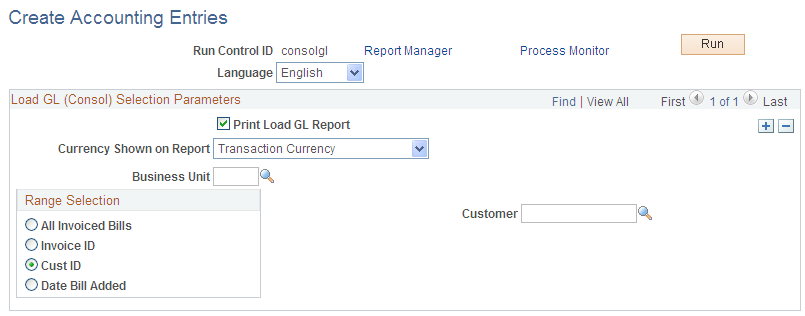
To run the Load GL Accounting Entries process for regular invoices, access the Load GL Accounting Entries page (Billing, Generate Invoices, Non-Consolidated, Create Accounting Entries, Load GL Acctng Entries, Load GL Accounting Entries); for consolidated invoices, access the Load GL for Consolidated Bills page (Billing, Generate Invoices, Consolidated, Create Accounting Entries, Consolidated Load GL, Load GL for Consolidated Bills).
After you define the run controls and access the Process Scheduler page, select the Curr Con Preload & Load GL job, which runs several processes at once. If you run the processes individually, you must run them one at a time and run Currency Conversion first, followed by the Pre-Load process.
GL Accounting Entries Report Page
Use the GL Accounting Entries Report page (RUN_BI_GL) to regenerate GL Accounting Entries reports listing all accounting entries that are processed in a specified accounting date range.
Restarting the Load GL Process
The PeopleSoft Billing Load GL process (BILDGL01) contains restart logic to enable you to restart the process from the point preceding a termination of the process, should one occur. Additionally, the Load GL process tags invoices that are selected for a Load GL process request with the process instance of the corresponding request to prevent duplicate accounting entries. If the Load GL process terminates after the system marks invoices with the process instance but before the accounting entries are created, the system does not generate accounting entries for these invoices without restart logic.
Note: To prevent duplicate accounting entries, the system does not process concurrent Load GL process requests that include invoices that are previously tagged with a process instance.
The Load GL Process table (BI_LOADGL_PROC) facilitates the restarting process. It retains the process instance and status of the Load GL process request. The system displays the information in this table on the Load GL Accounting Entries and Load GL for Consolidated Bills pages when a Load GL request has terminated and needs to be restarted.
Updating the Load GL Process Table
Before the system carries out each SQL Commit command of the Load GL process, it updates the Load GL Process table with the process instance and the status of the corresponding request. The system updates the process status with a number that indicates the current stage of the Load GL process. The process status numbers and the corresponding stages are:
Displaying Load GL Requests that Process Successfully
The system updates the status on the Load GL Process table to indicate that processing is complete before it carries out the last SQL Commit command for the corresponding request. After all requests for a run control are processed, the system deletes all records in the Load GL Process table for the corresponding run control. When multiple requests are all processed successfully, the Load GL Accounting Entries and Load GL for Consolidated Bills pages are displayed.
Image: The Load GL for Consolidated Bills page when multiple requests are processed successfully
This example illustrates the fields and controls on the The Load GL for Consolidated Bills page when multiple requests are processed successfully.
In this scenario, the system does not display the BI Load GL Status and Restart Process Instance fields. If the system processes successfully all requests within a run control, the parameters for the request are available to edit.
Displaying Load GL Requests That Terminate
The run control may contain a Load GL request that does not process successfully. On the Load GL Accounting Entries or the Load GL for Consolidated Bills page, the BI Load GL status indicates that the process is Complete for those requests that process successfully. The parameters for requests that process successfully are not available for edit when succeeding requests within the run control terminate.
Image: Displaying the updated BI Load GL status as Complete, and the parameters that are not available for edit
This example illustrates the fields and controls on the Displaying the updated BI Load GL status as Complete, and the parameters that are not available for edit.

If a request terminates after a SQL Commit command, the Load GL process saves the process instance and process status number on the Load GL Process table. The Load GL Accounting Entries or the Load GL for Consolidated Bills page displays the BI Load GL status of the aborted request and the Restart Process Instance number. All other request parameters are unavailable for entry.
Image: Displaying the BI Load GL status of the aborted request and the Restart Process Instance number
This example illustrates the fields and controls on the Displaying the BI Load GL status of the aborted request and the Restart Process Instance number.

All requests not processed, those that follow a terminated request, can be modified. You cannot delete a Load GL process request that must be restarted.
Restarting a Terminated Request
Although the system does not perform validation edits to ensure that you do not include in a second Load GL process request those invoices from a terminated request, you must use the original run control to restart the process. The system marks invoices that are included in an aborted process with the process instance of the aborted request. Although the system allows you to create a new run control to create general ledger entries for the same invoices, initiating this new run control does not produce any general ledger entries.
The system uses the process status number in the Load GL Process table to determine where to restart the request. It restarts a terminated process from the appropriate process status S01 through S99. If the system restarts a request from status S99, you get duplicate copies of the report if the process terminates after the report is printed.
You can check the Message Log to verify the stage from which a request is restarted.
Note: You cannot add a new Load GL process request to a run control ID that requires a restart. The Load GL process does not include any new invoices that become eligible between the request abort and the request restart, even if these invoices meet the existing run control selection criteria.
Inquiring About GL Accounting Entries
After you run the Load GL process or the Unbilled Revenue Accrual process, you can inquire on the accounting entries that are created by using the Accounting Entries By Invoice page.
You can also review the accounting entries after they go through the Journal Generator process and are posted to the general ledger on the Accounting Entries By Journal - Accounting Entry page. You can navigate to the corresponding line details by using the following page elements:
