
Using Transfer Pricing Definitions
This section provides an overview of transfer pricing definitions and discusses how to:
Use the Transfer Pricing Definition page.
Copy transfer pricing defaults between business units.
Use the Additional Transfer Price page at the header level.
Use the Additional Transfer Price page at the detail level.
Review examples of transfer pricing.
Pages Used to Define Transfer Prices
|
Page Name |
Definition Name |
Navigation |
Usage |
|---|---|---|---|
|
Transfer Pricing Definition |
CM_TRAN_PRICE_DEFN |
|
Define the transfer prices, markup percentages, and additional transfer costs to be used for a source business unit or a source and destination unit pair. |
|
Copy Pricing Definition |
CM_TRAN_PRC_COPY |
Click the Copy Pricing Definition link on the Transfer Pricing Definition page. |
Enter a source inventory business unit and a destination business unit (optional) to copy an existing transfer pricing definition to another inventory business unit. |
|
Additional Transfer Price (Header Level) |
CM_TRAN_PRICE_CE |
On the Transfer Pricing Definition page, click the Additional Costs link in the BU Level Defaults group box. |
Add or change additional costs at the header level of the transfer pricing definition. |
|
Additional Transfer Price (Detail Level) |
CM_TRAN_PRICE_CEDT |
On the Transfer Pricing Definition page, click the Addl Costs icon in the Item / Item Group Definitions group box. |
Add or change additional costs to a item group or item ID (detail level). |
Understanding Transfer Pricing Definitions
To define transfer prices, use the Transfer Pricing Definition component (CM_TRAN_PRICE_DEFN). Use the Transfer Pricing Definition component interface (CM_TRAN_PRICE_CI) to load data into the tables for this component.
The key to establishing your transfer price is the Transfer Pricing Definition component, where you can establish transfer prices by:
Inventory Business Unit Pairs: A combination of the source business unit, destination business unit, and pricing effective date.
Source Business Unit Only: A combination of the source business unit and pricing effective date. By leaving the destination business unit blank, you can create transfer prices for all items in the source unit that transfer to any destination business unit that is not already defined in a business unit pair.
The Transfer Pricing Definition component defines the transfer prices for all items within a source business unit or an inventory business unit pair. When a transfer pricing definition has not been setup for certain business units, the system transfers the items at the cost in the source inventory business unit. When a transfer pricing definition is created, setting all transfer prices at the business unit level (header level) may be too broad; therefore, the Transfer Pricing Definition component allow you to override the header level settings with transfer prices specific to the item group or item ID itself. The specific information is used instead of the more general information.
Once you define your transfer pricing definitions, you can:
Populate the Transfer Pricing table with your transfer prices and additional transfer costs by running the Calculate Transfer Price process. The Deplete On Hand Qty process looks to this table first to find a match and to retrieve transfer data.
Leave the Transfer Pricing table blank for some or all items. If the Deplete On Hand Qty process cannot find a match in the Transfer Pricing table, then it looks to the setup in the Transfer Pricing Definition components. The detail level overrides are used instead of the header level information. Header level information is used when no detail level overrides exist and the Price Overrides Only check box is not selected.
The Transfer Pricing Definition component can be used by both:
The Calculate Transfer Price process to populate the Transfer Price table.
The Deplete On Hand Qty process to calculate a transfer price for an MSR line directly using the data in the Transfer Pricing Definition component. Use this option if the Transfer Price table does not contain a transfer price for the MSR line.
Not all options on the Transfer Pricing Definition component are available when the Deplete On Hand Qty process is calculating a transfer price directly from the component. Look carefully at the field definitions for information about the Calculate Transfer Price process and the Deplete On Hand Qty process.
Note: PeopleSoft Cost Management does not support interunit pricing for non-cost items.
For additional details about applying transfer prices to an MSR, see the Understanding Interunit Transfers topic.
Transfer Pricing Definition Page
Use the Transfer Pricing Definition page (CM_TRAN_PRICE_DEFN) to define the transfer prices, markup percentages, and additional transfer costs to be used for a source business unit or a source and destination unit pair.
Image: Transfer Pricing Definition page
This example illustrates the fields and controls on the Transfer Pricing Definition page. You can find definitions for the fields and controls later on this page.

New Transfer Pricing Definitions
In add mode, you enter the source inventory business unit in the Business Unit field and the destination inventory business units in the Destination Unit field. The Pricing Effective Date field defaults to today's date if there is no entry. The Destination Unit field is not required. If you leave the Destination Unit field blank, then the parameters set up on this component apply to the source business unit, regardless of the inventory business unit receiving the stock. The transfer pricing definition with the source business unit and no destination unit is used as the default for all business unit pairs that are not defined. The source business unit must be valid and an open inventory unit.
Header Levels and Detail Levels
On the Transfer Pricing Definition page, overrides and default values can be entered at both the header level or the detail level.
Overrides and default values defined at the header level apply to the entire transfer pricing definition. The header level includes the Default Overrides group box and the BU Level Defaults group box. These values are used with transfers from this source inventory business unit (or source unit and destination unit combination) and for this price effective date. Information added at the header level is used to determine the transfer price for all items that are not overridden at the detail level as long as the Price Overrides Only check box has not been selected.
Overrides and default values defined at the detail level apply to an item group or item ID within the transfer pricing definition. The detail level includes the Item / Item Group Definitions group box. These values can be added to override the values defined at the header level.
Default Overrides Group Box
The values defined in this group box apply to the header level of this transfer pricing definition. The following zero check boxes prevent the system from performing a particular calculation. These check boxes are not mutually exclusive with their associated value. For example, both a Zero Markup Percent can be entered and the Zero Markup Percent flag checked, though once the Transfer at Zero Price field is selected, selecting the Zero Markup Percent has no additional effect. These check boxes control what is done for any items not overridden at the detail level. Keep in mind that these check boxes are never used for items defined in the detail level of this component. In addition, if the Price Overrides Only check box is selected, then this group box is not used.
The check boxes in this group box are used by both:
The Calculate Transfer Price process to populate the Transfer Price table (CM_TRAN_PRICE).
The Deplete On Hand Qty process to calculate a transfer price for an MSR line using the data in the Transfer Pricing Definition component. This option is used if the Transfer Price table does not contain a transfer price for the MSR line.
BU Level Defaults Group Box
The default values defined in this group box apply to the entire transfer pricing definition (that is, the header level). These default values are used with transfers from this source inventory business unit (or source unit and destination unit combination) and for this price effective date. When setting up a Transfer Pricing Definition component, keep in mind that your entry in the Price Overrides Only check box changes the use of this group box.
Select Lines Group Box
Use the Select Lines group box to enter search criteria for displaying existing items and item group definition in the Item / Item Group Definitions group box.
Item / Item Group Definitions Group Box
The detail level overrides and default values defined in this group box apply to the specific item ID or item group in the row. The values entered here override the same values entered at the header level. To create a new row to override header level attributes for a specific item ID or item group, add a new row to the grid.
 (Addl Costs)
Copy Pricing Definition Page
Use the Copy Pricing Definition page (CM_TRAN_PRC_COPY) to enter a source inventory business unit and a destination business unit (optional) to copy an existing transfer pricing definition to another inventory business unit.
Image: Copy Pricing Definition page
This example illustrates the fields and controls on the Copy Pricing Definition page. You can find definitions for the fields and controls later on this page.

When setting up the transfer pricing definitions for each of your source unit, destination unit, and price effective date combinations, you can reduce data entry time by using the copy feature on the Copy Pricing Definition page. Enter a source inventory business unit and a destination business unit (optional) Use this page to copy an existing transfer pricing definition to your new combination of source business unit, destination unit, and price effective date. This page is only available if you are adding a new transfer pricing definitions.
The copy action immediately saves the new data and overrides any existing information that you may have entered on the new transfer pricing definition.
Additional Transfer Price (Header Level) Page
Use the Additional Transfer Price (Header Level) page (CM_TRAN_PRICE_CE) to add or change additional costs at the header level of the transfer pricing definition.
On the Transfer Pricing Definition page, click the Additional Costs link in the BU Level Defaults group box.
Image: Additional Transfer Price page at the header level
This example illustrates the fields and controls on the Additional Transfer Price page at the header level. You can find definitions for the fields and controls later on this page.

This page displays the cost element detail for the header level of the transfer pricing definition and allows you to enter additional transfer costs using cost elements with a cost category of Addl Trans. This page can only be used by the Calculate Transfer Price process to populate the Transfer Price table.
Additional Transfer Price (Detail Level) Page
Use the Additional Transfer Price (Detail Level) page (CM_TRAN_PRICE_CEDT) to add or change additional costs to a item group or item ID (detail level).
On the Transfer Pricing Definition page, click the Addl Costs icon in the Item / Item Group Definitions group box.
Image: Additional Transfer Price page at the detail level
This example illustrates the fields and controls on the Additional Transfer Price page at the detail level. You can find definitions for the fields and controls later on this page.
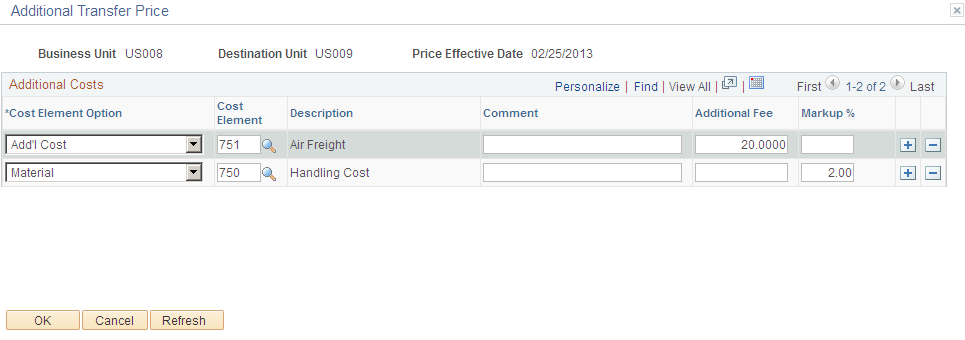
This page displays the cost element detail for the detail level of the transfer pricing definition and allows you to enter additional transfer costs using cost elements with a cost category of Addl Trans. The top section of this page displays the item ID or item group for these additional prices. The field definitions are the same as the Additional Transfer Price (Header Level) page defined above. This page can only be used by the Calculate Transfer Price process to populate the Transfer Price table.
Reviewing Examples of Transfer Pricing
The following examples show how the transfer price default hierarchy uses the Transfer Pricing Definition component. In the examples below, the fields used on the Transfer Pricing Definition component can be used by the Calculate Transfer Price process to build the Transfer Pricing table and by the Deplete On Hand Qty process to directly calculate the MSR line transfer price.
Transfer Pricing Definition 1: Source business unit: US001, Destination business unit: (blank), and Price Effective Date: 10/15/2009
Header Level:
Price Overrides Only check box
Price Markup %
Cost Element Option
Markup Cost Element
Not selected
20%
Add'l Cost
751
Detail Level:
Item ID
Transfer Price
Price Markup %
Cost Element
80200
Specify: 4.00
Specify: 4%
Specify: 750
Transfer Pricing Definition 2: Source business unit: US001, Destination business unit: US014, and Price Effective Date: 10/15/2009
Header Level:
Price Overrides Only check box
Price Markup %
Cost Element Option
Markup Cost Element
Not selected
15%
Add'l Cost
750
Detail Level:
Item ID
Transfer Price
Price Markup %
Cost Element
80400
Specify: 18.18
Specify: 10%
Default
80500
Specify: 7.00
Specify: 5%
Specify: 751
The following item and cost information are used in these examples:
|
Item ID |
Cost Method |
Cost Element |
Cost |
|---|---|---|---|
|
80100 |
Perpetual Average |
Material: 100 |
11.00 (current perpetual average) |
|
80200 |
Perpetual Average |
Material: 100 |
10.00 (current perpetual average) |
|
|
|
Landed Cost- Duty: 601 |
1.00 |
|
80300 |
Actual |
Material: 100 |
10.10 (default actual cost) |
|
80400 |
Perpetual Average |
Material: 100 |
10.00 (current perpetual average) |
|
|
|
Landed Cost- Duty: 601 |
1.00 |
|
80500 |
Perpetual Average |
Material: 100 |
5.00 (current perpetual average) |
|
|
|
Landed Cost- Duty: 601 |
.25 |
|
80600 |
Standard cost |
Material: 100 |
10.00 (current standard) |
Example 1
In this example, the following results will occur (for the US001/US014 combination only) when the Calculate Transfer Price process populates the Transfer Pricing table or when the Deplete On Hand Qty process calculates the transfer prices directly for MSR lines. In both cases, to populate transfer prices and cost elements for the source business unit US001 and the destination business unit US014, the processes (using the transfer price default hierarchy) look first to the transfer pricing definition 2; if data cannot be found then the processes look to the transfer pricing definition 1.
|
Item ID |
Cost Element |
Transfer Price |
Comments |
|---|---|---|---|
|
80100 |
100 |
11.00 |
On the transfer pricing definition 2 no detail information for this item is found, so the header information is used. A 15% markup is applied to the current perpetual average cost and added to the 750 cost element. |
|
|
750 |
1.65 |
|
|
80200 |
100 |
10.00 |
On the transfer pricing definition 2 no detail information for this item is found, so the header information is used. A 15% markup is applied to the current perpetual average cost and added to the 750 cost element. In addition, the landed costs in the cost element 601 is added to the transfer price. |
|
|
601 |
1.00 |
|
|
|
750 |
1.50 |
|
|
80300 |
100 |
10.10 |
On the transfer pricing definition 2 no detail information for this item is found, so the header information is used. A 15% markup is applied to the default actual cost and added to the 750 cost element. |
|
|
750 |
1.515 |
|
|
80400 |
100 |
18.18 |
Detail information for this item is found on the transfer pricing definition 2. A transfer price of 18.18 is applied to the material cost element and a 10% markup of the transfer price is applied to the 750 cost element. |
|
|
750 |
1.81 |
|
|
80500 |
100 |
7.00 |
Detail information for this item is found on the transfer pricing definition 2. A transfer price of 7.00 is applied to the material cost element and a 5% markup of the transfer price is applied to the 751 cost element. |
|
|
751 |
.35 |
|
|
80600 |
100 |
10.00 |
On the transfer pricing definition 2 no detail information for this item is found, so the header information is used. A 15% markup is applied to the current frozen standard cost and added to the 750 cost element. |
|
|
750 |
1.50 |
|
Example 2
In this example, all information is the same as example 1 except the Price Overrides Only check box is selected on the transfer pricing definition 2. The following results will occur (for the US001/US014 combination only) when the Calculate Transfer Price process populates the Transfer Pricing table or when the Deplete On Hand Qty process calculates the transfer prices directly for MSR lines. Since the transfer pricing definition 2 is more specific, the processes (using the transfer price default hierarchy) look first to it. If data cannot be found then the processes look to the transfer pricing definition 1.
|
Item ID |
Cost Element |
Transfer Price |
Comments |
|---|---|---|---|
|
80100 |
100 |
11.00 |
No detail information for this item is found on the transfer pricing definition 2, so the header information is used from the transfer pricing definition 1. A 20% markup is applied to the current perpetual average cost and added to the 751 cost element. |
|
|
751 |
2.20 |
|
|
80200 |
100 |
4.00 |
No detail information for this item is found on the transfer pricing definition 2, so the detail information is used from the transfer pricing definition 1. A transfer price of 4.00 is applied to the material cost element and a 4% markup of the transfer price is applied to the 750 cost element. |
|
|
750 |
.16 |
|
|
80300 |
100 |
10.10 |
No detail information for this item is found on the transfer pricing definition 2, so the header information is used from the transfer pricing definition 1. A 20% markup is applied to the default actual cost and added to the 751 cost element. |
|
|
751 |
2.02 |
|
|
80400 |
100 |
18.18 |
Detail information for this item is found on the transfer pricing definition 2. A transfer price of 18.18 is applied to the material cost element and a 10% markup of the transfer price is applied to the 750 cost element. Note that the detail level of the transfer pricing definition 2 instructs the system to use the header level default for the cost element even though the Price Overrides Only check box has been selected. |
|
|
750 |
1.81 |
|
|
80500 |
100 |
7.00 |
Detail information for this item is found on the transfer pricing definition 2. A transfer price of 7.00 is applied to the material cost element and a 5% markup of the transfer price is applied to the 751 cost element. |
|
|
751 |
.35 |
|
|
80600 |
100 |
10.00 |
No detail information for this item is found on the transfer pricing definition 2, so the header information is used from the transfer pricing definition 1. A 20% markup is applied to the current frozen standard cost and added to the 751 cost element. |
|
|
751 |
2.00 |
|