Defining Feature Function Security
To set up feature function security, use the Feature Security User Setup component.
This section provides an overview of feature function security setup and discusses how to establish feature function security at the:
Feature level
Function level
Field level
Pages Used to Set up Feature Function Security
|
Page Name |
Definition Name |
Navigation |
Usage |
|---|---|---|---|
|
Order Management |
INSTALLATION_OM |
Click the Order Management link on the Product Options page. |
Use to turn on or off feature function security. |
|
Features |
FFS_USERFTR |
|
Set up feature function security for features at the installation, business unit, role, and user level. The installation level is the default and is required. |
|
Functions |
FFS_USERFUNC |
Click the Select Functions link from the Features page. |
Set up feature function security for functions at the installation, business unit, role, and user level. |
|
Fields |
FFS_USERFIELDS |
Click the Select Fields link from the Functions page. |
Set up feature function security for fields at the installation, business unit, role, and user level. |
|
Valid Values |
FFS_FLDVAL_DTL |
Click the Valid Values button on the Fields page. |
Use to establish additional options for each field. |
Understanding Feature Function Security Setup
At the Installation Options level for Order Management, you establish whether to use feature function security.
The pages that you use to set up the security are the same irrespective of whether you are establishing feature function security by installation, business unit, role, or user ID. Feature function security at the installation level is required and is used as the default. The hierarchy of the security from bottom to top is installation, business unit, role, and user ID.
It is important that you carefully consider how you are going to use the levels of security that you establish and that you examine your choices if you are encountering problems with the system. For example, you may have two CSRs who can update different fields based on their user ID or role security.
Features Page
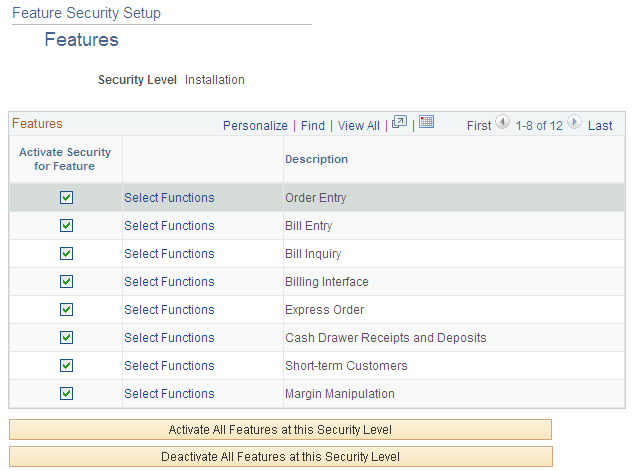
Use the Features page (FFS_USERFTR) to set up feature function security for features at the installation, business unit, role, and user level.
Image: Features page
This example illustrates the fields and controls on the Features page. You can find definitions for the fields and controls later on this page.
Functions Page
Use the Functions page (FFS_USERFUNC) to set up feature function security for functions at the installation, business unit, role, and user level.
Image: Functions page
This example illustrates the fields and controls on the Functions page. You can find definitions for the fields and controls later on this page.

Fields Page
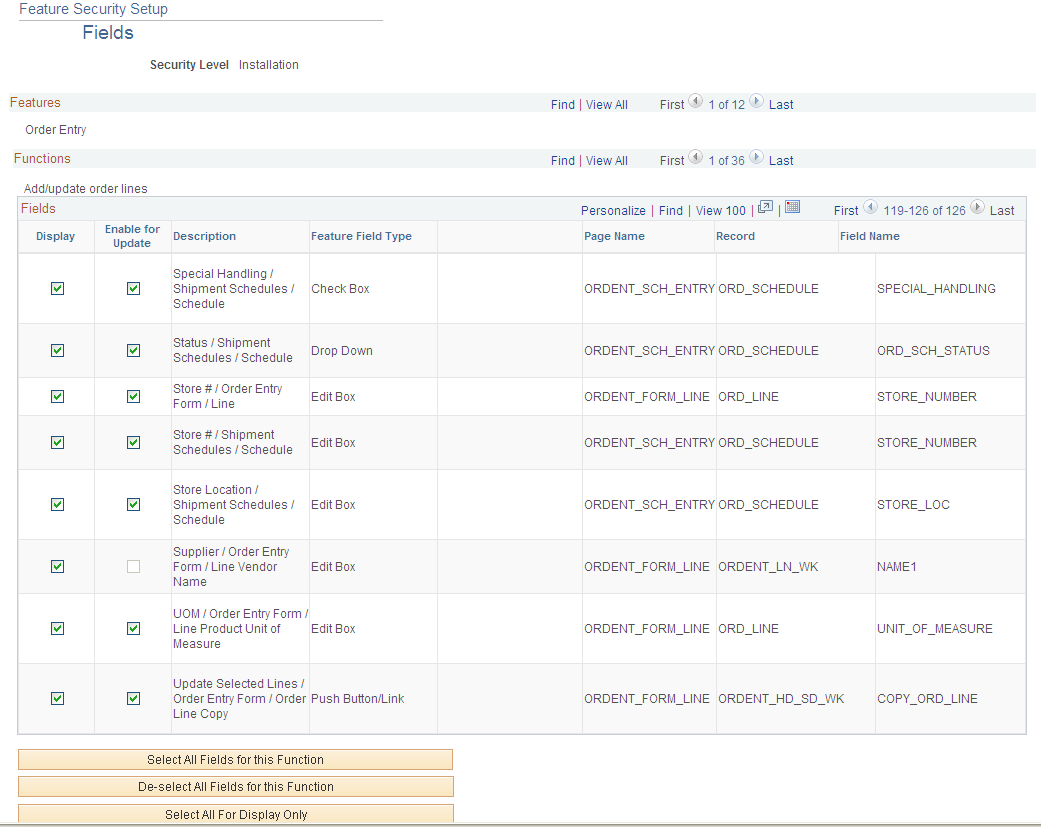
Use the Fields page (FFS_USERFIELDS) to set up feature function security for fields at the installation, business unit, role, and user level.
Image: Fields page
This example illustrates the fields and controls on the Fields page. You can find definitions for the fields and controls later on this page.