The input configuration file should contain five configuration properties and a corresponding set of value data.
The first line (the header row) of a precedence rules input file should
have these header properties:
Key|TriggerAttribute|TriggerValue|TargetAttribute|isLeafTrigger
The names of the header properties are arbitrary. For example, you can use RuleName instead of Key). The properties are delimited (for example, by the comma in a CSV file or the pipe character in a text file).
The header properties map to the
precedenceRule attributes as follows:
| Input Header Property | Maps to precedenceRule attribute | Description |
|---|---|---|
| Key | key | Name of the precedence rule. |
| TriggerAttribute | triggerAttributeKey | Name of the standard or managed attribute trigger. |
| TriggerValue | triggerAttributeValue | Standard or managed attribute value for the trigger. Optional, so the value in the input file can be blank. |
| TargetAttribute | targetAttributeKey | Name of the standard or managed attribute target. |
| isLeafTrigger | isLeafTrigger | For managed attributes, specifies if the trigger attribute is a leaf. |
After the header row, the second and following rows in the input file contain configuration data for the precedence rules. The following image illustrates an example CSV configuration file for two precedence rules:
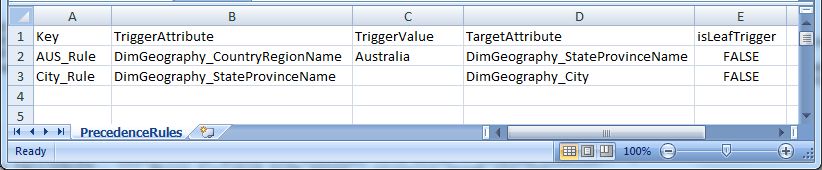
Note that the TriggerValue for the second precedence rule is blank, which means that any value in the DimGeography_StateProvinceName attribute will trigger the rule.
