In the list of attributes for a new data set, the Data Type column lists the data type for the attribute. The data type controls the available formatting and aggregation options for the attribute value.
Studio uses the data type from the original data to determine the data types. For a file upload, if a column is completely empty, then Studio automatically makes that attribute a string attribute.
Studio will identify an attribute as a date/time value if:
| Source | Identified as Date/Time When |
|---|---|
| JDBC | The original column is identified as a date column. |
| Oracle BI | The original column is identified as a date column. |
| Excel | The original column is identified as a date column. |
| JSON | The values for the attribute are in one of
the formats listed in a Provisioning Service configuration file.
For information on how to define the list of allowed date formats for JSON files, see the Provisioning Service Administration Guide. |
Note also that for Excel file uploads:
- If a column contains a calculated duration, Studio does not recognize it as a duration attribute.
- For a column to be identified as a time attribute, the value must include the hour.
You can use the drop-down list in the Data Type column to select a different data type from the one that Studio selects.
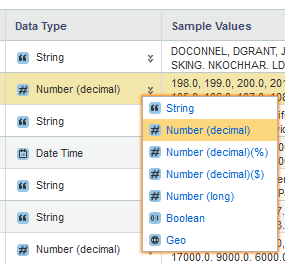
Some notes on selecting a different data type:
- Changing the data type on an attribute does not affect any filters on that attribute. The filters are always based on the data type from the original data.
- Selecting a different data type does not guarantee that the value can be converted to that data type.
- You cannot change any other data type to a date/time value, even if the value seems to look like a date/time.
- You can only change a value to a geocode if it uses the correct format, which is two decimal numbers separated by a white space. Geocode attributes are only supported for Excel files.
- If you select Number(decimal)(%) to format the value as a percentage, then Studio automatically multiplies the value by 100 before displaying it.
