Understanding the PeopleSoft Online Help Website Folders
Before adding new PeopleSoft Online Help to an existing website or changing how users access the help, you should understand the hierarchical folder structure of the website and how it corresponds to the organizational levels of the documentation on the site. The PeopleSoft Online Help site contains the following folder levels:
Global
Language
Product family
Subject
The top folder of the website (docroot) is the global level of the online help.
Image: Global Level of the PeopleSoft Online Help
This example illustrates the files and subfolders in the global level of the help system. In this example, the docroot is named “help-PB.” The contents of the global folder are described later in this section.
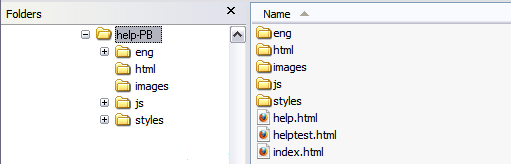
Files
The global level contains the following HTML files:
|
Field or Control |
Definition |
|---|---|
| index.html |
Contains JavaScript to load the homepage content for the appropriate language. |
| help.html |
Contains JavaScript to support context-sensitive help. |
| helptest.html |
Contains fields for testing and troubleshooting the context-sensitive help. |
Folders
The global level includes the following folders:
|
Field or Control |
Definition |
|---|---|
| language |
Contains all help content for a specific language. The only delivered language folder is eng (English). See Language Folder Level. |
| html |
Contains common HTML files that are used in the PeopleSoft Online Help user interface for all languages. |
| images |
Contains graphic files that are used in the user interface for all languages. |
| js |
Contains JavaScript files for all languages. |
| styles |
Contains cascading style sheet (CSS) files for all languages. |
Below the docroot folder are folders representing each installed documentation language. These folders represent the language level of the website.
Image: Language Level of the PeopleSoft Online Help
This example illustrates the files and subfolders in the language level of the help system. In this example, the docroot is named “help-PB.” The contents of the language folder are described later in this section.
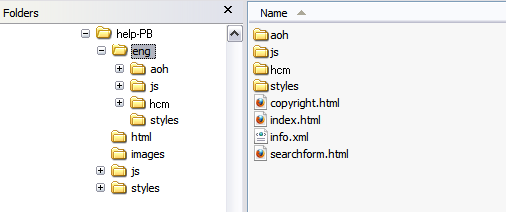
The language level is the top of the PeopleSoft Online Help site as far as users are concerned. When a user navigates to docroot/index.htm, that user is redirected to the appropriate language folder, based on his or her browser language. The files at and below the language level are all language specific.
Files
The language level contains the following HTML files:
|
Field or Control |
Definition |
|---|---|
| copyright.html |
Contains the Oracle copyright statements and legal notices. |
| index.html |
Contains the data that appears on the PeopleSoft Online Help home page for the selected language. |
| info.xml |
Contains data about links that should appear in the Related Pages portlet on the home page. |
| searchform.html |
Contains the content for the Search portlet that appears on every help page. |
Folders
The language level includes the following folders:
|
Field or Control |
Definition |
|---|---|
| product family |
Contains all help content for a specific product family. For example, the hcm folder contains the Human Capital Management online help. |
| js |
Contains JavaScript files with language-specific information, such as text strings that appear within the help user interface. |
| styles |
Contains Cascading Style Sheet (CSS) files for language-specific user interface formatting. This is also where your organization can modify the user interface formatting, if required. See Modifying Online Help Style Sheets. |
Within the language folders are one or more product family folders, depending on which product families you have installed. These folders represent the product family level of the website.
Image: Product Family Level of the PeopleSoft Online Help
This example illustrates the files and subfolders in the product family level of the help system. In this example, the docroot is named “help-PB.” The contents of the product family folder are described later in this section.
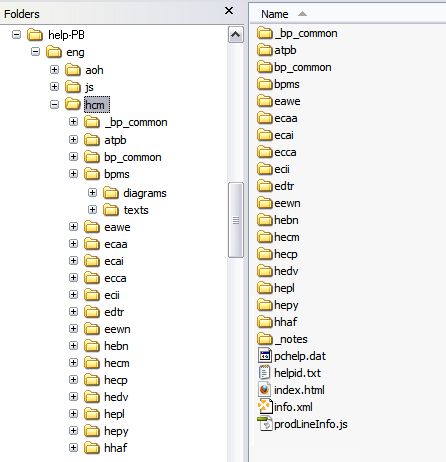
The product family folder contains several files, including the index.html file, which represents the product family navigation page containing links to all subject navigation pages within the product family. In addition, the product family folder contains one folder for each product or subject that has online help. Online help for subjects includes information that applies to the product family as a whole, such as application fundamentals help, or to a set of multiple, related products within the product family, such as call center applications. See Subject Folder Level. Common boilerplate files are stored in the _bp_common or bp_common folder.
The product family folder may contain a bpms folder, which contains files and folders for the business process map (BPM) diagrams and text-only BPMs. This folder is not available for all product families.
Within the product family folders are one or more subject folders, which contain the actual online help for each product or subject in the product family. These folders represent the subject level of the website.
Image: Subject Level of the PeopleSoft Online Help
This example illustrates the files and subfolders in the subject level of the help system. In this example, the docroot is named “help-PB.” The contents of the subject folder are described later in this section.
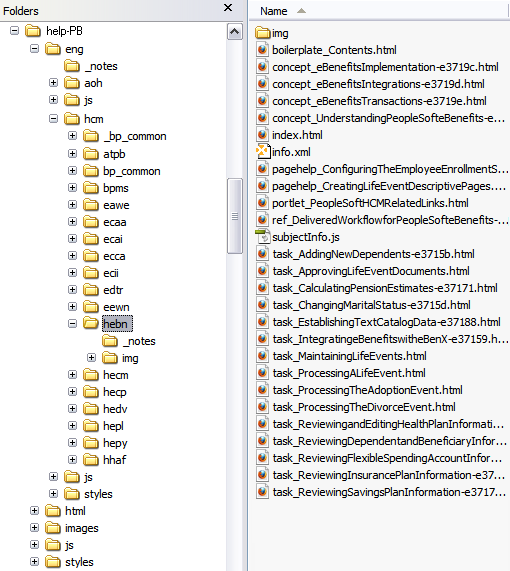
The subject folder contains several files, including the index.html file, which represents the subject navigation page containing links to all help pages for the subject. The prefix of each help page file name indicates the type of content that the page contains, such as concept or task information. All images for the subject are stored in the img subfolder.