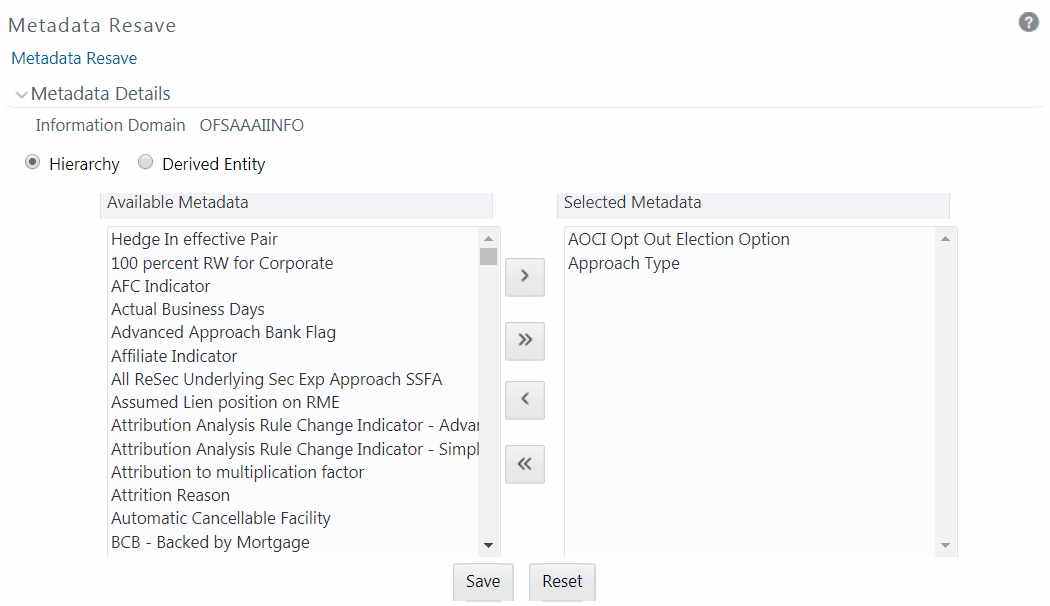
Save Metadata within the Infrastructure system facilitates you to resave the changes done to an authorized metadata for the selected Information Domain. When you resave metadata, all the existing metadata definitions are updated with the current changes along with the current modified date.
You (System Administrator) need to have SYSADM function role mapped to access the Metadata Resave window. The Metadata Resave window displays the list of Available Metadata for Hierarchy (default) for the selected Information Domain.
To resave metadata in the Metadata Resave window:
1. Filter the metadata type by selecting Hierarchy or Derived Entity. The list of Available Metadata is populated. Do one of the following:
§ Select the required metadata from the Available Metadata list and click  button. You can press Ctrl key form multiple selection.
§ To select all the Available Metadata, click  button.
You can also deselect a metadata by selecting from the Selected Metadata list and clicking  button or deselect all the selected metadata by clicking
  button.
2. Click Save and update the metadata changes. Status of operation is displayed.