OAuth server example workflow
Assume that you are using a image printing website such as Canon to print some of your photos. You also have some photos on your Flickr account that you would like to print. However, you must download all these locally, and then upload them again to the printing website, which is inconvenient. You would like to be able to sign into Flickr from your Canon printing profile, and print your photos directly.
This problem can be solved using the example OAuth 2.0 web server flow shown in the following diagram:
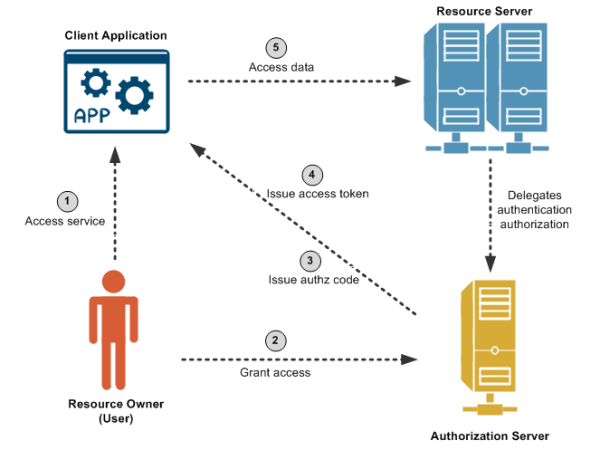
Out of band, the Canon printing client application preregisters with Flickr and obtains a client ID and secret. The client application registers a callback URL to receive the authorization code from Flickr when you, as resource owner, allow Canon to access the photos from Flickr. The printing application has also requested access to an API named /flickr/photos, which has an OAuth scope of photos.
The steps in the diagram are described as follows:
- You are using a mobile phone and are signed into the Canon image printing website. You click to print Flickr photos. The Canon client application redirects you to the Flickr OAuth authorization server. You must already have a Flickr account.
- You log in to your Flickr account, and the Flickr authorization server asks you "Do you want to allow the Canon printing application to access your photos?" You click Yes to authorize.
- When successful, the printing application receives an authorization code at the callback URL that was preregistered out of band.
| Note | You have not shared your Flickr user name and password with the printing application. At this point, you as resource owner are no longer involved in the process. |
- The client application gets the authorization code, and must exchange this short-lived code for an access token. The client application sends another request to the authorization server, saying it has a code that proves the user has authorized it to access their photos, and now issue the access token to be sent on to the API (resource server). The authorization server verifies the authorization code and returns an access token.
- The client application sends the access token to the API (resource server), and receives the photos as requested.