This topic applies to doclets and supplemental doclets.
For detailed information on doclets and supplemental doclets, click Inspect in the Performance Reporting ribbon.

The Inspect button launches the Properties dialog box.
From the Properties dialog box, you can also download previous versions of a doclet or Word- or PowerPoint-based supplemental doclet.
Note: | All steps in the following procedure are optional. |
 To view information about a doclet or supplemental doclet:
If the report package is not already open, in the Smart View Panel, navigate to the report package and open it.
Select a doclet or supplemental doclet in the list and click the Inspect button in the Performance Reporting ribbon.
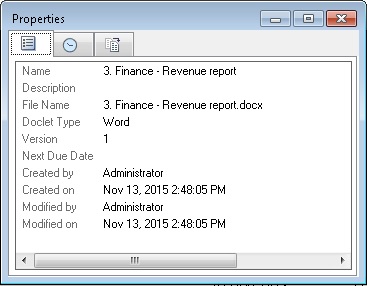
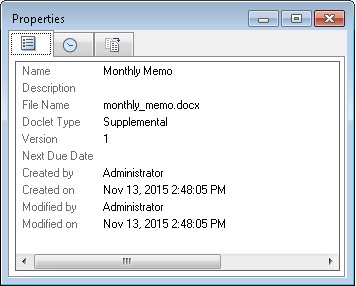
In the Properties dialog box, view the information the Properties tab (the default tab).
The Properties tab displays basic information about the doclet or supplemental doclet, such as the file name, doclet type, and the user who created it.
Click the History tab,
 , to view audit information about the doclet or supplemental doclet, such as the user who last updated it (if applicable).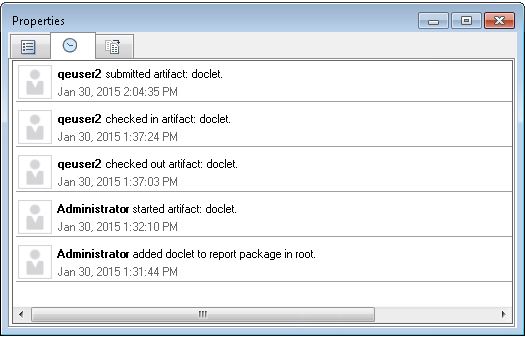
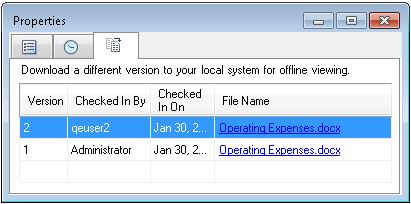
Click the Version tab,
 , to download previous versions of the doclet or Word- or PowerPoint-based supplemental doclet.
As new versions of the doclet or Word- or PowerPoint-based supplemental doclet are checked in, the previous versions are stored so that you can view them to see what changed.
To download a previous version of a doclet or Word- or PowerPoint-based supplemental doclet, click the link next to the version that you want.
A message notifies you of the location of the downloaded doclet or Word- or PowerPoint-based supplemental doclet.
You may download any type of supplemental doclet; however, only Word- or PowerPoint-based supplemental doclets may have previous versions.