FAQ - Can I view an Accounts Receivable account's balances in different properties?
In the Accounts Receivable Aging, you can view multiple accounts, whether in the same property or multiple properties in either the minimized view or maximized view.
To view accounts multiple properties you must be logged in to a HUB that contains those properties.
MINIMIZED VIEW
If you are in the minimized view of the Aging jump, select an account from the side panel to view the details for that account. (The account that is currently in view switches with the account you select.)
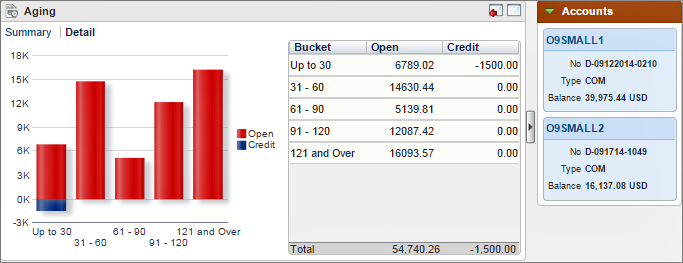
MAXIMIZED VIEW
The maximized view of the Aging jump allows you to view multiple accounts simultaneously by graph or by table.
In the bottom section (Profile Aging) select the properties to view, and then select Search.
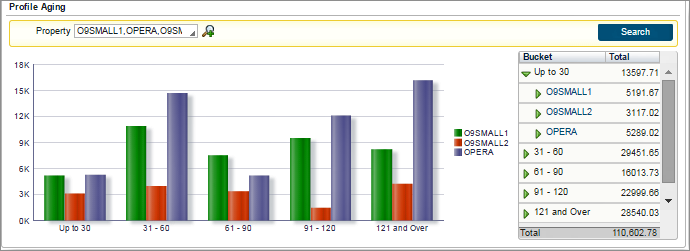
This graph generates a quick comparison color-coded view of net balances owed in each property.
The table breaks down the balances owed by aging period (Bucket).