The diagram below illustrates the behavior of the installer.
Note: This diagram shows how the installer distributes the BDD components
to the different nodes in your cluster. This diagram is not intended to
illustrate the number of nodes you can have. For various installation
configurations, including options for co-locating different BDD components on
the same node, see
Deployment configurations and diagrams.
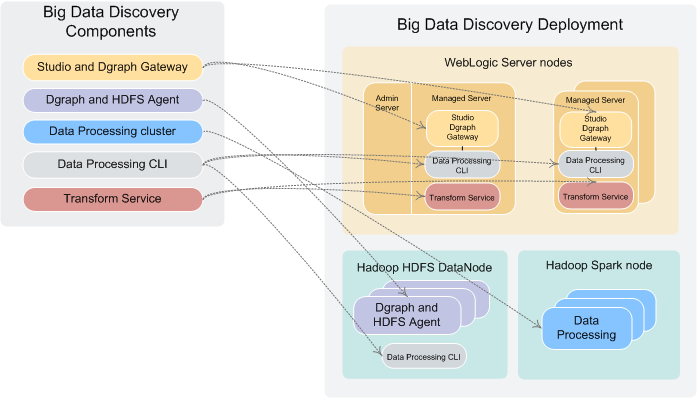
When the installer runs, it:
- Reads and validates bdd.conf and the Hadoop client libraries.
- If running in normal (non-silent) mode, prompts you for the values it requires, including the username and password for the WebLogic Server admin.
- Queries Cloudera Manager/Ambari for information on your Hadoop cluster, including the host names and port numbers of specific Hadoop nodes.
- Distributes the installation packages to each node in the cluster according to the configuration defined in bdd.conf.
- Generates the Hadoop fat JAR.
- If the FORCE property in bdd.conf is set to TRUE, deletes the ORACLE_HOME directory from each node.
- Verifies that each node meets all requirements.
- Installs the components:
- Installs WebLogic Server (including Studio and the Dgraph Gateway) on the Admin Server node and all Managed Server nodes.
- Installs the Dgraph and HDFS Agent on all Dgraph nodes.
- Installs the Data Processing CLI on all Managed Server and Dgraph nodes.
- Installs Data Processing on all qualified Spark nodes.
- Installs Jetty and the Transform Service.
- Distributes the Hadoop fat JAR all BDD nodes.
- If Kerberos is enabled, distributes the keytab file to all BDD nodes.
- Installs the bdd-admin script on all Managed Server nodes, Dgraph nodes, and Data Processing nodes (not shown in the diagram).
- Deploys the Transform
Service:
- Starts and configures Jetty.
- Deploys the Transform Service.
- Deploys Data Processing:
- Deploys Data Processing.
- If configured to do so, deploys the cron job that runs the Hive Table Detector and starts it.
- Deploys the Data Processing CLI to all Managed Server and Dgraph nodes.
- Deploys WebLogic Server:
- Creates the WebLogic domain and the Managed Servers.
- Deploys the Dgraph Gateway and Studio as applications within the WebLogic domain.
- Deploys WebLogic as a service on all Managed Servers.
- Starts all Managed Servers.
- Deploys the Dgraph and the
Dgraph HDFS Agent:
- Deploys both components.
- Creates the database directory if it doesn't currently exist.
- Starts the components.
- If the databases are stored on HDFS, creates and tests the local Dgraph mount directory.
- Verifies that the entire BDD deployment cluster is running.
