


|
|
|
|
|
Note: Oracle recommends that you stop the CRF Submit XML Generator service before uninstalling.
The Install Shield Wizard appears.
If the following error message occurs, click OK and continue.
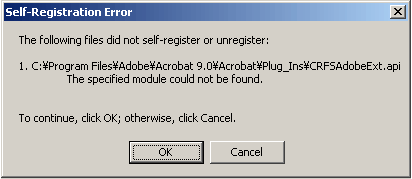
The Document Generator software uninstalls successfully.
The Document Generator software is uninstalled from the computer.
Note: After completing the uninstall wizard, you must manually delete the CRF Submit installation folder and all subfolders to make sure all the files have been removed from the system.
Copyright © 2005, 2016 Oracle and/or its affiliates. All rights reserved.