


|
|
|
|
|
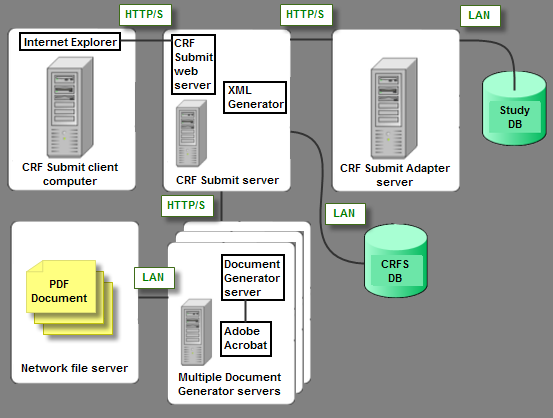
The following diagram shows the components that convert InForm study data into PDF files.
Component |
Description |
|---|---|
CRF Submit client computer |
The computer on which you use Internet Explorer to access the CRF Submit server to create and monitor work orders. |
CRF Submit server |
|
CRF Submit database |
An Oracle database that:
|
Document Generator server |
Performs final conversion to PDF files. |
Network file server |
Repository to hold the final PDF output. |
CRF Submit Adapter server |
Processes requests from the CRF Submit web server and retrieves clinical data from the InForm database and converts it into XML format. |
Study database |
Maintains and controls study data as it is entered into the InForm application. Contains the source data for the PDF, XML, and HTML files generated by the CRF Submit application. Note: The CRF Submit application does not modify the InForm data. |
Copyright © 2005, 2016 Oracle and/or its affiliates. All rights reserved.