Navigating Submittal Exchange Menus and Tabs
The top of each Submittal Exchange page has tabs and links for navigating the system.
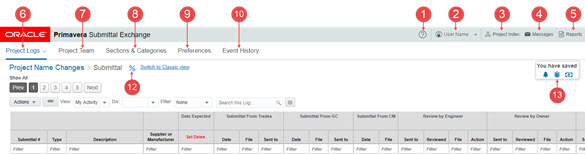
Note Not all users will see all menus, tabs, or options. Access to some features depends on which role or team you are on.
- Help Menu - Use the options under the Help icon to learn about Submittal Exchange and reach out for help.
- Account Menu - Use the options under your name to review account information.
- Project Index - Use the Project Index to select a project.
- Message Center - Use the Message Center to see emails you receive from the system.
- Reports Menu - Use the options under the Reports menu to generate reports or API keys.
- Project Logs Tab - Use the Project Logs to select a log.
- Project Team Tab - Use the Project Team tab to view and manage team members who have access to the project on the system.
- Sections & Categories Tab - Use the Sections & Categories tab to edit the expected items for submittals and closeouts.
- Preferences - Use the Preferences to view and edit project preferences.
- Event History - Use the Event History to review previous events on your project.
- Alert Icon - (not shown) - Use the Alert icon to access alerts on the system.
- Log Progress - Use the Log Progress to see the percentage of items that have been submitted and reviewed.
- Savings Calculators - Use the Savings Calculators to see what your organization has saved by using the system.
In This Section
Last Published Monday, November 17, 2025