Accounts are the most basic and critical products from the retail banking perspective. The majority of the banking customers hold either Current or Savings account with the bank and hence servicing CASACurrent Account or Savings Accounts are operative accounts through which account holders perform day to day operations such as deposits and withdrawal of money. accounts is the bread and butter, for banks.
The user can access his Accounts through the online channels. He can view balances and account statements, initiate service requests, make inquiry as well as perform financial transactions on his accounts. Users can manage their banking requirements, efficiently and effectively with banks through the self-service channel.
Pre-Requisites
Features Supported In the Application:
The retail accounts module of the application supports the following features: •
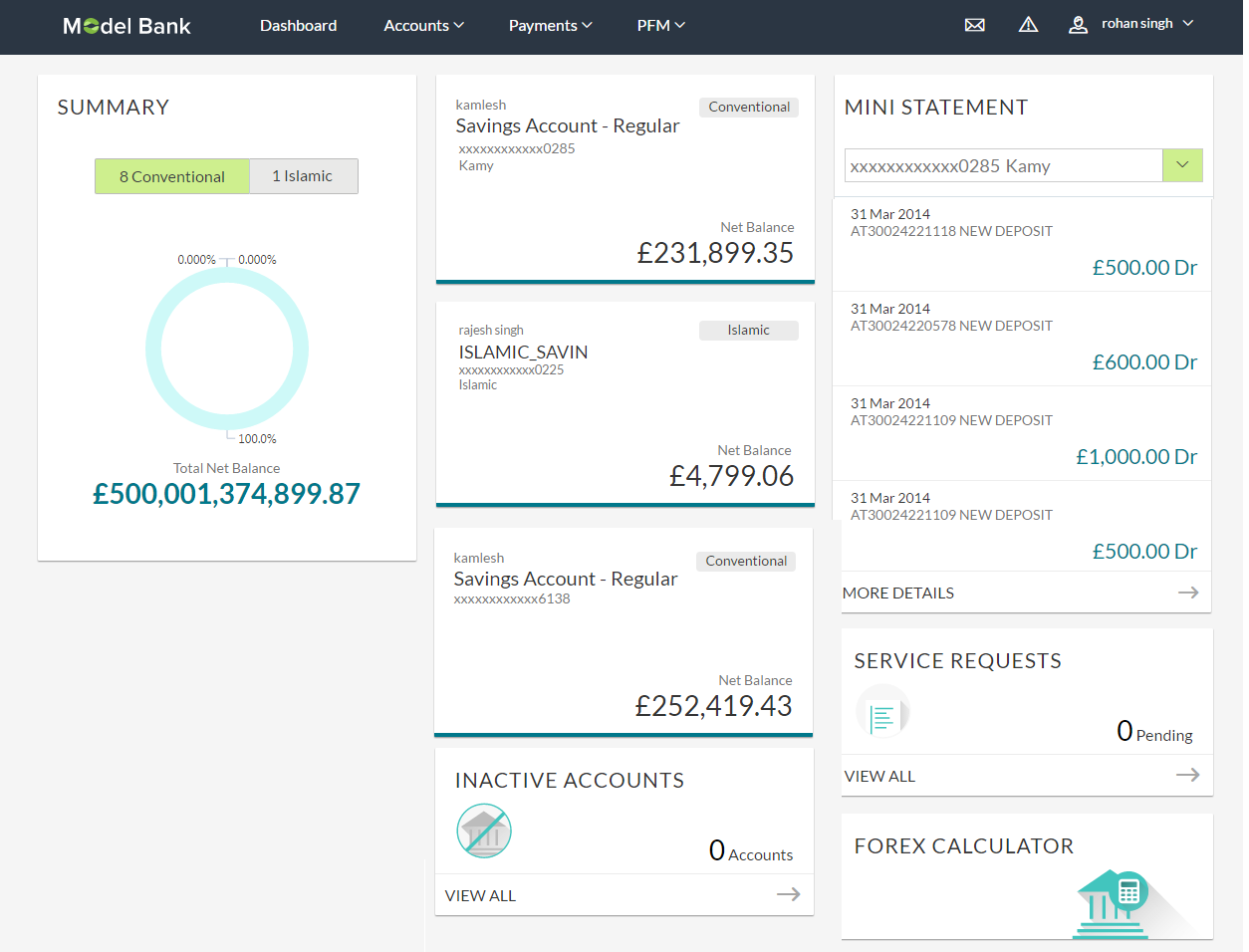
The Accounts dashboard provides a summary of the accounts held by the user. It therefore serves as a one stop shop, for the retail user – for both information and enquiry related to his account and relationship with the bank, as well as a launch pad for transactions.
User can see the count of his conventional and Islamic accounts and their net balances, in a graph. Each account is depicted as cards, displaying the name of the account holder, the account number and a label for Islamic / Conventional.
Alongside the cards of different accounts is the Mini Statement widget - the system retrieves the account statement details and displays it here. Mini statement of one account will be displayed at a time. User can change the account number from available accounts to view mini statement of other accounts. In addition to this, user can navigate to account statement screen to view complete transaction details or download account statement.
Dormant accounts that are in the ‘inactive’ status – either because they have not been used for sometime or for some regulatory reason etc.,, are grouped together and can be accessed through a separate “Inactive Accounts” widget on the dashboard. User can view his inactive accounts (if any) by navigating to the inactive accounts screen, from here.
Users can keep track of service requests initiated by him. The Dashboard provides status and count summary of service requests. This feature provides visibility to the user on the service requestA Service Request is a user request for information or advice, or for a standard change. raised by him, and helps reduce helpdesk costs for the bank as customers are updated on status and progress of their requests.
A ForexForeign Exchange Currency calculator is available on the user’s dashboard. The exchange rates are updated, every business day and calculations are performed based on user s inputs and displayed to him.
Find below the components of the dashboard:
Click on individual components to view in detail.
 Dashboard Overview
|
Summary This section lists the user’s cumulative balances in the bank graphically. There is a tab for Conventional & Islamic CASA accounts, click to see the Net Balance and the count of accounts. |
|
|
Account Cards All the customer’s accounts are displayed with their current balances and account number. The active accounts card displays the details, like:
Note: Each card is labeled if it is Islamic or conventional with additional labels for Joint accounts are shown for user to easily differentiate between the accounts. For more information on Islamic Financing, click here. Click on the respective account card to view the details. |
|
|
Inactive Accounts It displays total number of inactive accounts. Click View All to view all inactive accounts and their details. |
|
|
Mini Statements Select the account number for which you want to view the mini statement. It displays last few financial transactions of the primary account. The mini statement includes:
Click More Details to view all transactions in the account statement along with its detail. |
|
|
Service Requests Displays the count of pending service requests. Click this section to view all initiated service requests. |
|
