 icon (Workflow Status) to display the Workflow Status screen.
The initialization process copies current position runoff results into a Forecast Set from a Static Deterministic Process that the BSP System Administrator has previously built and executed. The Static Deterministic Process that is used as the source is named in the Forecast Set's Definition stage.
When you Initialize a Forecast Set, you may optionally recover data from a previous Forecast Set. This is the Forecast Set that you have designated as the "Initialization Forecast" set in your Definition step. For example, you might have started with a Forecast Set called "2021 Budget, Version 1" and now want to build a new version called "2021 Budget, Version 2".
When you initialize Version 2 of your 2021 Budget, you might want to recover data from Version 1 of your 2021 Budget. To do this, you would designate "2021 Budget, Version 1" as the "Initialization Forecast Set" when you first define "2021 Budget, Version 2".
NOTE: Only data from months that overlap both Forecast Set can be recovered. Also note that the first month of the Initialization Forecast Set must be the same or earlier than the first month of the Forecast Set being initialized.
There are also options in terms of what kind of data you might want to recover from the Initialization Forecast Set. The first option is to recover the Balance Driver Methods and/or Pricing Margin Driver Methods. For example, you might want to retain each planning user's preferred form of forecasting new business balances (i.e., New Add, Target End, Target Average, or Growth); or you might want to retain each planning user's preferred form of forecasting new business margins (New Add Rate vs. New Add Spread).
The second option is to recover the actual forecast driver values for New Business Balances and New Business Pricing Margins.
Note:
· In order to recover Balance Driver values from an Initialization Forecast, you must also recover the Balance Driver Methods
· In order to recover Pricing Margin Driver values from an Initialization Forecast, you must also recover the Pricing Margin Driver Methods
Other Notes:
1. Only months that overlap between a new Forecast Set and an older Initialization Forecast Set can be recovered.
2. When the new Forecast Set extends in time beyond the older Initialization Forecast Set, values for the last month in the older Forecast Set are copied out to the last month of the new Forecast Set.
In the Forecast Set Lifecycle, each of the Forecast Set goes through four status changes namely Defined, Initialized, Published, and Locked.
· Defined: Once a Forecast set is created and saved, the workflow status of the forecast set will be set to Defined.
· Initialized: To change the status to Initialized, select a created Forecast Set from the list and click icon (Workflow Status) to display the Workflow Status screen.
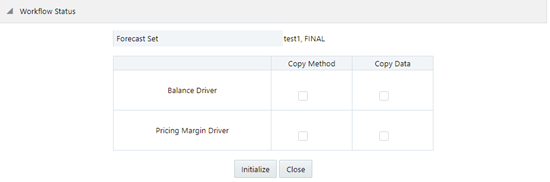
Select the relevant check boxes for Balance Driver and Pricing Margin Driver and click Initialize. This changes the status of the selected Forecast Set to Initialized.
· Published: To change the status to Published, select a Forecast set which is in Initialized status and click the  icon to display the Workflow Status screen.
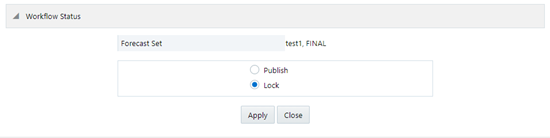
You can either change the status to Published or Locked.
Publish: If you select Publish, the Forecast set will be ready for the consumption of the planning analyst. The forecast set you selected will be with the status Published on the Forecast Set Details screen. A published forecast set can be un-published by again clicking the Workflow Status icon and selecting the Depublish check box. This sets the workflow status again to Initialized.
· Locked: If the status of a forecast set is Locked, then it cannot be unlocked or edited.