| Oracle Agile Engineering Data Management System Customization Management Release e6.2.1.0 E77560-01 |
|

 Previous |
 Next |
| Oracle Agile Engineering Data Management System Customization Management Release e6.2.1.0 E77560-01 |
|
Previous |
Next |
System Customization Management (SCM) is a tool for Agile e6 administrators that provides a way to manage customization code in Agile e6.
System Customization Management (SCM) is a tool for Agile e6 administrators and consultants that provides a sophisticated method to manage customization code in Agile e6. The SCM tool provides a controlled method for transferring customization code from one source environment to another target environment.
Best practice for creating custom enhancements and modifications is to:
Develop the custom code in a separate development environment of Agile e6.
In the development environment, thoroughly test and validate the custom code.
Transfer the development custom code to an Agile e6 test environment where key users can verify that all features are fully functional.
Transfer the now validated custom code from the Agile e6 test environment to the production Agile e6 environment.
In the system customization process, you must identify the modifications in one environment and transport them to a different environment. SCM provides capabilities that enable you to:
Select/identify modifications
Assign modifications to so-called change packages or bundles
Manage the existing bundles within an environment
Export the bundles into a set of files
Import the set of files and activate the modifications in another environment
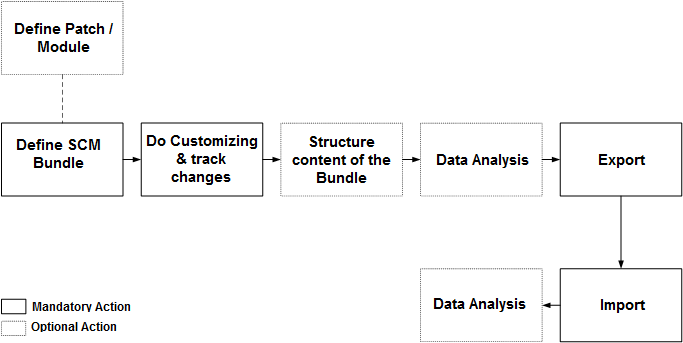
The following figure illustrates the general flow of actions, when working with SCM tool. This is an iterative process where the user will repeat the process as many times as needed to thoroughly define, export, and test the system customization.
In order to follow best practices, you will use two different Agile e6 environments:
A separate test environment, which includes a test source application and a test target application.
Develop, test, analyze, and verify the customization code in the test environment.
The production environment.
Only after the customization code has been fully tested and verified in the test environment, then transfer the customization code to the production environment.
Configure the test environment Source and Target application as described in the Chapter ”Configuring the Source Environment and the Target Environment. See
Develop the custom code in the separate development test environment of Agile e6. Define the SCM bundle and prepare to transfer it to the test target application.
Transfer the custom code to the test development target application. In the test development environment, thoroughly test and validate the custom code.
Transfer the development custom code to an Agile e6 test environment where key users can verify that all features are fully functional.
Repeat steps 2 through 4 as many times as needed until the customized code is ready to be deployed in the Agile e6 production environment.
Transfer the now validated custom code from the Agile e6 test environment to the production Agile e6 environment.
Bundles are the basic ”envelope” to organize and manage modifications.
For more information, see Chapter ”Bundle Objects”.
In addition to bundles, SCM provides the concepts of Patches and Modules. Patches and Modules are a set of bundles. For example, you might create a patch for a rollout which includes several independent bundles from different application areas such as document management, item management, or project management.
For more information, see Chapter "Managing Patches and Modules".
SCM also provides data analysis tools. The "where-used" for a specific object, shows whether the object is part of any other bundle. Consultants and administrators use this feature to assure that the correct, consolidated modification makes it into the bundle. The "Check Structure" feature reviews the structure of the current object and adds the subordinate objects to the current bundle.
In addition to adding objects to a bundle, you can enhance the bundle with objects of type INF. INF objects can be used to structure the content of the bundle or they can be used to include further instructions for handling the bundle.
The "Check Structure" feature reviews the structure of the current object and adds the subordinate objects to the current bundle. Check Structure will consider, for example:
Menus
(Sub-) Forms
Tables
Logiview procedures
Messages
Opens a list of all modifications which allows you to run where-used queries across all bundles in the current environment.