Oracle® Agile Engineering Data Management
Release Notes for Agile e6.2.1.0 Release Update Packs
Release e6.2.1.1/e6.2.1.2
E99689-02
January 2019
This document outlines the enhancements and additions to the core product for Agile e6.2.1.0 Release Update Packs.
|
Note: Each RUP is cumulative and contains all enhancements and additions delivered in prior RUPs. |
Enhancements
This section describes the enhancements included in Agile e6.2.1.0 Release Update Packs
Agile e6.2.1.1
Java Client
You will find several fixes for the Java Client User Interface behavior in this RUP
-
Drop Down menus no longer disappear, when trying to select from filtered drop down lists
-
Pre_mask triggers are executed while switching between folders in a form, if /Dynamic option is used.
-
Auto-Hide behavior for the browser window has been improved, so that it stays open on Mouse Over action and allows to work with the browser window content
-
Icons to expand and collapse browser structure do no longer fade out unexpectedly
LogiView
Menu_create
A new option /RESET is introduced in the LogiView function menu_create to clean the menu cache. In Agile e6.2.1 a caching mechanism was introduced for menus to improve the performance of the Java Client. However if the menu selections are modified for such a menu, the system still reads the old menu entries from the cache.
Using the option "/RESET" allows to clear the cache for the menu, so data is read from the database and the cache is refreshed.
LogiView Code Sample:
MENU_NAME = "menu_name"
SELECTION[1] = "selection1"
SELECTION[2] = "selection2"
menu_create(strcat(MENU_NAME, "/RESET"), SELECTION[1])
Furthermore an issue with duplicate titles was fixed when using menu_create with Option /Title.
Scan()
Starting with Agile e6.2.0 the LogiView scan() function had compatibility issues compared to Agile e6.1.3. When scanning for example a string that contains characters (e.g. 'X1') and converting this into an integer, the return code of scan() function is 0 and target variable is unchanged.
See sample LogiView code below:
10 intVar = -1
20 guard = -1
30 str = "X 1"
40 result= scan(str,"%i %i", intVar, guard)
50 put("result=",result)
60 put("intVar =", intVar)
70 put("guard =", guard)
Execute this procedure.
result=0
intVar =-1
guard = -1
Snapshot Management
Snapshot Management functionality has been improved to allow creation of snapshots even if some documents in the document structure are reserved by another user. Therefore EDB_REL_ACT_INS supports a new value 4, which skips the checks for "write access to parent" and "reserved by other user".
On creating a new document revision, the files belonging to the snapshot are not copied anymore if the snapshot is not taken over to the new document revision.
Installer
Modified Database Connect String to successfully connect to Oracle Pluggable Database
The syntax of the database connect string was changed to allow successful connection to the Oracle Pluggable database. Now it contains "SID=" instead of "ORACLE_SID=".
To connect to Oracle Pluggable Database, you need to modify the listener.ora file on the Oracle Pluggable Database server:
-
Add control parameter "USE_SID_AS_SERVICE_listener_name=on" (e.g. USE_SID_AS_SERVICE_LISTENER=on) in the listener.ora file.
-
Remove the value for the "HOST" in the listener. It should look like this "(HOST=)".
-
Restart your listener on the Pluggable Database.
Agile e6.2.1.2
Java Client (Bug 28243455)
When opening an object in the Java Client browser, the browser object name shows the full object name (e.g. 'Item / Item Number / Revision Number') now. This is also shown as the title in the dynamic tab.
Furthermore, if the user tries to open the same object (with identical object name) twice in the browser, the already opened object will be closed and the object will be re-opened. You will find the new object at the bottom of the browser panel.
Snapshot Management (ER 27570799)
The Fast Load procedure has been enhanced to provide more detailed information about snapshots. When the Fast Load procedure is used to load a CAD snapshot, you will now find information about T_DOC_SNP_STR.CAX_01 to T_DOC_SNP_STR.CAX_05 and T_DOC_SNP_STR.CAX_FILE_NAME in the resulting table T_CAX_STR_TMP.
Userexit EXM_SND_EXT supports parameter -U (ER 28243455)
When using EXM_SND_EXT userexit to use server side mailing, you can use the parameter -U to define the user, whose email address is used as "from_user" in the email. Previously the parameter -U was ignored and the email was always sent on behalf of the current user.
The behavior of client side mailing remains unchanged.
AutoVue and Support of latest JDK 1.8
Agile e6.2.1 RUP2 will mandate the users to upgrade to AutoVue 21.0.2 which requires JDK1.8.0_181 or higher version.
If customers on Agile e6.2.1.0 GA or RUP1 want to use AutoVue 21.0.2 without applying RUP2, they can follow the guide to manually upgrade to AutoVue 21.0.2 (Refer to Support Note Doc ID 2491584.1).
If customers have already applied RUP2, but they still want to use AutoVue 21.0.1, they can also follow the guide to manually downgrade to AutoVue 21.0.1 (Refer to Support Note Doc ID 2491586.1)
|
Note: Manually upgrade or downgrade steps need to be re-done every time when re-deploying Jvue and Vuelink. |
Platform Support for Oracle WebLogic 12.2.1.3 (ER 28825014)
-
If using Oracle WebLogic 12.2.1.2 with Agile EDM 6.2.1.0, it is strongly recommended to upgrade to Oracle WebLogic 12.2.1.3, because Oracle WebLogic 12.2.1.2 is end of Error Correction by AUG, 2018 (see Support Note Doc ID 950131.1 for details)
-
If using JDK 1.8.0_161 or higher version, two Weblogic patches (28186730 and 28298734) need to be applied on Oracle WebLogic 12.2.1.3 (See Support Note Doc ID 2357811.1 for details). We recommend apply latest Weblogic patches.
-
Customers can perform a new installation of Agile PLM 6.2.1.0 directly on Oracle WebLogic 12.2.1.3 after manually updating the following property file in Agile e6.2.1.0 GA installer:
<installation-media-path>\installer\properties\iconstants.properties
Please modify the first line as described below (or copy from rupInstaller\pkg\installer\properties\iconstants.properties):
PLM_INSTALLER_ORACLE_WLS_VERSION=12.2.1.3.0
-
Customers who choose to stay in Oracle WebLogic 12.2.1.2 for Agile EDM 6.2.1 do so at their own risk as security patches for Oracle WebLogic 12.2.1.2 are no longer provided.
-
Oracle WebLogic 12.2.1.3 may be a prerequisite for future Agile EDM patches and/or RUPs. Customers using Oracle WebLogic 12.2.1.2 for Agile EDM 6.2.1 should upgrade to Oracle WebLogic 12.2.1.3 as part of RUP2 uptake, or do so as soon as practical.
-
If you choose to continue using Oracle WebLogic 12.2.1.2 and you encounter an issue, you may be required to upgrade to Oracle WebLogic 12.2.1.3 as part of the SR action plan with Oracle Support.
Platform Support for Oracle Database 12cR2 (12.2.0.1.0) (ER 21768678)
Database templates have been adapted to be compatible with Oracle Database 12.2.
Database templates of Agile EDM are using Automatic Shared Memory Management (ASMM) instead of Automatic Memory Management (AMM) since Agile EDM 6.2.1 RUP 2 (See Support Note Doc ID 2244817.1). The templates are included in RUP installer package (addon/db/unix or addon/db/windows). Please follow instructions in "Installing Database Server in Server Installation Guide" to create databases with these templates. The templates should be copied into <installation-media-path>/addon in case of database installation by installer.
|
Note: There is a platform specific issue on Solaris 11 with Automatic Shared Memory Management. An error "ORA-27125: unable to create shared memory segment", might occur during database creation with some existing templates. Please see support document "ORA-27125 When Creating 12c Database On Solaris 11" (see Support Note Doc ID 1584995.1) to solve the issue. |
|
Note: Upgrade Tool certification on Oracle Database 12.2 has not been done yet. It will be delivered later. |
Platform Support for AIX 7.2 (ER 28932890)
Agile 6.2.1.0 is certified on AIX 7.2 (PowerPC 7 or higher, 64-bit), but the main supported AIX platform for Agile e6.2.1.0 is still AIX 7.1 (PowerPC 5 or higher, 64-bit).
In order to install and run Agile e6.2.1.0 on AIX 7.2 please make the following modifications in installation packages:
-
Update the file <installation-media-path>\installer\xml\xmlpropertyextension\os_specific.xml in the installation package like this:
<Architecture id="UNIX:AIX:7.2" name="AIX 7.2">
<Version id="UNIX:AIX:7.2:ppc" name="AIX 7.2 ppc" EP_MACH="rs6000-ibm-aix7.1" Java-Ref="jdk180" Database-Vendor-Ref="ORACLE" Database-Version-ef="ora121"/>
<Version id="UNIX:AIX:7.2:ppc64" name="AIX 7.2 ppc (64bit)" EP_MACH="rs6000-ibm-aix7.1" EP_MACH_64="ppc64-ibm-aix7.1" Java-Ref="jdk180" Database-Vendor-               Ref="ORACLE" Database-Version-Ref="ora121"/>
</Architecture>
-
After installation, change the version in <ep_root>/axalant/scripts/ep_get_mach from AIX:1:7 to AIX:2:7 before logging into the Java Client.
-
If you want to use Batch Client to connect AIX 7.2 server, change the version in <batchclient_root>/axalant/scripts/ep_get_mach from AIX:1:7 to AIX:2:7.
-
If you want to use the AutoVueBatch to connect AIX 7.2 server, change the version in <autovuebatch_root>/axalant/scripts/ep_get_mach from AIX:1:7 to AIX:2:7.
-
If you want to use the EIP to connect AIX 7.2 server, change the version in <eip_root>/bin/ep_get_mach from AIX:1:7 to AIX:2:7.
De-Support
This section describes any features de-supported for Agile e6.2.1.1. There are no de-supported features in Agile e6.2.1.2
Agile e6.2.1.1
Web Client
The Web-Client will be de-supported. Oracle will keep the existing functionality of the Web Client but will not provide any further fixes. Customer who are using the Web Client should use the Java Client (WebStart) instead or should leverage the web service interface to build dedicated Web Frontends for specific use cases.
By default the Web Client startscreenstart screen shows a de-support message.
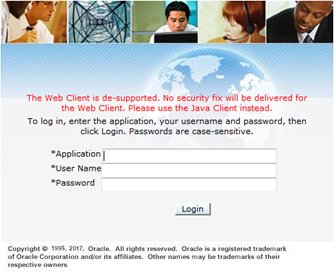
If you want to de-activate this warning message, please execute the following steps:
-
Copy web.xml from WebPresentationService to <ep_root>\staging\custom\installation\WebPresentationService\WEB-INF
-
Change the parameter configuration in web.xml. Set the param-value to "false" under the param-name "showDeSupport".
-
Redeploy WebPresentation service.
-
Login Webclient, the de-support message disappear from login page.
-
Redo step 2, set the param-value to "true" or others.
-
Redo step 3, 4, the de-support message is shown on the login page with red color.
Documentation Accessibility
For information about Oracle's commitment to accessibility, visit the Oracle Accessibility Program website at http://www.oracle.com/pls/topic/lookup?ctx=acc&id=docacc.
Access to Oracle Support
Oracle customers have access to electronic support through My Oracle Support. For information, visit http://www.oracle.com/pls/topic/lookup?ctx=acc&id=info or visit http://www.oracle.com/pls/topic/lookup?ctx=acc&id=trs if you are hearing impaired.
Release Notes for Agile e6.2.1.0 Release Update Packs
E99689-02
Copyright © August, 2019 Oracle and/or its affiliates. All rights reserved.
This software and related documentation are provided under a license agreement containing restrictions on use and disclosure and are protected by intellectual property laws. Except as expressly permitted in your license agreement or allowed by law, you may not use, copy, reproduce, translate, broadcast, modify, license, transmit, distribute, exhibit, perform, publish, or display any part, in any form, or by any means. Reverse engineering, disassembly, or decompilation of this software, unless required by law for interoperability, is prohibited.
The information contained herein is subject to change without notice and is not warranted to be error-free. If you find any errors, please report them to us in writing.
If this is software or related documentation that is delivered to the U.S. Government or anyone licensing it on behalf of the U.S. Government, the following notice is applicable:
U.S. GOVERNMENT END USERS: Oracle programs, including any operating system, integrated software, any programs installed on the hardware, and/or documentation, delivered to U.S. Government end users are "commercial computer software" pursuant to the applicable Federal Acquisition Regulation and agency-specific supplemental regulations. As such, use, duplication, disclosure, modification, and adaptation of the programs, including any operating system, integrated software, any programs installed on the hardware, and/or documentation, shall be subject to license terms and license restrictions applicable to the programs. No other rights are granted to the U.S. Government.
This software or hardware is developed for general use in a variety of information management applications. It is not developed or intended for use in any inherently dangerous applications, including applications that may create a risk of personal injury. If you use this software or hardware in dangerous applications, then you shall be responsible to take all appropriate fail-safe, backup, redundancy, and other measures to ensure its safe use. Oracle Corporation and its affiliates disclaim any liability for any damages caused by use of this software or hardware in dangerous applications.
Oracle and Java are registered trademarks of Oracle and/or its affiliates. Other names may be trademarks of their respective owners.
Intel and Intel Xeon are trademarks or registered trademarks of Intel Corporation. All SPARC trademarks are used under license and are trademarks or registered trademarks of SPARC International, Inc. AMD, Opteron, the AMD logo, and the AMD Opteron logo are trademarks or registered trademarks of Advanced Micro Devices. UNIX is a registered trademark of The Open Group.
This software or hardware and documentation may provide access to or information on content, products, and services from third parties. Oracle Corporation and its affiliates are not responsible for and expressly disclaim all warranties of any kind with respect to third-party content, products, and services. Oracle Corporation and its affiliates will not be responsible for any loss, costs, or damages incurred due to your access to or use of third-party content, products, or services.
