
The Manual Decisioning in FCC Studio provides you the ability to make manual decisions on similarity edges which can be marked as required for your graph analysis apart from the threshold that is set in the Ruleset page. This flexibilty provides an Ad-hoc experience to improve the graph analytic capability and identify the match to analze risk and take required actions.
You can specify your Manual Threshold in the Ruletset page for Manual Decisioning.
To navigate to the Manual Decisioning page, in the FCC Studio Workspace, click Navigation Menu on the upper-left corner, and then click Manual Decisioning.
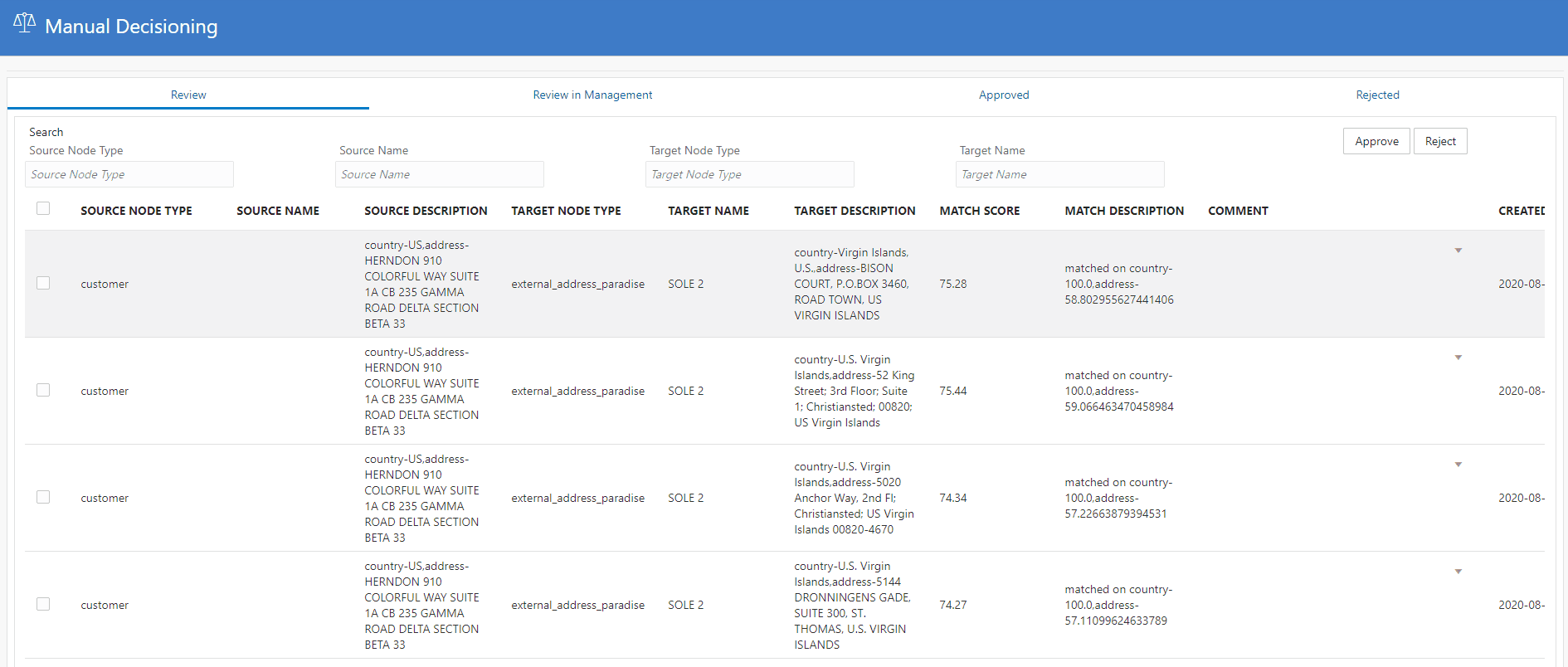
The Manual Decisioning page is displayed in a tabular format, where the manual edges source information is available for reviewing and adding to the graph for analysis. It has the following tabs:
· Review
The Review tab displays the information, that can be Approved or Rejected.
· Review in Management
The Review in Management tab displays the sources that are approved and sent by the user. The Administrators can review these details and further approve or reject.
This tab has the following tabs that catergorizes the sources based on approval and rejection:
§ Review for Acceptance
In this tab, the sources that are submitted by the users are further validated and if it the sources are accepted, then they are move to the Accepted tab. If the sources are rejected, then they are moved to the Review for Rejection tab.
§ Review for Rejection
In this tab, the sources that are rejected from the Review for Acceptance tab are displayed. You can further validate these source to either approve or review the sources again.
NOTE |
The Review in Management tab is available only for the users with the request_approve and review_request permissions. |
· Approved
The Approved tab displays the sources that are approved.
· Rejected
The Rejected tab displays the sources that are rejected.