This chapter provides information about Loading Multiple Load Runs in OFSAA in the Oracle Financial Services Data Foundation application and step-by-step instructions to use this section.
Topics:
· Loading OFSAA Staging Tables
· Loading Data into OFSAA Results Tables from Staging Tables
Multiple load run enables data to be loaded multiple times during the day for staggered processing of data by analytical applications. The degree of complexity of data required by analytical apps vary from one to the other, the load run ensures that the customer can process the data as soon as it is ready for an app to uptake. This reduces the turnaround time to reporting, by avoiding the 'end of day' type of processing of information as part of the original design.
NOTE |
As a work around, currently you can use the following methods to load the results table using different Load Run IDs. |
1. To optimize the end‐to‐end data flow and the need for intra‐day reporting, institutions could load intra-day records into OFSAA. Current application can only handle one set of records per date (incremental loads are not possible).
2. Users need to adjust and reload data (either full or partial) for the current date.
3. Users need to adjust and reload data (either full or partial) for any of past dates.
4. Support incremental consumption of data from staging area.
NOTE |
The load run is enabled only in the model and is '0' by default in the model. This does not impact data previously available. The enhancements to the OFSAA batch and run framework to cover all the use cases will be taken in a future release. |
OFSDF 8.1.0.0.0 staging model provides a flexibility to load multiple snapshots of the data in the staging tables (Product Processors). A column named n_load_run_id is introduced as part of the primary key of the product processor tables to enable this feature. However, the full fledged functionality to load and manage these snapshots will be part of the platform release at a later stage. In order to leverage this design in 8.0 release, the below mentioned changes should be performed as a workaround to load multiple snapshot of data from staging to results tables such as Fact Common Account Summary.
For Loading multiple snapshots of data for the same FIC_MIS_DATE, the existing T2T's should be executed through the Run Rule Framework . Additionally, the load should be filtered accordingly for each load run via the run filter.
To execute this run:
1. Navigate to $FIC_HOME/ficweb/webroot/conf
2. Edit the file: excludeURLList.cfg
3. Add the following entry at the end of the file: [SQLIA]./pr2
NOTE |
There should not be any blank line in the file. |
Loading of data into OFSAA can be in any of the following ways:
· ETL Tool
· OFSAA F2T
· OFSAA T2T
· OFSAA Excel upload
· OFSAA DIH
OFSAA data model includes load run identifier as part of the primary key for a set of staging tables. This enables data to be stored for multiple load runs for any date. OFSAA data model also has a table to maintain master information about load run and can be used for identifying or filtering load run during run execution within OFSAA.
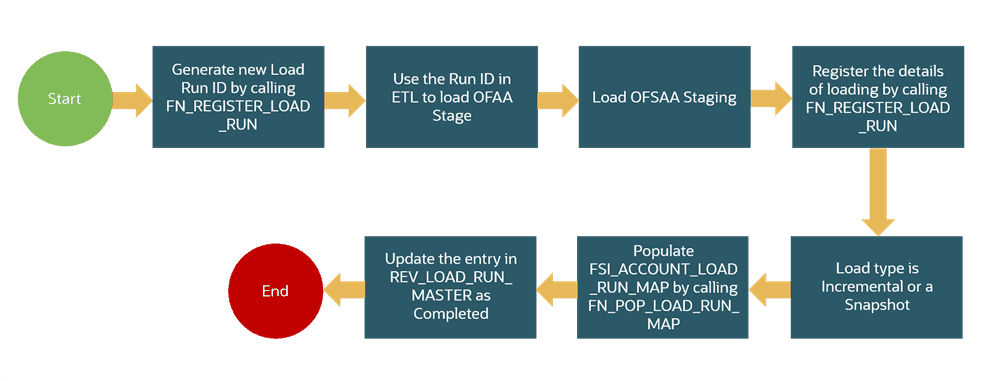
Before loading data into the staging table, generate a Load Run Identifier to stamp the records from the source. These records can be a complete snapshot or can be partial or incremental data too. This load run identifier can be generated by calling the function in the OFSAA atomic schema named fn_register_load_run. The function expects some input parameters and returns a unique load run identifier back to the calling program.
Figure 57: Generate the Load Run Identifier
NOTE |
Column n_load_run_id should always be populated only by the value returned by fn_register_load_run. |
Function - Register Load Run (fn_register_load_run)
Parameters - Batch ID, MIS-Date, Load Run Name, Load Run Purpose, Load Run Type
Table 28: Parameters of FN_REGISTER_LOAD_RUN
Parameters |
Source Of Values |
Example Values |
Batch ID |
Auto generated if you are using OFSAA Framework |
OFSBFNDIN- FO_20150101_1 |
MIS-Date |
Input from Customer |
01/01/2015 |
Load Run Name |
Input from Customer |
Daily EOD Load |
Load Run Purpose |
Input from Customer |
BA/BS (BASEL Advanced Approach, BASEL Standard) |
Load Run Type |
Input from Customer |
B - Base, A - Adjustments, P- Backdated Adjustments |
Example:
Declare
Result number;
Begin
Result: = fn_register_load_run ('OFSBFNDINFO_20150101_1','20150101','FSDF_LOAD','BA', 'A');
End;
The function registers the request in the table name rev_load_run_master and marks load as "In progress". You can use columns LOAD_RUN_NAME and LOAD_PURPOSE as per the requirement.
Column Load Type must have only the permissible value such as:
· "B - Base
· "A - Adjustments
· "P- Backdated Adjustments
Table 29: Column values for LOAD_RUN_NAME and LOAD_PURPOSE
LOAD_R UN_I D |
MIS_DA TE |
LOAD_T YPE |
LOAD_PUR POSE |
START_DT_ TIME |
LOAD_RUN_ NAME |
BATCH_ID |
LOAD_RUN_ STATUS |
1 |
01-JAN-15 |
A |
BA |
01-JAN-15 |
FSDF_Load |
OFSBFNDIN FO_201501 01 _1 |
In Progress |
NOTE |
Multiple calls to the procedure can be made to the function for given FIC_MIS_DATE. Each call will return a number which will be unique across the FIC_MIS_DATE or Extraction date. You can use this load identifier to load either one or more staging tables. |
After the load run ID is generated as described above, you can use the same in external ETL process to stamp the records from the source system before them loading either in one or the multiple staging tables of OFSAA Staging area.
Load strategy at a customer site falls across two categories:
For example, if we have three Loan Contract accounts in a bank system which is supposed to be loaded into OFSAA Stage Loan Contracts using the Load Run ID = 1 for BASEL Standard Approach, the data after loading staging table will appear as below:
Table 30: Complete Snapshot Load example
FIC_MIS_DATE |
V_ACCOUNT_NUMBER |
V_GAAP_CODE |
N_LOAD_RUN_ID |
N_EOP_BAL |
01-JAN-15 |
LOAN1000 |
USGAAP |
1 |
4066.213 |
01-JAN-15 |
LOAN1001 |
USGAAP |
1 |
34538.905 |
01-JAN-15 |
LOAN1002 |
USGAAP |
1 |
667.357 |
NOTE |
After each load you need to run fn_register_load_details function mentioned in Post Stage Load Process and Updating Load as Completed which is explained in the following sections. |
In order to enable downstream applications to consume only the latest set of record, you need to call another function named fn_pop_load_run_map. This is mandatory in case of incremental snapshot load scenario. This function populates a intermediate processing table that keep track of latest incoming record identifier.
Function - Populate Load Run Map
Parameters - Batch Id, MIS Date, Stage Table Name, Load Run Id, Load Run Name
Table 31: Populate Load Run Map Example
Parameters |
Source of Values |
Example Values |
Batch ID |
Auto generated if you are using OFSAA Framework |
OFSBFNDIN- FO_20150101_1 |
MIS-Date |
Input from Customer |
01/01/2015 |
Stage Table Name |
Input from Customer |
STG_CASA |
Load Run ID |
Input from Customer |
1 |
Load Run Name, |
Input from Customer |
FSDF_Load |
Example:
Declare
Result number;
Begin
Result: = fn_pop_load_run_map('OFSBFNDINFO_20150101_1','20150101','STG_CASA',1,'FSDF
_LOAD');
END;
NOTE |
For troubleshooting any errors while making the function calls , refer to fsi_message_log table for more details. |
For the example mentioned above, records in FSI_ACCOUNT_LOAD_RUN_MAP table will appear as below:
Table 32: Records in the FSI_ACCOUNT_LOAD_RUN_MAP table
FIC_MIS_DATE |
V_ACCOUNT_NUMBER |
V_GAAP_CODE |
N_LOAD_RUN_ID |
F_LATEST_LOAD_RUN_FLAG |
1-Jan-15 |
LOAN1000 |
USGAAP |
1 |
N |
1-Jan-15 |
LOAN1001 |
USGAAP |
1 |
N |
1-Jan-15 |
LOAN1002 |
USGAAP |
1 |
N |
1-Jan-15 |
LOAN1001 |
USGAAP |
2 |
Y |
1-Jan-15 |
LOAN1002 |
USGAAP |
2 |
Y |
1-Jan-15 |
LOAN1000 |
USGAAP |
2 |
Y |
There may be a requirement to reload a complete snapshot of data in the OFSAA staging again. This could either be to satisfy a intraday reporting requirement, or to load corrected source records in the OFSAA staging table. The earlier design forced users to truncate staging table to accommodate the new set of date. However with the introduction of Load Run identifier concept, you can retain both set of data in the staging area and allow the downstream application choose the correct set for processing. This will involve making another call to fn_register_load_run function.
For example in the below table, LOAN1001 and LOAN1002 have some changes since the previous load and will now need be loaded again staging with a different load run identifier . Additionally, strategy is to load the complete snapshot again to staging, all the records from the source such as, both changed and unchanged records will need to stamped with the new load run identifier
Table 33: The STG_LOAN_CONTRACTS table after the loading
FIC_MIS_DATE |
V_ACCOUNT_NUMBER |
V_GAAP_CODE |
N_LOAD_RUN_ID |
N_EOP_BAL |
01-JAN-15 |
LOAN1000 |
USGAAP |
1 |
4066.213 |
01-JAN-15 |
LOAN1001 |
USGAAP |
1 |
34538.905 |
01-JAN-15 |
LOAN1002 |
USGAAP |
1 |
667.357 |
01-JAN-15 |
LOAN1000 |
USGAAP |
2 |
4066.213 |
01-JAN-15 |
LOAN1001 |
USGAAP |
2 |
34540.000 |
01-JAN-15 |
LOAN1002 |
USGAAP |
2 |
670.000 |
REV_LOAD_RUN_MASTER after second function call will appear as below:
Table 34: The REV_LOAD_RUN_MASTER table after the second function call
LOAD_ RUN_ID |
MIS_DAT E |
LOAD_T YPE |
LOAD_PURP OSE |
START_DT_ TIME |
LOAD_RUN_ NAME |
BATCH_ID |
LOAD_RUN _STATUS |
1 |
01-JAN-15 |
B |
BA |
01-JAN-15 13:00 PM |
FSDF_Load |
OFSBFND- INFO_20150 101_1 |
Complete |
2 |
01-JAN-15 |
B |
BA |
01-JAN-15 23:00 PM |
Loan Correc- tions |
OFSBFND- INFO_20150 101_2 |
In Progress |
Following tables require full snapshot mandatorily:
· STAGE ACCOUNT WRITE OFF DETAILS
· STAGE ACCOUNT RECOVERY DETAILS
· STAGE PARTY RATING DETAILS
· STAGE INSTRUMENT RATING DETAILS
· STAGE ACCOUNT RATING DETAILS
If the source system is unable to provide snapshots on a daily basis due to certain limitations, we can customize the T2Ts, and prepare the snapshot data out of incremental data. Data Loading scenarios are as follows to prepare the snapshot data set:
4. Day 1: Load full snapshot data as part of day 1 load to the Staging area and process the same to Results area.
5. Day 2: Receive incremental data in the Staging area and process the same to Results area.
6. Day 2: Create a customized T2T to copy the previous day data from results table excluding the records that are no more part of the load, for which you have received data as part of today’s incremental load, and reload the same to results table with Current Date Surrogate key and Run Surrogate key.
Day 2 steps should be followed for subsequent loads.
This scenario is applicable when source may to portions of data at different point in time, or handover only the records changed since the last load. This is contrary to example explained under the Complete snapshot load section.
The same scenario in case of incremental snapshot load will appear as below.
NOTE |
Only the changed source records are stamped with the new load run identifer. |
Table 35: Incremental Snapshot Load example
FIC_MIS_DATE |
V_ACCOUNT_NUMBER |
V_GAAP_CODE |
N_LOAD_RUN_ID |
N_EOP_BAL |
01-JAN-15 |
LOAN1000 |
USGAAP |
1 |
4066.213 |
01-JAN-15 |
LOAN1001 |
USGAAP |
1 |
34538.905 |
01-JAN-15 |
LOAN1002 |
USGAAP |
1 |
667.357 |
01-JAN-15 |
LOAN1001 |
USGAAP |
2 |
34540.000 |
01-JAN-15 |
LOAN1002 |
USGAAP |
2 |
670.000 |
NOTE |
After each load you need to run fn_register_load_details function mentioned in Post Stage Load Process and Updating Load as Completed which is explained in the following sections |
In order to enable downstream applications to consume only the latest set of record, you need to call another function named fn_pop_load_run_map. This is mandatory in case of incremental snapshot load scenario. This function populates a intermediate processing table that keep track of latest incoming record identifier.
Function - Populate Load Run Map
Parameters - Batch Id, MIS Date, Stage Table Name, Load Run Id, Load Run Name
Table 36: Populate Load Run Map example
Parameters |
Source of Values |
Example Values |
Batch ID |
Auto generated if you are using OFSAA Framework |
OFSBFNDIN- FO_20150101_1 |
MIS-Date |
Input from Customer |
01/01/2015 |
Stage Table Name |
Input from Customer |
STG_CASA |
Load Run ID |
Input from Customer |
1 |
Load Run Name, |
Input from Customer |
FSDF_Load |
Example
Declare
Result number;
Begin
Result: = fn_pop_load_run_map('OFSBFNDINFO_20150101_1','20150101','STG_CASA',1,'FSDF
_LOAD');
END;
NOTE |
For troubleshooting any errors while making the function calls , refer to fsi_message_log table for more details. |
For the example mentioned above, records in FSI_ACCOUNT_LOAD_RUN_MAP table will appear as below:
Table 37: Records in the FSI_ACCOUNT_LOAD_RUN_MAP table
FIC_MIS_DATE |
V_ACCOUNT_NUMBER |
V_GAAP_CODE |
N_LOAD_RUN_ID |
F_LATEST_LOAD_RUN_FL AG |
1-Jan-15 |
LOAN1000 |
USGAAP |
1 |
Y |
1-Jan-15 |
LOAN1001 |
USGAAP |
1 |
N |
1-Jan-15 |
LOAN1002 |
USGAAP |
1 |
N |
1-Jan-15 |
LOAN1001 |
USGAAP |
2 |
Y |
1-Jan-15 |
LOAN1002 |
USGAAP |
2 |
Y |
Once you load the OFSAA Stage tables successfully using the load run ID which is generated from Load Run Map function, you need to perform certain post load processes in order to complete the loading.
Topics:
Once you load the OFSAA Stage tables successfully using the load run ID which is generated from Load Run Map function, you need to register the load run details by calling the following function with the load type whether it was incremental or full snap shot.
Function - Register Load Run Details
Parameters - batch id, mis-date, load run name, load run id, stage table name, load type
Table 38: Register Load Run Details
Parameters |
Source Of Values |
Example Values |
Batch ID |
Auto generated if you are using OFSAA Framework |
OFSBFNDIN- FO_20150101_1 |
MIS-Date |
Input from Customer |
01/01/2015 |
Stage Table Name |
Input from Customer |
STG_CASA |
Load_Run_Id |
Input from Customer |
1 |
Load Run Name, |
Input from Customer |
FSDF_Load |
Load Type |
Input from Customer |
S - Full Snap Shot I - Incremental |
Example:
Declare
Result number;
Begin
Result: =
fn_register_load_details('OFSBFNDINFO_20150101_1','20150101', 'STG_CASA',1,'FSDF_LOAD', 'I');
END;
This function populates a table named rev_load_run_details. The columns load type can have only 2 values, such as:
· "S - Complete/Full Snapshot
· "I - Incremental Snapshot
Table 39: Population of the REV_LOAD_RUN_DETAILS table
LOAD_RUN_ID |
MIS_DATE |
STAGE_TABLE_NAME |
LOAD_TYPE |
1 |
1-Jan-15 |
STG_LOAN_CONTRACTS |
I |
Once you complete these steps, update the status of the record inside rev_load_run_master as Completed.
UPDATE rev_load_run_master
SET LOAD_RUN_STATUS = 'Completed' WHERE pMis_Date = '01-Jan-15' AND pLoad_Run_Name = 'FSDF_LOAD' and LOAD_RUN_ID = 1 ;
OFSAAI does not support load run versioning for Data Movement from Stage to Results using Batch/Run Framework. The same feature is expected as an enhancement in future release of AAI.
As a work around, currently you can use the following methods to load the results table using different Load Run IDs.
Topics:
· Complete Snapshot Load Scenario
To enable the Data Load into Results table from staging using the Load Run concept in case of Full Snap Shot, You can use the following Task Level Parameter in the T2T Filter condition and can pass the load run id to be passed in Batch Framework or Run Framework
For example: FCAS T2T for Stage Loan Contracts
· "Modify Filter Condition inside T2T:
Filter Conidtion to be used in T2T: The highlighted condition required to be added in T2T
Filter : UPPER(STG_LOAN_CONTRACTS.v_gaap_code)='USGAAP' AND STG_LOAN_CONTRACTS.fic_mis_date=$MISDATE AND STG_LOAN_CONTRACTS.N_LOAD_RUN_ID='[LOADRUN]'
· "Modify the Corresponding Batch Task Each Time with Load Run Idxxx
a. Select Batch, Task (T2T_STG_LOANS_CAS)
b. Click Edit.
c. Add Highlighted Condition in Default Value and Save (Each Time we need to provide the Load Run ID which are supposed to use. Here in the below example we are using 1)
[DRCY]=USD,[LOADRUN]=1
Execute the batch after this change; it will load the Result table with the given Load Run Id Records Modify the Corresponding Process Task of a Run Each Time with Load Run Id
7. Select Process, Click Edit
8. Choose the Components, Select the Object (T2T_STG_LOANS_CAS) and Click Components
9. Click the Yellow Drop Button near the T2T
10. Add the Highlighted Condition with the text, and Save : "DRCY","USD","LOADRUN","1"
Fire the Run after this change. It loads the Result table with the given Load Run ID Records.
To enable the Data Load into Results table from staging using the Load Run concept in case of incremental load, You can use the following T2T join change concept in the T2T ANSI join and can use the Batch Framework or Run Framework to execute the same
For example, FCAS T2T for Stage CASA Modify Join Condition inside T2T:
Join Condition to be added in all relevant T2T For example, STG_CASA T2T join
INNER JOIN FSI_ACCOUNT_LOAD_RUN_MAP
ON FSI_ACCOUNT_LOAD_RUN_MAP.V_ACCOUNT_NUMBER = STG_CASA.V_ACCOUNT_NUMBER
AND FSI_ACCOUNT_LOAD_RUN_MAP.N_LOAD_RUN_ID = STG_CASA.N_LOAD_RUN_ID AND FSI_ACCOUNT_LOAD_RUN_MAP.FIC_MIS_DATE = STG_CASA.FIC_MIS_DATE AND FSI_ACCOUNT_LOAD_RUN_MAP.V_GAAP_CODE = STG_CASA.V_GAAP_CODE
AND FSI_ACCOUNT_LOAD_RUN_MAP.F_LATEST_LOAD_RUN_FLAG = 'Y'
Execute the batch or fire the Run after the above step.