
This chapter provides information about Standard Dimension Tables in the Oracle Financial Services Data Foundation application and step-by-step instructions to use this section.
Topics:
· Overview of the Reclassification of Standard Dimensions
· Overview of the Reclassification of Standard Dimensions Population
· Dimension Data Expectations through SCD
· Overview of the Mappers for the Reclassification of Standard Dimensions
· Maintenance of Mapper for the Reclassification of Standard Dimensions
· Loading Mapper Maintenance through Backend
· Usage of Mapper Tables in Data Flow and Reports
There are certain Standard Dimensions in Financial Services Data Foundation, which are pre- populated with standard set of values. These values are used by downstream applications for various reporting requirements. There are equivalent customer specific dimension tables which are populated using Slowly Changing Dimension (SCD) process. It is required to reclassify these user specific values to standard specific values as the reporting expects these standard set of values. The reclassification is done using out of the box Mapper Definitions under Mapper Maintenance screen.
These are the out of the box User Specific Dimensions to Standard Dimensions reclassification available in Financial Services Data Foundation:
|
User Specific Dimension |
User Specific Dimension |
Standard Dimension |
Standard Dimension |
|---|---|---|---|
|
DIM_BALANCE_CATEGO RY |
Balance Category |
DIM_STD_BALANCE_CAT EGORY |
Standard Balance Category |
|
DIM_CREDIT_LINE_PURP OSE |
Credit Line Purpose |
DIM_STD_CREDIT_LINE_ PURPOSE |
Standard Credit Line Purpose |
|
DIM_CREDIT_LINE_TYPE |
Credit Line Type |
DIM_STD_CREDIT_LINE_ TYPE |
Standard Credit Line Type |
|
DIM_IRC |
Interest Rate Curve |
DIM_STANDARD_IRC |
Standard Interest Rate Curve |
|
DIM_LOB |
Line of Business |
DIM_STANDARD_LOB |
Standard Line of Business |
|
DIM_MITIGANT_TYPE |
Mitigant Type |
DIM_STD_MITIGANT_TYP E |
Standard Mitigant Type |
|
DIM_PARTY_TYPE |
Party Type |
DIM_STANDARD_PARTY_ TYPE |
Standard Party Type |
|
DIM_PRODUCT |
Product |
DIM_STANDARD_PRODU CT_TYPE |
Standard Product Type |
|
DIM_GL_ACCOUNT |
General Ledger |
DIM_STD_GL_TYPE |
Standard General Ledger Type |
|
DIM_VEHICLE_TYPE |
Vehicle Type |
DIM_STD_VEHICLE_TYPE |
Standard Vehicle Type |
|
DIM_WRITE_OFF_REASO NS |
Write Off Reasons |
DIM_STD_WRITE_OFF_RE ASONS |
Standard Write Off Reasons |
|
DIM_RECOVERY_TYPE |
Recovery Type |
DIM_STD_RECOVERY_TY PE |
Standard Recovery Type |
By default, all standard dimensions will be pre-populated with seeded data. It is mandatory to have data in user specific dimensions and then maintain the reclassifications. Therefore, you must execute the SCDs and then map the reclassification codes under Mapper Maintenance.
These are out of the box mappers that are available in FSDF for the standard dimension reclassifications:
· MAP_PROD_CODE_STD_PROD_TYPE - Mapper for Product Code to Standard Product Code
· MAP_PARTY_TYP_STD_PARTY_TYP - Mapper for Party Type Code to Standard Party Type Code
· MAP_CRDLN_TYP_STD_CRDLN_TYP - Mapper for Credit Line Type to Standard Credit Line Type
· MAP_DIM_IRC_STD_IRC - Mapper for Interest Rate Code to Standard Interest Rate Code
· MAP_DIM_LOB_STD_LOB - Mapper for Line of Business Code to Standard Line of Business Code
· MAP_BAL_CAT_STD_BAL_CAT - Mapper for Balance Category to Standard Balance Category
· MAP_CRDLN_PUR_STD_CRDLN_PUR - Mapper for Credit Line Purpose to Standard Credit Line Purpose
· MAP_MITG_TYP_STD_MITGN_TYP - Mapper for Mitigant Type to Standard Mitigant Type
· MAP_CREDIT_SCR_MDL_REG_MDL - Mapper for Credit Score Model To Reg Credit Score Model
· MAP_DIM_GL_ACCT_STD_GL_TYPE - Mapper for General Ledger Account to Standard General Ledger Account Type
· MAP_GL_CODE_REP_LINE - Mapper for GL Code to Repline Code
· MAP_RECVR_TYP_STD_RECVR_TYP - Mapper for Common Recovery Type to Standard Recovery Type
· MAP_VEHCL_TYP_STD_VEHCL_TYP - Mapper for Vehicle Type to Standard Vehicle Type
· MAP_WRTOFF_STD_WRTOFF_REASN - Mapper for Write Off Reasons to Standard Write Off Reasons
Mapper can be maintained under OFSAAI.
1. Navigate to OFSAAI > Financial Services Data Foundation > Unified Analytical Metadata > Business Metedata Management > Map Maintenance.
Figure 8: Navigate to the Map Maintenance page
2. For illustration, selected the Mapper for Mitigant Type to Standard Mitigant Type. Click Mapper Maintenance.
Figure 9: Select the Mapper Maintenance for a Mapper

3. FSDF maps OTH and MSG out-of-the-box for this mapper. The remaining mappings can be maintained by the user according to user specific values.
Figure 10: Mapper Maintenance page

Load all the required user specific dimensions using SCD.
Resave these hierarchies:
· HCMDF001 - Hier - Map Common Product
· HCMDF002 - Hier - Map Common Standard Product Type
· HCMDF003 - Hier - Map Common Party Type
· HCMDF004 - Hier - Map Common Standard Party Type
· HCMDF005 - Hier - Map Common Interest Rate Curve
· HCMDF006 - Hier - Map Common Standard Interest Rate Curve
· HCMDF007 - Hier - Map Common Line of Business
· HCMDF008 - Hier - Map Common Standard Line of Business
· HCMDF009 - Hier - Map Common Credit Line Type
· HCMDF010 - Hier - Map Common Standard Credit Line Type
· HCMDF011 - Hier - Map Common Credit Line Purpose
· HCMDF012 - Hier - Map Common Standard Credit Line Purpose
· HCMDF013 - Hier - Map Common Mitigant Type
· HCMDF014 - Hier - Map Common Standard Mitigant Type
· HCMDF015 - Hier - Map Common Balance Category
· HCMDF016 - Hier - Map Common Standard Balance Category
· HCMDF017 - Hier - Map Common General Ledger Code
· HCMDF018 - Hier - Map Common Standard General Ledger Type
· HCMDF019 - Hier - Map Common Vehicle Type
· HCMDF020 - Hier - Map Common Standard Vehicle Type
· HCMDF021 - Hier - Map Common Write Off Reasons
· HCMDF022 - Hier - Map Common Standard Write Off Reasons
· HCMDF023 - Hier - Map Common Recovery Type
· HCMDF024 - Hier - Map Common Standard Recovery Type
Figure 11: Metadata Resave for Hierarchies

One Standard Dimension table in source can be mapped only to one Standard Dimension table. One to Many or Many to Many mapping leads to error in T2T as the records are duplicated. From the illustration, the possible combinations for Mitigant Type to Standard Mitigant Type mapping are One to One and Many to One mappings.
· One to One Mapping: You can map one Mitigant Type data model to one Standard Mitigant Type data model using the Mapper Maintenance screen. Here, you must select one value in Mitigant Type data model and one value in Standard Mitigant Type data model.
· Many to One Mapping: You can map many values in Mitigant Type data model to one value in Standard Mitigant Type data model using the Mapper Maintenance screen.
To conduct One to One or Many to One mapping:
1. Navigate to OFSAAI > Financial Services Data Foundation > Unified Analytical Metadata > Business Metedata Management > Map Maintenance.
2. Click Add to create a new map or select an existing Map. For illustration, an existing Mapper for Party Type Code to Standard Party Type Code value is selected. Click Mapper Maintenance.
Figure 12: Select an existing Mapper for One to One or Many to One mapping

3. The Mapper Maintenance window opens (In this illustration, the Map - Mapper for Party Type Code to Standard Party Type Code window opens). To conduct One to One or Many to One mapping, in the Member Combinations section, click Add.
Figure 13: Mapper Maintenance page of the selected Mapper

4. The Add Mappings page is displayed. In this illustration:
§ To map One to One, select one value in the Hier - Map Common Mitigant Type data model and one value in the Hier - Map Common Standard Mitigant Type data model, and click Go. Repeat this step for each One to One data model mapping, and then click Save. In this illustration, MSG - Missing is mapped to AFC - Auto Financing Company.
Figure 14: Add Mappings page with the one-to-one mapping
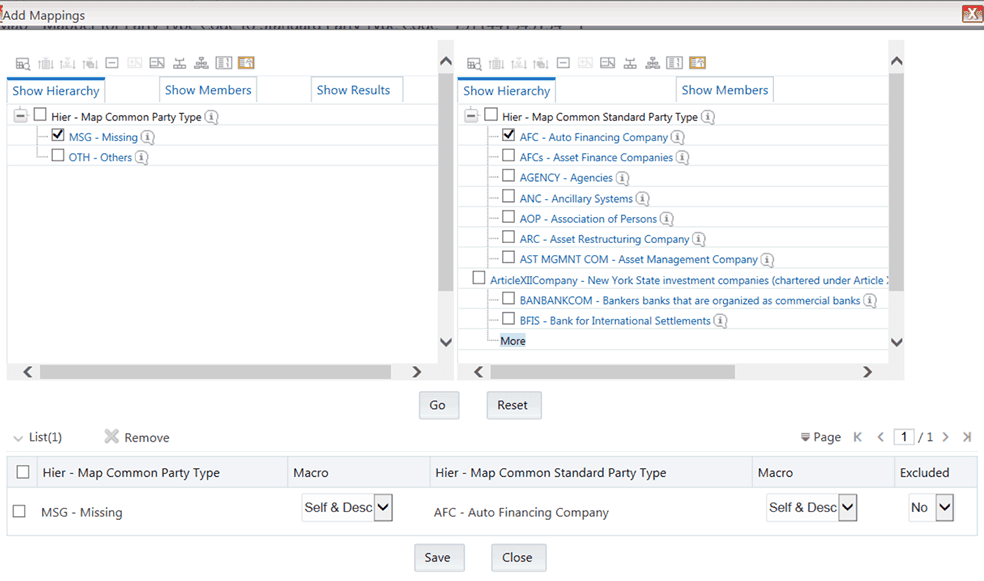
§ To map Many to One, select multiple (two in this illustration) values in the Hier - Map Common Mitigant Type data model and one value in the Hier - Map Common Standard Mitigant Type data model, and then click Go. Click Save. In this illustration, MSG-Missing and OTH-Others are mapped to AFC-Auto Financing Company.
Figure 15: Add Mappings page with the many-to-one mapping

5. An acknowledgment is displayed: Confirm Save? To confirm saving data, click Yes. In the Mapper Maintenance window, in the Mapped combinations and the Mapped members sections, you can see the newly conducted mapping.
Load each Physical table in Atomic Schema with V_MAP_ID as mentioned against each mapper, V_MEMBER_1
=> Customer Specific Value Dimension's Member Code, V_MEMBER_2 => Standard Dimension’s Member Code.
|
Physical Table |
V_MAP_ID |
|---|---|
|
MAP_MITG_TYP_STD_MITGN_TYP |
1514359498413 |
|
MAP_DIM_IRC_STD_IRC |
1511442223838 |
|
MAP_PROD_CODE_STD_PROD_TYPE |
1511441227779 |
|
MAP_DIM_LOB_STD_LOB |
1511442482993 |
|
MAP_CRDLN_PUR_STD_CRDLN_PUR |
1511528494678 |
|
MAP_PARTY_TYP_STD_PARTY_TYP |
1511441945154 |
|
MAP_BAL_CAT_STD_BAL_CAT |
1514359600480 |
|
MAP_CRDLN_TYP_STD_CRDLN_TYP |
1511527713328 |
|
MAP_CREDIT_SCR_MDL_REG_MDL |
1497513837744 |
|
MAP_DIM_GL_ACCT_STD_GL_TYPE |
1523447233065 |
|
MAP_GL_CODE_REP_LINE |
1494610765133 |
|
MAP_RECVR_TYP_STD_RECVR_TYP |
1524045220417 |
|
MAP_VEHCL_TYP_STD_VEHCL_TYP |
1524044256132 |
|
MAP_WRTOFF_STD_WRTOFF_REASN |
1524044617123 |
The mapper maintenance output is always physically stored in underlying tables. These tables are registered in OFSAA as an object. Therefore, these tables can be used, without any restrictions, in any of the metadata that requires reclassification. Financial Services Data Foundation Data Flows (T2Ts) make use of this information to populate the Standard Dimension Surrogate Keys of Results area tables.