This section provides information about the Data Redaction feature used in the OFSAA Data Foundation applications.
Topics:
· Overview of Data Redaction in OFSAA
· Accessing PII Table and PII Datasheet
· Mapping Roles to User Groups for Data Redaction
· Enabling, Rerunning, and Disabling Data Redaction
· Data Redaction Batch Execution Sample
Data Redaction is one of the features of Data Security that provides protection of data against unauthorized access and data theft.
In OFSAA, these tables are seeded as a part of Data Redaction:
· AAI_DRF_FUNCTION_MASTER
This table stores the Redaction function definitions. Generic logical functions can be address, email, card number, phone number, and so on.
· AAI_DRF_FUNCTION_COLUMN_MAP
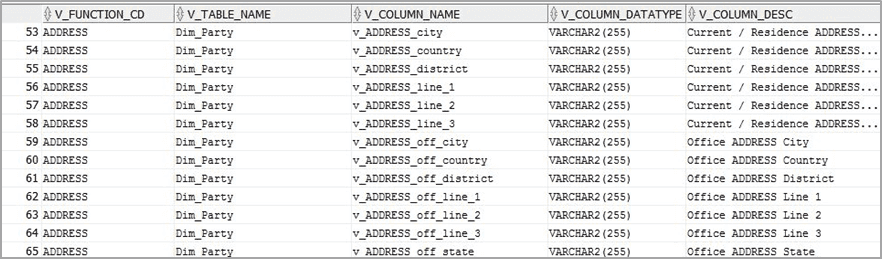
This table stores the Function- Column mappings Redaction. The PII columns will be redacted according to the Function mapping.
Figure 1: AAI_DRF_FUNCTION_COLUMN_MAP for DIM_PARTY
· AAI_DRF_TABLE_ACCESS_CD_MAP
This table stores the mapping of tables that contain the columns marked for redaction to the Access codes. These access codes are SMS function codes and are expected to be mapped to the role DATASECURITY. The policy expression will be created based on this role and evaluated to access non-redacted data.
NOTE:
The list of PII, on which Data Redaction is applied, is available at My Oracle Support (MOS).
AAI_DRF_FUNCTION_COLUMN_MAP is the PII table.
NOTE:
The latest version of the PII Datasheet list can be downloaded from My Oracle Support (MOS).
Execute the Data Redaction seeded Batch ##INFODOM##_DATA_REDACTION to execute the Data Redaction Utility if it is available as a part of the application common metadata. If the Batch is not available, you must create a new Batch as mentioned in the Creating Batch for Executing Data Redaction Utility section in the Oracle Financial Services Advanced Analytical Applications Infrastructure Administration and Configuration Guide Release 8.1.x.
The task in the batch ##INFODOM##_DATA_REDACTION consists of the following three parameters:
· dataredaction.sh
· true/false
· OFSAA User ID
For more information, see the Data Redaction Utility section in the Oracle Financial Services Advanced Analytical Applications Infrastructure Administration and Configuration Guide Release 8.1.x.
This section provides information about mapping the User Roles to the User Groups for Data Redaction. The details are as follows:
· Data Controller Group is mapped to DATASECURITYADMIN role and the following are the mapping details:
§ Group Code: DATACONTROLLER
§ Group Name: Data Controller Group
§ Group Description: Data Controller Group
§ Role code: DATASECURITYADMIN
§ Role Name: Data Security Admin
§ Role Description: Data security admin role for executing redaction policies
· Map from individual applications to the DATASECURITY role. The following are the mapping details:
§ Role code: DATASECURITY
§ Role Name: Data Security Viewer
§ Role Description: Data Security Viewer role for viewing original (non-redacted) data.
Follow these steps to map the individual applications to the DATASECURITY role:
i. DATASECURITY role must be mapped to those application User groups which hold the privilege to view the data in its original form (un-redacted). Therefore, applications must identify the functions which must be mapped to the DATASECURITY role. These mappings must be sourced as seeded data.
ii. Map the DATASECURITY role to the respective User groups. This mapping must be done manually from individual applications to the DATASECURITY role.
This section provides information about executing the Data Redaction batch for enabling, disabling, and rerunning Data Redaction.
Topics:
To enable Data Redaction, follow these steps:
1. Modify the OFS_BFND_SCHEMA_IN.xml file. For the DATA_REDACT parameter, set the value to TRUE. For more information, see the Configure the OFS_BFND_SCHEMA_IN.XML File section in the required 8.1.x.x.x release version of the Oracle Financial Services Data Foundation Application Pack Installation and Configuration Guide.
During the upgrade installation, in the CONFIGURATION table of the CONFIG schema, update the IS_DATA_REDACTION_ENABLED parameter to Y.
2. Map the OFSAA user to the Data Redaction role. The OFSAA user who executes the Data Redaction batch requires the following privileges:
§ Users must be mapped to the DATACONTROLLER group.
§ The user group must be mapped to the DATASECURITYADMIN role.
3. As a SYSADMIN, do the following tasks:
a. Modify the Data Redaction batch as follows:
##INFODOM##_DATA_REDACTION to dataredaction.sh,false,<USER that is mapped to DATACONTROLLER and FSADMIN groups>
b. Give access to the OFSAA user mentioned in the previous step.
4. To redact data in the columns, execute the Data Redaction batch ##INFODOM##_DATA_REDACTION.
5. Validate the AAI_DRF_FUNCTION_COLUMN_MAP table, and verify if all the redacted columns and policies are created in the table.
To rerun the Data Redaction batch, follow these steps:
1. In the CONFIGURATION table of the CONFIG schema, update the IS_DATA_REDACTION_ENABLED parameter to N.
2. Rerun the Data Redaction batch ##INFODOM##_DATA_REDACTION.
3. Perform steps mentioned in the Enabling Data Redaction section.
To disable Data Redaction, follow these steps:
1. In the CONFIGURATION table of the CONFIG schema, update the IS_DATA_REDACTION_ENABLED parameter to N.
2. Rerun the Data Redaction batch ##INFODOM##_DATA_REDACTION.
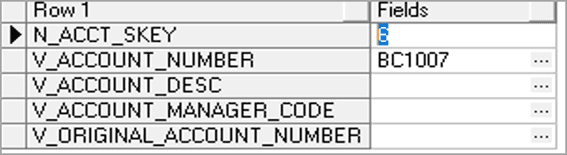
This is a sample of data before executing the Data Redaction Batch.
Figure 2: Sample data before executing the Data Redaction batch
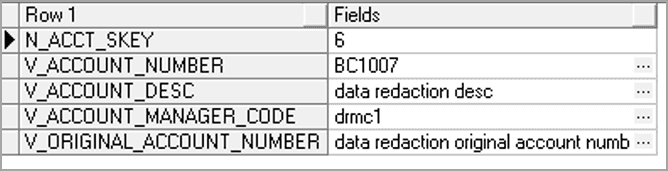
This is a sample of data after executing the Data Redaction batch:
Figure 3: Sample data after executing the Data Redaction batch