The mapping combinations for the General Ledger Code for Mgmt Reporting hierarchy maintained as Parent-Child hierarchy are:
· One Parent to One Reporting Line Code mapping with or without Debit Credit Indicator.
· Many Parents to One Reporting Line Code mapping with or without Debit Credit Indicator.
· Many Parents to Many Reporting Line Codes mapping with or without Debit Credit Indicator.
The procedures for mapping combinations as Parent-Child hierarchy are:
To map one parent GL Code to one Reporting Line Code, use the Mapper Maintenance utility. In this utility, select one parent GL Code, select one member in the Debit Credit Indicator hierarchy with the value Debit or Credit or Missing, and select one member in the Reporting Line Code hierarchy. As a result, during the T2T process, the corresponding data from the Stage GL Data table, for the selected parent GL Codes and their descendants, are aggregated and then loaded into the Fact Management Reporting table.
NOTE |
In the T2T process, in the Stage GL Data table, the aggregation of parent GL Codes and their descendants take place in all the Measure columns that are associated with the Primary Keys. The conditions for the Debit Credit Indicator column values in the Stage GL Data table are: · The value must be M, when you map GL Code to the Missing (MSG) member. If nothing is mapped, the system automatically sets value to M. · The value must be D, when you map GL Code to the Debit member. · The value must be C, when you map GL Code to the Credit member. |
To perform One Parent to One Reporting Line Code mapping with or without Debit Credit Indicator:
1. In the Mapper Maintenance page, in the Member combinations section, click Add.
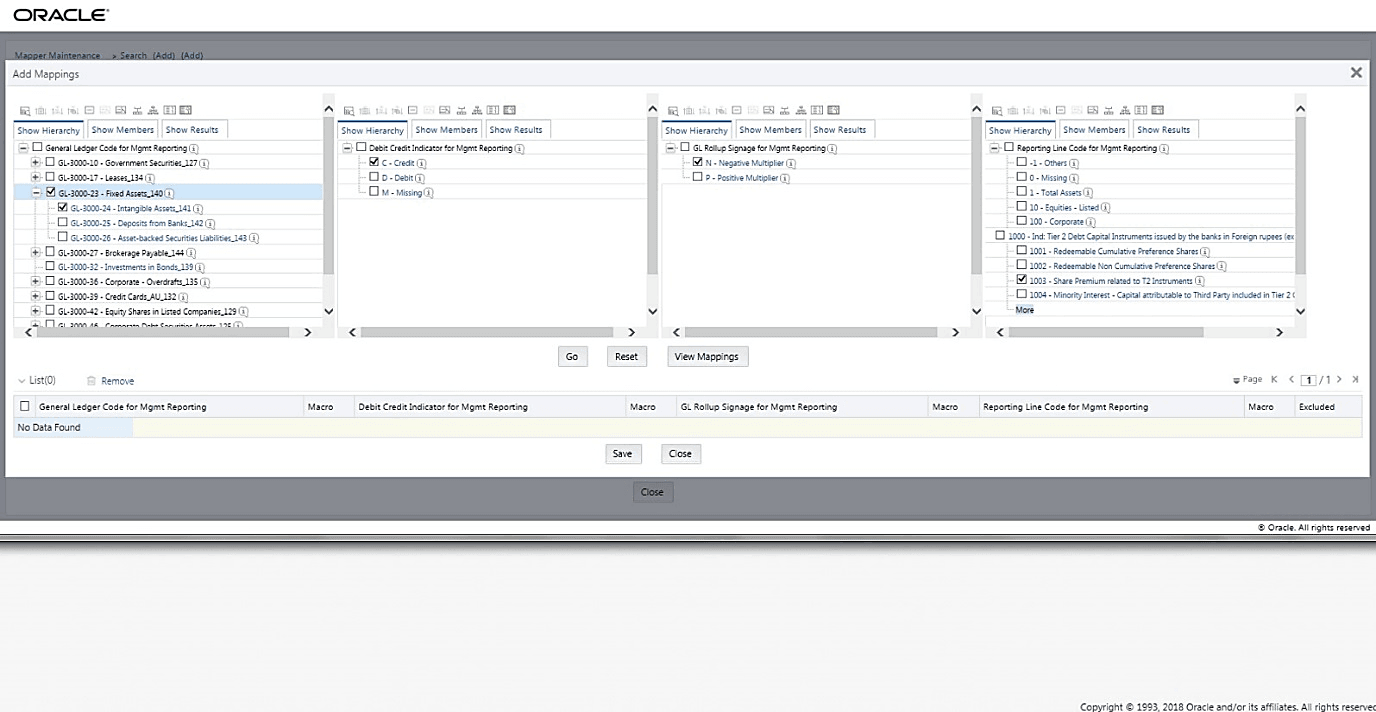
2. The Add Mappings pop-up page appears. For illustration, select one parent member of the General Ledger Code for Mgmt Reporting hierarchy, GL-3000-23 – Fixed Assets_140 and its child member GL-3000-24 – Intangible Assets_141, and the member of the Debit Credit Indicator for Mgmt Reporting hierarchy C - Credit to map to the member of the Reporting Line Code for Mgmt Reporting hierarchy 1003 – Share Premium related to T2 Instruments with the member of the GL Rollup Signage for Mgmt Reporting hierarchy N - Negative Multiplier.
3. To map the members, click Go. The list of mapped members appear at the bottom. To save the mappings, click Save.
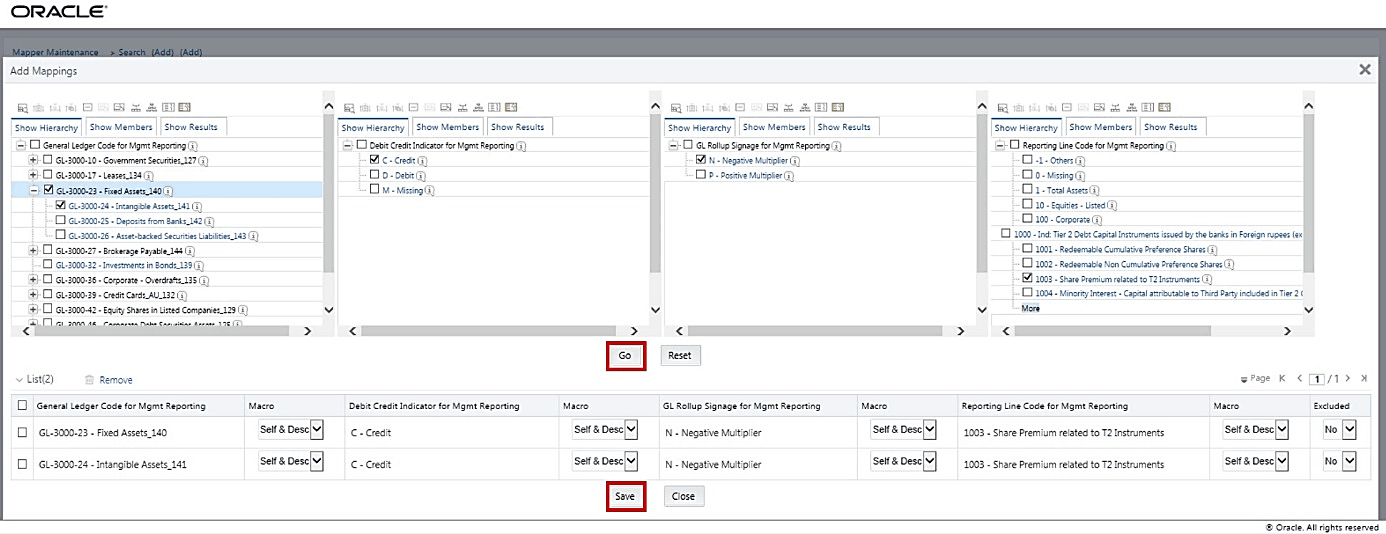
4. An acknowledgement pop-up message appears. To confirm saving the mappings, click Yes.
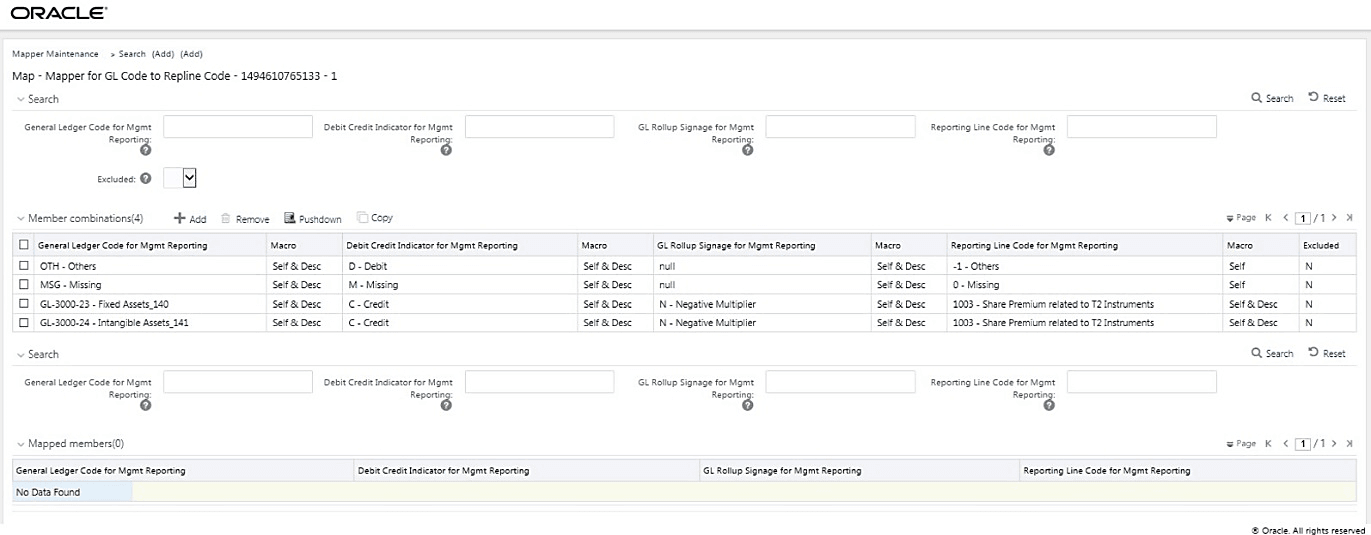
5. The mapped member combinations are listed in the Mapper Maintenance page.
To map multiple parent GL Codes to one Reporting Line Code, use the Mapper Maintenance utility. In this utility, select two or more parent GL Codes, select one member in the Debit Credit Indicator hierarchy with the value Debit or Credit or Missing, and select one member in the Reporting Line Code hierarchy. As a result, during the T2T process, the corresponding data from the Stage GL Data table, for the selected parent GL Codes and their descendants, are aggregated and then loaded into the Fact Management Reporting table.
NOTE |
In the T2T process, in the Stage GL Data table, the aggregation of parent GL Codes and their descendants take place in all the Measure columns that are associated with the Primary Keys. The conditions for the Debit Credit Indicator column values in the Stage GL Data table are: · The value must be M, when you map GL Code to the Missing (MSG) member. If nothing is mapped, the system automatically sets value to M. · The value must be D, when you map GL Code to the Debit member. · The value must be C, when you map GL Code to the Credit member. |
To perform Many Parents to One Reporting Line Code mapping with or without Debit Credit Indicator:
1. In the Mapper Maintenance page, in the Member combinations section, click Add.
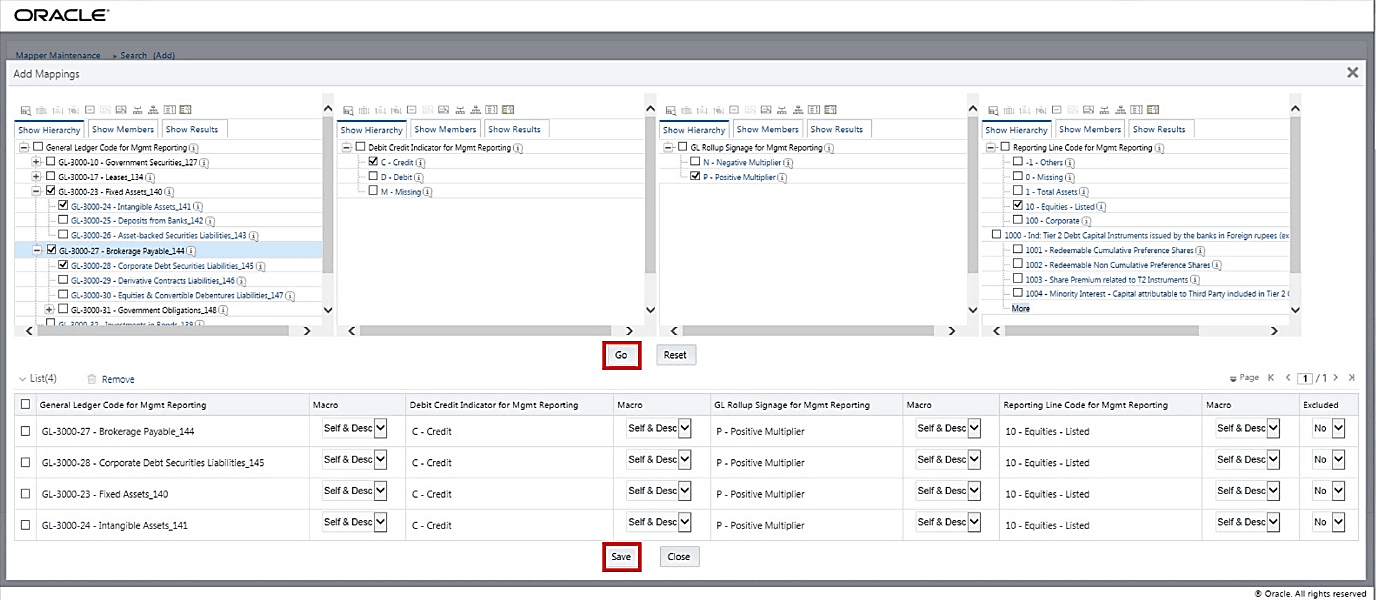
2. The Add Mappings pop-up page appears. For illustration, select parent members of the General Ledger Code for Mgmt Reporting hierarchy, GL-3000-23 – Fixed Assets_140 and GL-3000-27 – Brokerage Payable_144, and their child members GL-3000-24 – Intangible Assets_141 and GL-3000-28 – Corporate Debt Securities Liabilities_145 respectively, and the member of the Debit Credit Indicator for Mgmt Reporting hierarchy C - Credit to map to the member of the Reporting Line Code for Mgmt Reporting hierarchy 10 – Equities - Listed with the member of the GL Rollup Signage for Mgmt Reporting hierarchy P - Positive Multiplier.
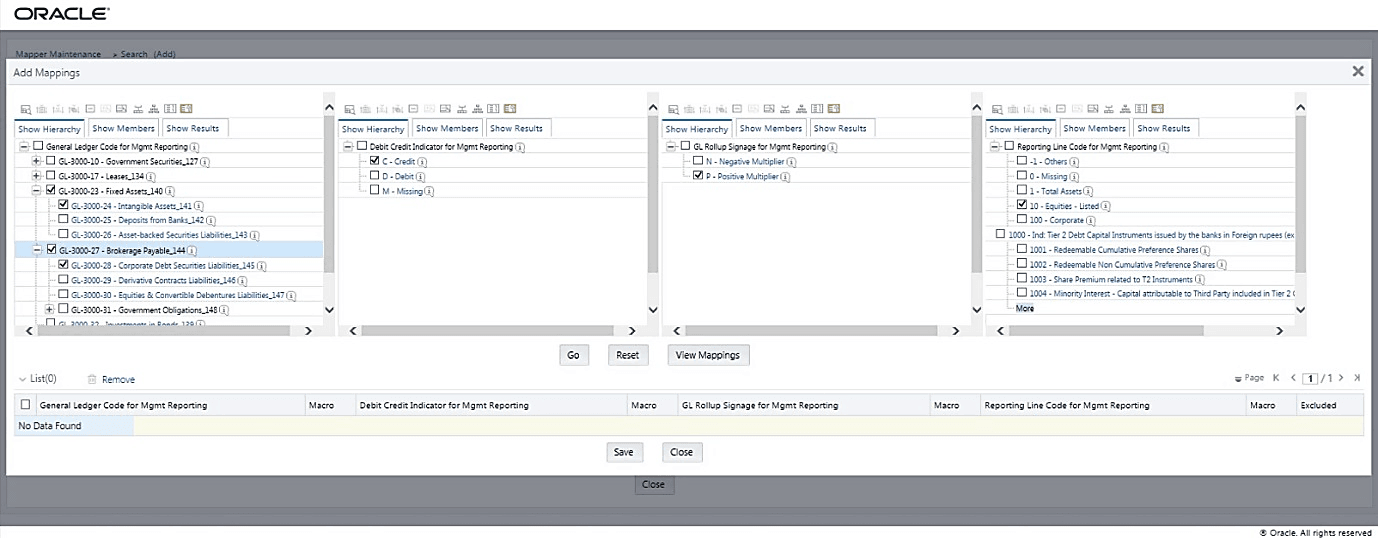
3. To map the members, click Go. The list of mapped members appear at the bottom. To save the mappings, click Save.
4. An acknowledgement pop-up message appears. To confirm saving the mappings, click Yes.
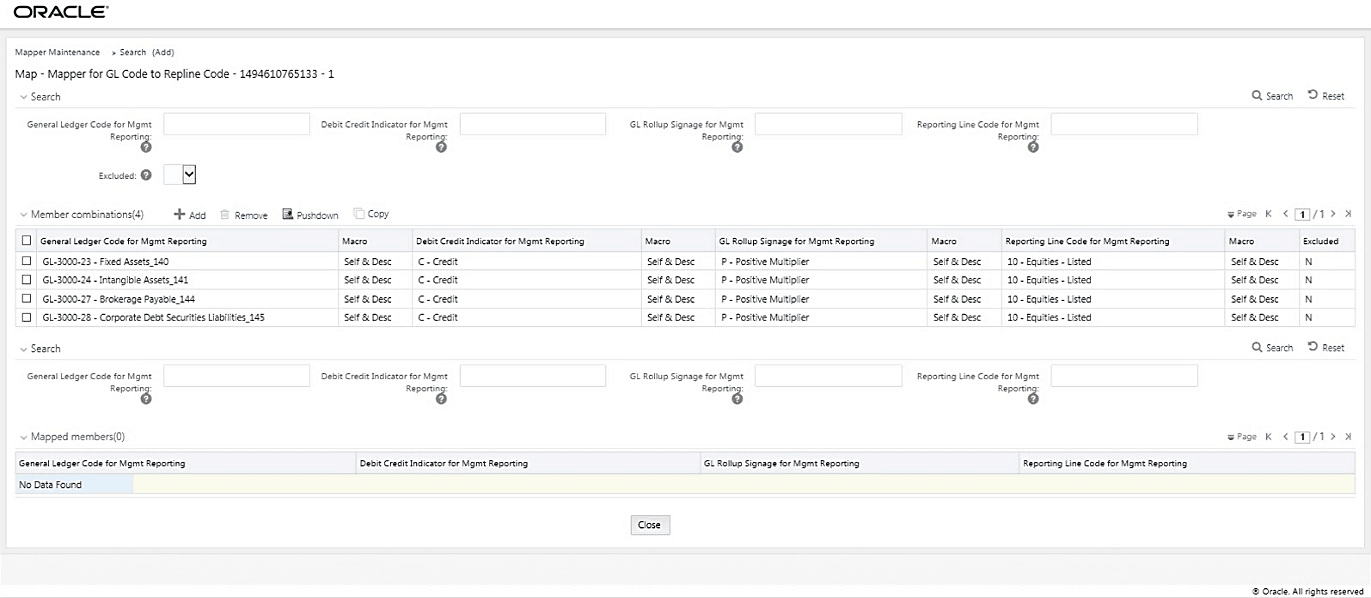
5. The mapped member combinations are listed in the Mapper Maintenance page.
To map multiple parent GL Codes to multiple Reporting Line Codes, use the Mapper Maintenance utility. In this utility, select two or more parent GL Codes, select one member in the Debit Credit Indicator hierarchy with the value Debit or Credit or Missing, and select two or more members in the Reporting Line Code hierarchy. As a result, during the T2T process, the corresponding data from the Stage GL Data table, for the selected parent GL Codes and their descendants, are aggregated and then loaded into the Fact Management Reporting table.
NOTE |
In the T2T process, in the Stage GL Data table, the aggregation of parent GL Codes and their descendants take place in all the Measure columns that are associated with the Primary Keys. The conditions for the Debit Credit Indicator column values in the Stage GL Data table are: · The value must be M, when you map GL Code to the Missing (MSG) member. If nothing is mapped, the system automatically sets value to M. · The value must be D, when you map GL Code to the Debit member. · The value must be C, when you map GL Code to the Credit member. |
To perform Many Parents to Many Reporting Line Codes mapping with or without Debit Credit Indicator:
1. In the Mapper Maintenance page, in the Member combinations section, click Add.
2. The Add Mappings pop-up page appears. For illustration, select parent members of the General Ledger Code for Mgmt Reporting hierarchy, GL-3000-23 – Fixed Assets_140 and GL-3000-27 – Brokerage Payable_144, and their child members GL-3000-24 – Intangible Assets_141 and GL-3000-28 – Corporate Debt Securities Liabilities_145 respectively, and the member of the Debit Credit Indicator for Mgmt Reporting hierarchy C - Credit to map to the members of the Reporting Line Code for Mgmt Reporting hierarchy 10 – Equities - Listed and 100 – Corporate with the member of the GL Rollup Signage for Mgmt Reporting hierarchy P - Positive Multiplier.
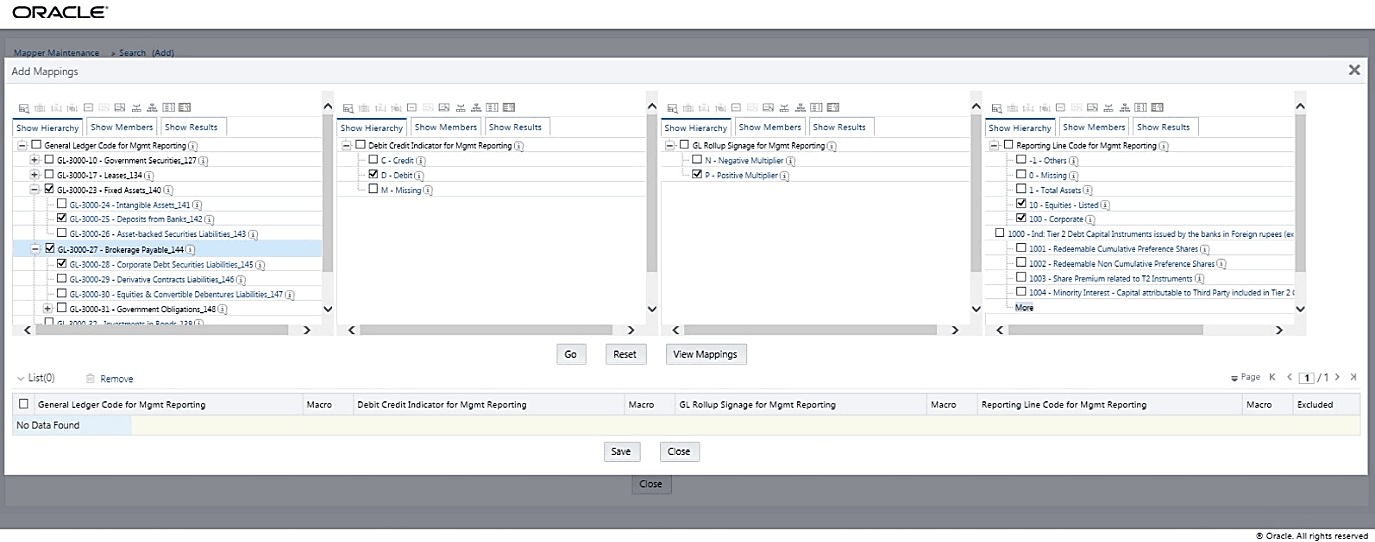
3. To map the members, click Go. The list of mapped members appear at the bottom. To save the mappings, click Save.

4. An acknowledgement pop-up message appears. To confirm saving the mappings, click Yes.
5. The mapped member combinations are listed in the Mapper Maintenance page.
