
Use one of two methods to access the SCD batch execution log files in order to view the complete log generated for the SCD batch execution.
· View and download the log files from the application UI.
· View log files in the application server.
To view and download the log files from the application UI:
1. In the Task Details section, select the task that was executed and click View Log.
2. Select and view the log file:
The View Logger pop-window appears.
In the Log File box, select the required file, and then click View Log. The complete log file content appears in the Log File Contents section.
Two types of log files are generated:
§ SCDCPP.log
§ FICGEN.log
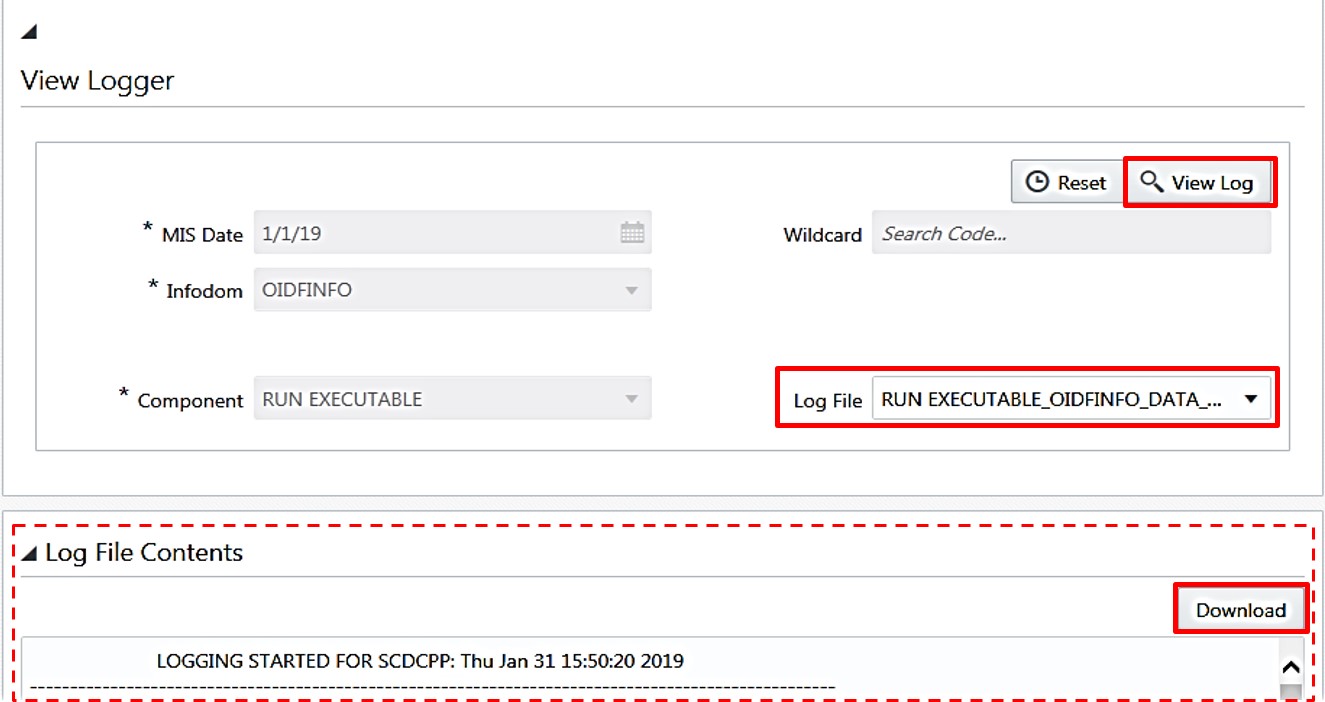
3. To download a copy of the log file content to the system, click Download.
To view the execution log file on the application server:
· Go to the path ftpshare/logs/<Run_Date>/<infodom>/RUN_EXECUTABLE.
|
NOTE |
For comprehensive information on the configuration and execution of a batch, refer to the Oracle Financial Services Analytical Applications Infrastructure User Guide. |
To check the error messages:
· Open the log file present in the ftpshare/logs/<Run_Date>/<infodom>/RUN_EXECUTABLE folder for Dimension tables.